

Introduction
This reference document provides details of the QuantReplay Market Simulator Representational State Transfer (REST) API.
Scope
This document provides technical-level details of using the administrative functions through the REST API of the QuantReplay Market Simulator, for modifying administrative settings and sending administrative requests to market simulator instances.
General
REST Logic
Market Simulator instances interact. So, if a person sends a request about Venue status from one Market Simulator, the system can receive it in another Market Simulator, process it and return a response. Final response to this person will be provided from the initial Market Simulator from which the person sent a request.
It is possible to check the status of the Market Simulator instance. All Market Simulators have REST patterns - types of requests that they can accept and process. If Market Simulator receives REST request that it cannot process, it returns an error - e.g.: method is unavailable.
The commands to Check Status, Stop/Start order Generation, check its status, etc. do not influence the Database, they influence only the work of the current simulator instance.
REST Requests
You can go straight to the Database and make the necessary changes for the Market Simulator instance, but it requires access to the Database. As an option, it is possible to send REST request from outside.
A client (e.g.: a Web interface) can make a request to the REST engine of one of the simulator instances - REST call to the REST port of one of the simulators - with the request to make some changes on the LSE instance, for example. It is possible to send status request, change the status,stop/start orders generation, etc. Market Simulator makes the requested changes in the Database. There is NO UM Messaging, Market Simulator instances communicate over REST.
REST Usage
All that we have in the Database should be accessible through REST. It is possible to compare the Database and GET REST request.
Through REST it is possible to:
-
see some specific listing / venue / datasources
-
see all listings / venues / price seed
-
see venue / multiple venues status
-
see order generation status
-
start / stop order generation
-
update some listing / venue / price seed / datasources /settings
-
add listing / venue / price seed / datasources / settings
-
send order
Market Simulator gets data from the Database at its start, as a result, Market Simulator provides only current data to REST.
| Changes made directly to the database may require a restart of the simulator process in order to make these changes visible through the REST API. |
Base URL
Requests to the Market Simulator REST API are unsecured, since the Market Simulator deals only with non-production simulated market data and trades in testing environments.
Request Methods
HTTP GET
Market Simulators use the GET request to retrieve information about the specified system resource, and can return the following response codes:
| Status Code | Meaning |
|---|---|
200 OK |
Request was successful and the response body contains the requested resource. |
404 NOT FOUND |
The requested URI or resource identifier is unknown. |
412 PRECONDITION FAILED |
The value of the |
500 SERVER ERROR |
Request could not be processed due to an internal server error. |
503 SERVICE UNAVAILABLE |
System is temporarily unable to process the request. Please wait and then try again. |
HTTP POST
Market Simulators use the POST request to add one or more new resources to the system or make complex requests, and can return the following response codes:
| Status Code | Meaning |
|---|---|
200 OK |
Request was successful, the response body contains the result of the action. |
201 CREATED |
Request was successful, we added the new resource(s) and the response body contains the validated form of the resource(s) or the response to a complex request. |
400 BAD REQUEST |
The request failed validation, see response body for details. |
403 FORBIDDEN |
User is not allowed to execute requested action, see response body for details. |
404 NOT FOUND |
The requested URI is unknown. |
405 METHOD NOT ALLOWED |
POST is not valid for the specified resource. |
409 CONFLICT |
Request could not be processed due to an inconsistent server state, see response body for details. |
412 PRECONDITION FAILED |
The value of the |
500 SERVER ERROR |
Request could not be processed due to an internal server error. |
502 BAD GATEWAY |
Request could not be forwarded to destination simulator instance, see response body for details. |
503 SERVICE UNAVAILABLE |
System is temporarily unable to process the request. Please wait and then try again. |
HTTP PUT
Market Simulators use the PUT request to update one or more existing resources in the system, and can return the following response codes:
| Status Code | Meaning |
|---|---|
200 OK |
Request was successful, we updated the resource(s) and the response body contains the validated form of the resource(s). |
204 NO CONTENT |
Request was successful, we updated the resource(s) and the response body is empty. |
400 BAD REQUEST |
The request failed validation, see response body for details. |
404 NOT FOUND |
The requested URI or resource identifier is unknown. |
405 METHOD NOT ALLOWED |
PUT is not valid for the specified resource. |
412 PRECONDITION FAILED |
The value of the |
500 SERVER ERROR |
Request could not be processed due to an internal server error. |
503 SERVICE UNAVAILABLE |
System is temporarily unable to process the request. Please wait and then try again. |
HTTP DELETE
Market Simulators use the DELETE request to remove one or more existing resources from the system, and can return the following response codes:
| Status Code | Meaning |
|---|---|
204 NO CONTENT |
Request was successful, we deleted the resource(s) and the response body is empty. |
404 NOT FOUND |
The requested URI or resource identifier is unknown. |
405 METHOD NOT ALLOWED |
DELETE is not valid for the specified resource. |
412 PRECONDITION FAILED |
The value of the |
500 SERVER ERROR |
Request could not be processed due to an internal server error. |
503 SERVICE UNAVAILABLE |
System is temporarily unable to process the request. Please wait and then try again. |
Data Format
The following data types are used in the request and response bodies of the Market Simulator REST API:
In the case where an indication of "no value" is required, a null property value may be specified, which is represented in the database as NULL or as a default value.
If instead the property is omitted completely:
-
In a POST request, the default value for that property is used (if any) or is NULL
-
In a PUT request, the property is not updated and retains its previous value
This is the case if any property is omitted, including arrays. If the property for an array is specified but the array is empty, it indicates to save an empty array. If the array property is omitted completely, it would still be saved as an empty array in a POST request, but leave the original list of array values not updated in a PUT request.
Request Headers
| HTTP Header | Value type | Required | Meaning |
|---|---|---|---|
X-API-Version |
string |
No |
Defines the REST API version. If it mismatches with the simulator major version, the response is sent with status code 412 PRECONDITION FAILED. The equality of versions is only checked if the request contains the header. |
Request Body
In the case of requests that contain a body (generally POST and PUT requests) the body must be sent in JSON format, using the following request header:
Content-Type: application/json
All property names in the request body must be double quoted. See below for further details on the format of specific types of request body values.
Response Body
In the case of responses that contain a body (generally GET, POST, and PUT responses) the body will be sent in JSON format. All property names in the response body will be double quoted. See below for further details on the format of specific types of response body values.
Strings
Any string values sent as part of a JSON request or response must be wrapped in double quotes.
Example
{
    "myStringProperty":"myStringValue",
    "myEmptyStringProperty":null
}
Numbers
Any numerical fields (Integer or Float) sent as part of a JSON request or response must not be wrapped in double quotes. In the case of Float values, a period ( "." ) must be used as the decimal separator, regardless of a user’s regional settings.
Example
{
    "myIntegerProperty":123,
    "myFloatProperty":123.456,
    "myEmptyNumberProperty":null
}
Date/Time
All time stamps sent to or returned from Market Simulators must be expressed in UTC.
Time stamps are expressed using the format: YYYY-MM-DD HH:mm:SS.ssssss
Example
2015-09-08 15:32:09.119456
Random Order Generation
Some notes on understanding how random order generation works in the market simulator.
Distribution of Actions
The simulator uses a separate pseudo random number generator per listing so that as each random action is determined based on probability distributions, as described below in greater detail, each subsequent action determined from the output of each pseudo random number generator for each listing is independent of any underlying threading model for managing the load across all active listings. Each of these separate pseudo random number generators is seeded by default with its own genuine random number provided by API calls specific to the platform where the simulator is running, so that the resulting sequence of actions will be different each time the simulator is started.
The frequency of random generation of orders is almost entirely dependent on Listings → randomOrdersRate. The primary setting controls the number of actions taken by the random order generator per second, including the resulting actions taken on resting orders (placing them, and amending or canceling them), as well as the frequency of matching orders resulting in trades. Some other settings, such as Venues → randomPartyCount and Listings → randomDepthLevels would also have some effect, but not as significant as randomOrdersRate.
The value entered for randomOrdersRate determines the frequency with which a timer will trigger in the market simulator to do an action. The specific action taken is randomly chosen each time by a statistically correct, evenly distributed random number generator.
There is a hard-coded 1/3 probability of the simulator choosing to "do nothing" as an action, therefore the effective applied frequency of choosing a random action (including "do nothing") is:
Of actual actions taken, there is a hard-coded probability distribution of:
40% probability of resting bid action
40% probability of resting ask action
10% probability of aggressive buy
10% probability of aggressive sell
That means that 80% of the time we should have an action on a resting order in the book, and 20% of the time we should have an action of an aggressive order that may match against a resting order in the book. Note however, aggressive orders will not be sent against an empty side of a book with no corresponding resting orders.
Venues → randomPartyCount value determines the number of counter parties that will be used to determine which party each order action is generated from, and each party is chosen using a simple round-robin choice of parties for each subsequent random action.
For example, if a value of randomPartyCount = 10 is configured, party #1 will be used for the first random action, party #2 will be used for the next action, and so on until we get to party #10 and then return back to party #1 and keep repeating.
Coming back to the probability of order actions, if the random action chosen is a resting bid (40% probability) or ask (40% probability) action, we then have an additional random choice of actions determined by the following logic and hard-coded probability distribution:
If a bid does not exist for a resting bid action (or an ask does not exist for a resting ask action) for the current counter party (as determined by the Venues → randomPartyCount setting described above), then simply place the new bid (or place the new ask). Otherwise, if there is already an existing resting bid (or ask) for the current counter party, use the following probability distribution:
45% probability of amend quantity of existing order
45% probability of amend price of existing order
10% probability of cancel existing order
So in summary, there is an 80% probability each second of performing an action on a resting order (either placing a new order for the party, otherwise 90% probability of amending, or 10% probability of canceling), and a 20% probability each second of performing an aggressive action (matching orders in the book, resulting in trades).
Coming back to our example of randomOrdersRate = 10, this should result in an average of about 8 resting order actions per second (new if no existing order for the party, otherwise about 7 amends, and about 1 cancel) and an average of about 2 matching order trades per second.
While randomOrdersRate is the primary setting determining frequency of actions taken by the simulator, another setting Listings → randomDepthLevels is worth noting. This determines the number of allowed depth levels in the book, such that if the random chosen action is to place a new resting bid or ask for the current counter party, it will not be done if it would mean exceeding this configured maximum number of levels in the book. Combined with the probability distribution of quantity and price as described in the following sections, this maximum number of depth levels could also limit the number of times there is an existing order in the book for a given counter party to perform amend or cancel actions on, and could also limit the range of quantity and price levels available for aggressive orders to match against. The deeper the book is allowed to grow, the closer the simulator will be able to apply the probabilities described above, without synthetically blocking an action due to a limit in the number of depth levels in the book.
Distribution of Price
The price used on randomly generated orders is largely determined by the configuration of Listings → randomOrdersSpread to determine the minimum bid/ask spread to maintain, and Listings → randomTickRange to determine the range which prices are distributed across multiple depth levels of the order book.
The setting Listings → randomOrdersSpread is expressed as an absolute decimal price value, with an enforced minimum of the value of Listings → tickSize configured for the same listing. This effectively becomes the smallest spread allowed in the order book determined by generation of random orders. If the spread becomes less than this value (or crossed) it is likely due to other actions, such as historical data playback or manually entered orders.
Starting with an empty book, the initial value to consider when generating a new random price will be taken from a starting "seed" price as stored in a table of starting prices per instrument (across all listings of that instrument). After the book has resting orders, the initial value is taken from the best prices in the book. In both cases, the initial value is adjusted to incorporate the configured spread as described above. Specifically, prices for new resting Bid orders and aggressive Sell orders use an initial starting value of the best Ask price in the order book subtracting the configured spread, or the best Bid price directly if there are no resting Ask orders, or failing that the configured Bid price directly from the table of starting prices (or Mid price if there is no Bid). Respectively, prices for new resting Ask orders and aggressive Buy orders use an initial starting value of the best Bid price in the order book adding the configured spread, or the best Ask price directly if there are no resting Bid orders, or failing that the configured Bid price directly from the table of starting prices (or Mid price if there is no Ask).
In order to support coordination of randomly generated prices across multiple listings of a common instrument, each listing can also base these initial Bid and Ask values on an aggregation of market data from one or more configured datasources in addition to its own order book by configuring the random price sources of the listing (see this section). In that case the initial Bid and Ask prices are selected from the top of book values of the aggregation of the current listing’s order book and the top of the book of each configured datasource symbol. A random price source can also refer to another listing of the local venue instead of a datasource, in which case the top of the book of that listing is taken directly from its order book on the running simulator instance. Alternatively, it is also possible to configure the current listing’s order book to be excluded from this, so it is only the top of the book of each configured datasource symbol that is usedfor the initial Bid and Ask.
Once this initial price value is determined, the setting Listings → randomTickRange is used to determine the number of ticks by which to vary the price of random orders relative to the starting value. New resting Bid order prices and aggressive Sell order prices are randomly chosen as a number of ticks below the initial value, and new resting Ask order prices and new aggressive Buy order prices are randomly chosen as a number of ticks above the initial value. The frequency distribution of random prices across this range of prices is exponentially weighted by a factor of \(1.05 ^ {randomTickRange - 1}\) so that more orders are placed near the top of the book than lower down.
The following diagram represents this distribution:
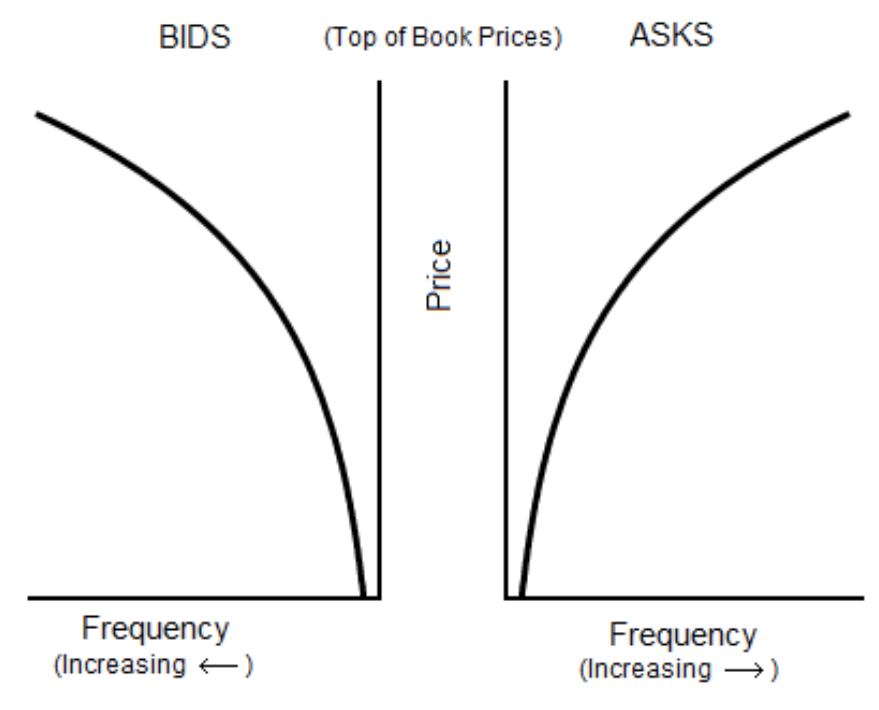
The final price of a new random order is chosen as a number of ticks away from the initial price value, weighted by the frequency distribution as described above. In this way, the final price is a multiple of the configured ticks on the listing (Listings → PriceTickSize).
Distribution of Quantity
The quantity used on randomly generated orders is determined by the configuration of minimum and maximum values of either quantity or amount per each listing.
If the setting Listings → randomAmtMinimum is not set, then the value Listings → randomQtyMinimum is used as the lowest possible quantity value (or instead qtyMinimum if that is larger than randomQtyMinimum or randomQtyMinimum is not set). If the setting Listings → randomAmtMinimum is set, then this value divided by the determined random price (per the section above) is used as the lowest possible quantity value (or instead Listings → randomQtyMinimum if that is set and is larger than the minimum quantity determined from randomAmtMinimum, or again instead qtyMinimum if that is larger than the minimum quantity determined from randomAmtMinimum and randomQtyMinimum if it is set). This lowest possible quantity value is then rounded up to the nearest multiple of the setting Listings → qtyMultiple.
Likewise, if the setting Listings → randomAmtMaximum is not set, then the value Listings → randomQtyMaximum is used as the highest possible quantity value (or instead qtyMaximum if that is smaller than randomQtyMaximum or randomQtyMaximum is not set). If the setting Listings → randomAmtMaximum is set, then this value divided by the determined random price (per the section above) is used as the highest possible quantity value (or instead Listings → randomQtyMaximum if that is set and is smaller than the maximum quantity determined from randomAmtMaximum, or again instead qtyMaximum if that is smaller than the maximum quantity determined from randomAmtMaximum and randomQtyMaximum if it is set). This highest possible quantity value is then rounded down to the nearest multiple of the setting Listings → qtyMultiple.
If the settings Listings → randomAggQtyMinimum / randomAggQtyMaximum / randomAggAmtMinimum / randomAggAmtMaximum are set, then these values are used instead for aggressive orders, and the other corresponding settings described above are used only for passive orders.
Once the lowest and highest possible quantity values are determined, the quantity of random order actions is generated as an integer between these values, rounded to the nearest multiple of the setting Listings → qtyMultiple.
Special Market Events
Documentation TBC (controlling high volatility, spikes, market impact, etc.).
Datasource Playback
The market simulator can read data from an external datasource and play it back through the main order book of the simulator to allow clients to consume this as tradable market data. For instance, a datasource with bid/ask market data is turned into orders that are sent into the simulator’s matching engine, which then results in published market data and the ability for other clients to send orders into the same matching engine’s order book.
The market simulator currently supports CSV file format, databases such as PostgreSQL and TimescaleDB, and a market data feed received over a FIX connection. The simulator can read market data in the form of multiple bid/ask order book levels.
See this section for specific details of configuring datasources.
Format Specific Configuration
CSV Files
The connection string for a CSV file is the full absolute local file path to the file containing data. For example: “/path/to/my/file.csv”
Following usual CSV standards:
-
Numeric values are expected to be specified with a decimal point for fractional amounts. e.g. 3 or 3.45
-
Strings can be specified without double quotes (") if they have no spaces, otherwise if spaces are present the string should be surrounded by double quotes ("). e.g. abc or "a b c"
-
If a string is surrounded by double quotes and it contains a double quote, it must be escaped by using 2 double quotes. e.g. "a b "" c" for the string a b " c
-
Either a Unix or Windows style end of line can be used for each row.
An additional point is that currently all Date/Time strings are expected to be specified in the format: "YYYY-MM-DD HH:MM:SS.MMM"
The following datasource properties can be configured to indicate aspects specific to the format of a CSV file:
-
textDelimiter - delimiter used to separate values ("," by default if not specified)
-
textHeaderRow - 1-based row index of where header row is located (0 indicates no header row)
-
textDataRow - 1-based row index of where the first row of data is located. Cannot be 0, and must be greater than
textHeaderRow
Specifically for CSV format files, and only when textHeaderRow is 0 or not specified, the column mapping properties of the datasource can be used to map columns by index number. The columnTo property of the column mapping can be used to specify a 1-based column number to map to in the datasource. In this case, if no column mappings are indicated, the following default order of columns is expected:
ReceivedTimeStamp, MessageTimeStamp, Instrument, BidParty, BidQuantity, BidPrice, AskPrice, AskQuantity, AskParty
If some columns are mapped but not others, any unmapped column is by default mapped to its corresponding position or name as indicated above by the default list of columns.
If at least one of the columns for a depth level is defined (BidParty, BidPrice, BidQuantity, AskParty, AskPrice, AskQuantity), the other columns for price and quantity for that depth level must be also be specified. For instance if BidParty is defined, then BidPrice and BidQuantity must also be defined. If BidPrice is defined, then BidQuantity must also be defined. BidParty and AskParty are optional columns for each depth level.
Specifically, one of ReceivedTimeStamp or MessageTimeStamp must be mapped either explicitly or implicitly. If only one is specified, its value is used for the other.
The following examples show sample generic CSV formats using these datasource properties:
textDelimiter absent / textHeaderRow=1 / textDataRow=2
col1,col2,col3,col4,col5,col6,col7
"2019-03-07 15:00:00.243",value1,"value 2","value "" 3",1,2,3
"2019-03-07 15:01:05.876",value4,"value 5","value "" 6",4,5,6
textDelimiter=; / textHeaderRow=2 / textDataRow=4
col1,col2,col3,col4,col5,col6,col7

"2019-03-07 15:00:00.243";value1;"value 2";"value "" 3";1;2;3
"2019-03-07 15:01:05.876";value4;"value 5";"value "" 6";4;5;6
textDelimiter absent / textHeaderRow=0 / textDataRow=1
"2019-03-07 15:00:00.243",value1,"value 2","value "" 3",1,2,3
"2019-03-07 15:01:05.876",value4,"value 5","value "" 6",4,5,6
Databases
The connection string for a database is the URL containing the IP, port, authentication details, and database name required to connect to the database instance. For example: “postgresql://myuser:mypassword@10.0.1.1:5432/mydatabasename”
The following datasource properties can be configured to indicate aspects specific to the format of a database:
-
tableName - name of table containing data in the database
FIX Market Data Feed
For the FIX format, the datasource is not a static set of records — market data is received over a FIX session from a live external market data feed subscription, for instance from another market simulator instance or any other FIX service publishing market data.
The connection string for a FIX datasource names the initiator session through which the simulator reaches the market data feed and, optionally, the QuickFIX settings file defining that session, as one or two comma-separated values:
-
the session identifier, in the format
{BeginString}:{SenderCompID}->{TargetCompID}:{SessionQualifier}(:{SessionQualifier}is only added if SessionQualifier is configured), for exampleFIXT.1.1:SIMULATOR->FEED. On its own, it names an initiator session configured in the QuickFIX configuration file of the simulator instance. -
optionally, after a comma, the path of a separate QuickFIX settings file in which the session is configured as an initiator session, for example
FIXT.1.1:SIMULATOR->FEED, /path/to/feed.cfg.
Whitespace around the values and the comma is ignored. A connection string in any other form — a malformed session identifier, an empty path or more than two values — is rejected.
The following datasource properties can be configured to indicate aspects specific to the FIX format:
-
listings - the symbols to subscribe to on the feed
-
incrementalSubscriptions - when set, the subscriptions request incremental refreshes rather than full refreshes (see below)
Note that the configured column mappings do not apply to the FIX format and are ignored, since mapping of each value follows the standard FIX specification.
Subscriptions
While order generation is running (see Basic Single Level Order Book), the simulator keeps one market data subscription per distinct session and symbol across all enabled FIX datasources of the venue, requested with a MarketDataRequest (35=V) using the following values:
-
Symbol (55) - per each listing symbol configured on the datasource
-
MDReqID (262) - generated by the simulator
-
SubscriptionRequestType (263) - 1 (Snapshot + Updates)
-
MarketDepth (264) - 0 (Full Book) when any datasource with that session and symbol has randomPriceOnly unset and maxDepthLevels unset or 0; otherwise the largest maxDepthLevels among those datasources, counting 1 (Top of Book) for one with randomPriceOnly set
-
MDUpdateType (265) - 1 (Incremental Refresh) when incrementalSubscriptions is set on every datasource sharing the session and symbol, otherwise 0 (Full Refresh)
-
MDEntryType (269) - 0 (Bid) and 1 (Offer)
A subscription is requested when order generation starts and again each time its session logs on while generation is running. It is cancelled (using MarketDataRequest (35=V) with SubscriptionRequestType (263) = 2) when order generation is stopped (see this section), and dropped without any message when the session disconnects.
Deriving orders
Unless randomPriceOnly is set, every update received for a symbol that equals the symbol of an enabled listing of the venue is applied to the matching engine of that listing as one bid/ask order book, with the same logic as a row of a CSV or database datasource (see Basic Single Level Order Book and Multiple Level Order Book):
-
the bid entries (269=0) form the bid levels 1, 2, etc in the order they appear in the message, and the offer entries (269=1) the ask levels; entries of any other type and the entries of a side beyond the MarketDepth (264) of the subscription are ignored
-
the price and quantity of a level are MDEntryPx (270) and MDEntrySize (271)
-
the party of a level is MDEntryBuyer (288) for a bid and MDEntrySeller (289) for an offer when present; otherwise every level derived from the datasource carries the party “DS” followed by the datasource id (for instance DS3), so that a level unchanged between two refreshes keeps matching its resting order and a shifted book costs one new order rather than one amendment per level
-
an update resulting in no bid or offer entries cancels every order the simulator has generated for that listing
Datasources sharing a subscription (the same session and symbol) derive orders from it only once: its refreshes are applied as long as one of them has randomPriceOnly unset, and every level without MDEntryBuyer (288) or MDEntrySeller (289) carries the party of one of those datasources with randomPriceOnly unset; which one is not specified. Configure a single datasource per session and symbol when the party of the derived orders matters.
A symbol matching no enabled listing of the venue is still subscribed to, so that it can serve as a price source, but derives no orders.
Each update is applied as soon as it is received, with no delay between refreshes; the repeat property has no meaning for a FIX feed. Refreshes received while order generation is stopped are discarded, and the orders already derived stay in the matching engine until the next refresh is applied.
A FIX datasource, with either value of randomPriceOnly, can also provide the top of the book that random order generation of a listing bases its prices on, when the listing names the datasource and the symbol among its random price sources (see this section).
Basic Single Level Order Book
For a simple datasource where each row contains only a single level bid/ask order book, the simulator starts reading the single level of depth from the first row of the datasource, and then proceeds to read each subsequent row after that. The trigger for playing back the content of a datasource follows the same logic as the configuration used to indicate whether or not to generate random orders. The orderOnStartup property of a venue determines whether to play back any configured datasources when the simulator starts, and the genstart REST API can be used to start play back on demand. If the randomOrdersEnabled property of a listing is true, then both random order generation and playback from a configured datasource will begin and continue to run simultaneously. If the randomPriceOnly property of a datasource is true, no orders are derived from its rows, and the datasource is used only for deriving prices during random order generation (see this section).
In processing each datasource row, the simulator compares the current state of the matching engine for the given listing of each row, and generates a series of order actions (new orders, amends, cancels) to modify the current state of the matching engine to change to a state that matches the values from the current datasource row being processed. Multiple orders for the same counter party are supported on either one or both sides of the order book. When applying changes from a new order book snapshot, the actions are performed in a specific sequence: first all necessary cancels, then new orders, and finally amends.
The following logic is applied to derive order actions from each row of a datasource:
-
Any existing orders from counter parties that do not match the party of the datasource row being processed are canceled.
-
Any existing orders for the same party as the datasource row being processed without a corresponding bid or ask entry in the datasource are canceled.
-
Any existing orders for the same party and side as the datasource row, but with a different price or quantity, are amended to the same price and quantity as the corresponding bid or ask entry in the datasource.
-
Any bid or ask entries in the datasource without a corresponding existing order for the same party results in a new order with the properties of that bid or ask entry in the datasource.
This will result in all of the usual market data updates generated when any order actions are sent into the matching engine. Each row of the datasource is played back into the matching engine at a rate that corresponds with the ReceivedTimeStamp property of the row. The first row will be played back immediately, the second row will be played back with a delay of the difference between the ReceivedTimeStamp of the second and first rows, and so on. This continues until the last row of the datasource, at which point if the repeat property of the datasource is false, then play back will stop, otherwise if it is true the simulator will continue to play back the content of the datasource restarting from the first row.
The order actions derived from each datasource row processed by the simulator use the bid and ask party, quantity, and price values to update the state of the matching engine. While ReceivedTimeStamp is used only to determine when the order actions are played back into the matching engine, the MessageTimeStamp is used to set the timestamp property (generally set by the sender) of each order action. The MessageTimeStamp property value used to set the timestamp on each order action is adjusted with the difference between the ReceivedTimeStamp of the first row and the current time of day at that moment.
For example, if the following 2 first rows from a datasource were being played back at a current time of day of 14:30:00.500 :
ReceivedTimeStamp,MessageTimeStamp,...
"2019-03-07 15:00:00.243","2019-03-07 15:00:00.115",...
"2019-03-07 15:01:05.876","2019-03-07 15:01:05.203",...
…then the resulting order actions would be played back at the following times, with the following timestamps:
@ 14:30:00.500 : timestamp = 14:30:00.372
@ 14:31:06.133 : timestamp = 14:31:05.460
| Note that the simulator will play back order actions with at least the same delay between values of ReceivedTimeStamp for each row, though the actual delay may be longer if the simulator is unable to play back the order actions for each row for too small of a specified delay. |
For database format and CSV file format with a non-zero textHeaderRow value, the column mapping properties of the datasource can be used to map columns by name. The columnFrom property of the column mapping is used to select the internal simulator field that will be mapped from, and the columnTo property indicates the data source column that the simulator field will be mapped to.
If some columns are mapped but not others, any unmapped column is by default mapped to its corresponding name as indicated by the available columnFrom possible values
If at least one of the columns for a depth level is defined (BidParty, BidPrice, BidQuantity, AskParty, AskPrice, AskQuantity), the other columns for price and quantity for that depth level must be also be specified. For instance if BidParty is defined, then BidPrice and BidQuantity must also be defined. If BidPrice is defined, then BidQuantity must also be defined. BidParty and AskParty are optional columns for each depth level.
Specifically, one of ReceivedTimeStamp or MessageTimeStamp must be mapped either explicitly or implicitly. If only one is specified, its value is used for the other.
See the section Market Simulator REST API | Column Mapping Sub List for descriptions of all possible fields that can be mapped from a datasource as configured using the columnFrom property of a datasource column mapping. If any bid or ask level is missing a price or quantity value, that bid or ask entry is considered to be empty and removed from the state of the matching engine. If the party value for a bid or ask level is missing, a default value of “CP1” is used for datasources with a single level bid/ask order book.
The following shows a sample datasource list of single level bid/ask order books, which can be interpreted either as a CSV or database format.
ReceivedTimeStamp,MessageTimeStamp,Instrument,BidParty,BidQuantity,BidPrice,AskPrice,AskQuantity,AskParty
"2019-03-07 15:00:00.243","2019-03-07 15:00:00.115","VOD.L",CP1,10,133.50,134.85,15,CP2
"2019-03-07 15:01:05.876","2019-03-07 15:01:05.203","VOD.L",CP1,10,133.50,135.83,15,CP2
"2019-03-07 15:01:14.667","2019-03-07 15:01:13.998","VOD.L",CP1,8,133.50,135.70,18,CP2
Multiple Level Order Book
For a more complex datasource where each row contains a bid/ask order book with more than one level, the simulator processes each row much like as described above for a single level order book, but changing the state of the matching engine to have the multiple bid/ask levels indicated by each row of the datasource.
The column mapping properties of the datasource can be used to map to multiple simulator fields corresponding to the columnFrom values of BidParty, BidQuantity, BidPrice, AskPrice, AskQuantity, AskParty. For each of these columnFrom values, a 1-based index can be appended to indicate which bid or ask level that value should be applied to, for example BidParty1 for the first bid level, BidParty2 for the second bid level, and so on. In this case, the columnTo property still works the same way, indicating either the name or (for a CSV file format when textHeaderRow is 0 or not specified) the index position of the datasource column to map to.
If any bid or ask level is missing a price or quantity value, that particular bid or ask entry, along with all subsequent entries on that side, will be considered empty. These entries will be removed from the state of the matching engine. If the party value for a bid or ask level is missing for datasources with multiple bid/ask levels, a default value of “CP#” is used, where # is the index for each level (e.g. level 1 would use CP1, etc).
Note that the # character can also be appended to either the columnFrom or columnTo datasource column mappings to indicate that all available depth levels can be mapped. For instance a column mapping of columnFrom=BidPrice# and columnTo=bidpx# indicates that a simulator field of BidPrice for level 1 of bids would be mapped to a column name in the datasource of bidpx1, and a simulator field of BidPrice for level 2 of bids would be mapped to a column name in the datasource of bidpx2, and so on.
It is also possible to limit the number of depth levels processed from a datasource using the maxDepthLevels property of a datasource. This value can optionally be used to indicate the maximum number of bid/ask levels that will be processed by the simulator in the datasource, after which the remaining levels will be ignored and treated as empty.
The following shows a sample datasource list of bid/ask order books with multiple (5) levels, some with empty entries, which can be interpreted either as a CSV or database format.
ReceivedTimeStamp,MessageTimeStamp,Instrument,BidParty1,BidQuantity1,BidPrice1,BidParty2,BidQuantity2,BidPrice2,BidParty3,BidQuantity3,BidPrice3,BidParty4,BidQuantity4,BidPrice4,BidParty5,BidQuantity5,BidPrice5,AskPrice1,AskQuantity1,AskParty1,AskPrice2,AskQuantity2,AskParty2,AskPrice3,AskQuantity3,AskParty3,AskPrice4,AskQuantity4,AskParty4,AskPrice5,AskQuantity5,AskParty5
2021-04-08 12:34:00.003,2021-04-08 12:34:00.003,VOW,CP1,500000.0,1.18811,CP2,1000000.0,1.1881,CP3,3000000.0,1.18807,CP4,5000000.0,1.18805,,,,1.18818,1500000.0,CP6,1.18823,3000000.0,CP7,1.18826,5000000.0,CP8,,,,,,
2021-04-08 12:34:10.044,2021-04-08 12:34:10.044,VOW,CP1,1000000.0,1.18812,,,,,,,,,,,,,1.18819,1000000.0,CP6,,,,,,,,,,,,
2021-04-08 12:34:20.048,2021-04-08 12:34:20.048,VOW,CP1,3000000.0,1.18812,CP2,1000000.0,1.18811,CP3,500000.0,1.1881,,,,,,,1.18815,2000000.0,CP6,1.18816,1000000.0,CP7,1.18817,1000000.0,CP8,,,,,,
Market Phases
The market simulator can be configured to operate in the context of specific market phases following a configured schedule. Each phase has distinct rules of operation regarding what type of trading is allowed and how orders are matched.
If any market phases are scheduled according to the startTime and endTime properties of phases configured on a venue, each of the scheduled market phases will become the active market phase between these start and end times during that day, interepreting these times according to the timeZone property configured on the venue. Any phase with the same end time as the start time of the next phase (including 00:00 and 24:00 which are considered as overlapping) will result in the immediate transition from the first phase to the next phase at this common time. If there is a gap in scheduled market phases, and no market phase is scheduled to be currently active, then the default active market phase is the Open phase. Any phase scheduled with a start time after its own end time is considered invalid and ignored.
For any scheduled market phases with overlapping start and end times, the phase scheduled to start within the start and end times of another phase will take priority as the active market phase, and then when it ends, revert to the initial market phase, unless that phase is also now ended. In general, if multiple phases have overlapping start and end times, each new phase with the most recent start time will be considered active at its start time, then at its end time the active phase should revert to the phase with the most recent start time that has not yet reached its end time.
Some examples of this include:
-
If phase1 has a start time and end time between the start time and end time of phase2, then phase1 is active between phase2 being active (phase2 follows phase1 which then reverts back to phase2).
-
If phase1 has a start time between the start time and end time of phase2, and phase1 has an end time greater than the end time of phase2, then phase1 would be active for the last part of phase2 and continue past it (phase2 follows phase1 which then becomes the Open phase if no other phase is scheduled).
See this section for specific details of configuring market phases on venues.
The following indicates details on the operation of each specific phase while it is active.
Open Phase
While the Open market phase is active, all normal trading activity is allowed.
Closed Phase
While the Closed market phase is active, all trading activity is blocked. It is still possible for market sessions to be connected and remain connected, and it is still possible to subscribe to market data updates and remain subscribed to market data updates, but all order action requests will be rejected, such as requests for new orders, amending orders, or canceling orders. In addition, at the moment a Closed phase starts, any existing orders in the matching engine for any listing will be terminated and rejected if they have a Time In Force of Day or Time In Force of GoodTillDate with an expiration of the current day.
Auction Phase
An auction phase collects orders over a call period and then crosses them in a single uncrossing event, instead of matching orders continuously. There are three auction phase types — PreOpen (opening auction), PreClose (closing auction) and Auction (intraday auction). They behave identically and differ only in the trading-session values reported to clients over the FIX interface.
General Rules
An auction runs in two consecutive sub-phases:
-
Call. Begins at the phase start time. New limit orders with a Time In Force of Day, GoodTillDate or GoodTillCancel are accepted and added to the order book by price/time priority, but no orders are crossed. Market orders are also accepted and rest ahead of all limit orders, ordered only by the time they were received (they carry no price). Limit orders with a Time In Force of ImmediateOrCancel or FillOrKill are rejected. Amends and cancels are accepted and follow the usual priority rules; resting market orders can also be amended (only their quantity) and cancelled. An indicative auction price and volume are recalculated on every accepted order action and published with the resulting book update, and are additionally republished on a fixed 30-second interval while the order book is crossed. The market data entries carrying these values, and the auction imbalance published alongside them, are described in the Market Simulator FIX Rules of Engagement.
-
Uncrossing. Begins at a randomized time around the phase end time (see below). For its whole duration, every order action — new orders, amends and cancels — is rejected. The collected orders are then crossed at a single clearing price — the last indicative auction price calculated during the call — in price/time priority (market orders are matched first; any market orders left unfilled are cancelled), and the resulting trades are published. Any limit orders that remain rest in the book.
The exact time at which the uncrossing begins is chosen randomly within endTime +/- endTimeRange (in minutes); the chosen instant can fall on any second within that window, not only on a whole minute.
The window never reaches back before the start of the auction: for an auction configured with a startTime of 17:00, an endTime of 17:10 and an endTimeRange of 20, the uncrossing time is drawn between 17:00 and 17:30.
When the uncrossing completes, the simulator immediately switches to the phase scheduled to be active at the auction’s configured endTime or at the moment the auction actually finished, whichever is later. An auction that finishes early therefore starts the following phase ahead of schedule only if that phase is configured to start exactly at the auction’s endTime; an auction that finishes late enters whichever phase is scheduled to be active at that moment. As with any phase, if no phase is scheduled at that time, the simulator falls back to the Open phase.
During an auction’s call sub-phase, market data is published on every order action, exactly as during normal trading. The book reported to clients combines the orders already resting at the start of the phase with the orders placed during the call. Resting market orders are reported as Market Bid (269=b) and Market Offer (269=c) depth entries that carry no MDEntryPx and are ranked ahead of all priced levels; these entries are received only by clients that requested the 269=b/c entry types — a plain Bid (0) / Offer (1) subscription does not include them.
Snapshots taken during an auction also carry the last known values of the session-level entries:
-
Opening Price (269=4);
-
Closing Price (269=5);
-
Previous Closing Price (269=e);
-
Auction Clearing Price (269=Q), with its volume;
-
Trade Volume (269=B).
Each of these entries is included only if the corresponding entry type was requested, and any value that has never been determined is simply omitted. During an opening or a closing auction call, the Opening Price (269=4) or the Closing Price (269=5) carries that auction’s indicative price and volume instead of the value of a previous session. An intraday auction has no session-level entry of its own: it publishes its indicative value as a Settlement Price (269=6) entry that exists only for the duration of the call.
While an auction phase is active (in either sub-phase), halt and resume requests are rejected (see Halt/Resume Market Phase). Conversely, if the market is halted at the moment an auction is scheduled to start, the halt is discarded and the auction starts as scheduled.
Uncrossing
The uncrossing crosses the book at the last IEP calculated during the call, for a total quantity equal to the IEV, in price-time priority. Orders are crossed in three passes, all executing at the IEP:
-
market orders against opposing market orders, in time priority;
-
the market orders left on one side (market orders can remain on one side only) against the opposing limit orders priced at or better than the IEP, best price first and oldest first within a price;
-
the remaining limit orders priced at or better than the IEP against one another, best price and oldest first on both sides.
Every cross produces the usual ExecutionReport messages for both orders and a trade market data entry. Market orders that remain unexecuted once the passes are complete are cancelled, and their owners receive an ExecutionReport with ExecType (150) = 4 (Canceled). If no IEP could be calculated — the book was not crossed at the end of the call — nothing is crossed and all market orders are cancelled. Because the IEP maximises the tradable quantity, the book is no longer crossed once the uncrossing completes; limit orders priced through the IEP may nevertheless remain in the book when the opposing side is exhausted.
Continuing the example above, the uncrossing takes place at 60.08 for 1300:
-
the two at-auction orders cross first — order 8 against order 7 for 500;
-
order 8’s remaining 500 crosses against the offers eligible at 60.08: 300 against order 2 and 200 against order 5;
-
the eligible bids then cross against order 5’s remaining 300 — 100 from order 1 and 200 from order 3.
1300 shares change hands, all at 60.08, and the book is left with order 4 (300 at 60.07) on the bid side and order 6 (300 at 60.11) on the offer side. Order 4 and order 6 were never eligible at the IEP, so neither trades.
When the uncrossing sub-phase begins, the indicative entries are withdrawn:
-
Early Price (269=P) — deleted;
-
Imbalance (269=A) — deleted;
-
Settlement Price (269=6) — deleted, for an intraday auction;
-
Opening Price (269=4) and Closing Price (269=5) — kept at their indicative value until the auction’s outcome replaces or clears it, as described below.
Each individual cross is reported as it occurs:
-
a client subscribed to full snapshots (MarketDataSnapshotFullRefresh, 35=W) receives, for every cross, a snapshot of the order book as it stood immediately before the uncrossing started together with that cross’s trade (Last Trade, 269=2);
-
a client subscribed to incremental updates (MarketDataIncrementalRefresh, 35=X) receives only the trade for each cross, with no bids or offers;
-
a client not subscribed to trades receives nothing for the individual crosses.
Once all crosses are complete, the simulator publishes a single fresh full snapshot of the resulting order book to every subscription, regardless of its update type. An auction in which nothing crosses produces no per-cross messages but still publishes this closing snapshot.
This closing snapshot reflects the auction’s outcome. A closing auction first carries the last settled Closing Price (269=5) — the price of an earlier session, never the indicative value published during the call — into the Previous Closing Price (269=e), whether or not the auction crossed. The remaining entries depend on the outcome.
An auction that crossed sets:
-
Auction Clearing Price (269=Q) — the IEP and IEV the book was crossed at;
-
Opening Price (269=4) — set by an opening auction to the clearing price, reported with MDEntryPx (270) only, replacing the indicative price and volume published during the call;
-
Closing Price (269=5) — set by a closing auction to the clearing price;
-
Trading Session High Price (269=7) and Trading Session Low Price (269=8) — reset by an opening auction to the opening price, and tracked from there on;
-
Trade Volume (269=B) — reset by an opening auction to the auction’s clearing volume; a closing or an intraday auction adds its clearing volume to it.
If an auction does not cross, no clearing price can be calculated, and the entries are instead cleared and omitted from updates until a price can next be determined:
-
Auction Clearing Price (269=Q) — cleared for any auction type;
-
Opening Price (269=4) — cleared by an opening auction;
-
Closing Price (269=5) — cleared by a closing auction;
-
Trade Volume (269=B) — cleared by an opening auction;
-
Trading Session High Price (269=7) and Trading Session Low Price (269=8) — left untouched.
The precise FIX trading-status and market-data reporting for each sub-phase is described in the FIX Rules of Engagement.
Indicative Auction Price, Volume and Imbalance
Throughout the call sub-phase of an Auction phase, the simulator maintains an indicative equilibrium price (IEP), an indicative equilibrium volume (IEV) and an imbalance (a size and a side) for the instrument. They are recalculated after every order placement, amendment and cancellation accepted during the call, and are reported in the same market data message that carries the resulting book change — no separate message is emitted for them.
The entry type carrying the indicative price and volume depends on the auction phase:
| Auction phase | MDEntryType (269) | Entry |
|---|---|---|
Opening auction (PreOpen) |
4 |
Opening Price |
Closing auction (PreClose) |
5 |
Closing Price |
Intraday auction (Auction) |
6 |
Settlement Price |
While the order book is crossed (the best bid is priced at or above the best offer), two entries are published:
-
the auction phase’s price entry (269=4, 269=5 or 269=6), with MDEntryPx (270) = IEP and MDEntrySize (271) = IEV;
-
an imbalance entry, with MDEntryType (269) = A, MDEntrySize (271) = imbalance size and TradeCondition (277) = imbalance side (
P— more buyers,Q— more sellers). This entry carries no MDEntryPx (270). Venues normally suppress the imbalance when they already publish market depth; the simulator publishes both.
While the order book is not crossed, no equilibrium price exists. Only the auction phase’s price entry is published, with MDEntrySize (271) = 0 and no MDEntryPx (270), and any imbalance entry published earlier is deleted.
In addition, the same indicative price and volume are republished as an Early Price (269=P) entry on a fixed 30-second interval while the book is crossed, whether or not the value changed. The entry is deleted when the uncrossing begins, and a snapshot request returns its last published value immediately, without waiting for the next interval. If the book stops being crossed during the call, the entry is neither updated nor deleted — it keeps its last value until the uncrossing, so it may report an equilibrium price while the auction phase’s own price entry reports a zero volume and no price.
The following logic is applied during the calculation of the Indicative Price, Volume and Imbalance.
1 — Candidate prices. The candidates are every distinct limit order price in the book that lies between the best offer and the best bid, inclusive. If the book is not crossed the range is empty, so there is no candidate and no indicative price.
2 — Cumulative quantities. For each candidate price \(p\):
-
the cumulative buy quantity \(CQB(p)\) is the total quantity of all buy orders eligible to trade at \(p\) — every buy limit order priced at \(p\) or higher, plus every buy market ("at-auction") order, which is eligible at every candidate price;
-
the cumulative sell quantity \(CQS(p)\) is the total quantity of all sell orders eligible to trade at \(p\) — every sell limit order priced at \(p\) or lower, plus every sell market order.
3 — Tradable quantity and imbalance. For each candidate price \(p\):
-
\(TradeQty(p) = \min(CQB(p), CQS(p))\);
-
\(Imb(p) = CQB(p) - CQS(p)\). A positive imbalance means demand exceeds supply at that price, a negative one that supply exceeds demand.
4 — Selecting the IEP. The following rules are applied in order, each one narrowing the candidates left by the previous rule, until a single price remains:
-
the price with the highest \(TradeQty(p)\);
-
the price with the lowest \(\lvert Imb(p) \rvert\);
-
if the remaining imbalances are non-zero and all share the same sign: the highest of the remaining prices when the imbalance is positive, the lowest when it is negative;
-
otherwise — the remaining imbalances are all zero, or they are equal in size but differ in sign — the remaining price closest to the reference price. The reference price is the last known Closing Price (269=5) for an opening auction, and the last trade price of the preceding Open phase for a closing or an intraday auction;
-
when no reference price has been determined yet the previous rule cannot apply: the lowest of the remaining prices is used.
5 — Reported values. The IEV is \(TradeQty(IEP)\) and the imbalance size is \(\lvert Imb(IEP) \rvert\). The imbalance side is P (more buyers) for a positive imbalance and Q (more sellers) for a negative one. When the imbalance at the IEP is zero, the side is taken from the heavier surplus across all candidate prices — Q if the largest sell surplus exceeds the largest buy surplus, P otherwise.
Example
Consider the following order book during a call for auction. The book is crossed: the best bid (60.10) is above the best offer (60.07).
| Order # | Bid Size | Bid Price | Ask Price | Ask Size | Order # |
|---|---|---|---|---|---|
1 |
100 |
60.10 |
60.07 |
300 |
2 |
3 |
200 |
60.09 |
60.08 |
500 |
5 |
4 |
300 |
60.07 |
60.11 |
300 |
6 |
The candidate prices are the book’s limit prices between 60.07 and 60.10 inclusive: {60.07, 60.08, 60.09, 60.10}. The order at 60.11 lies outside the range and is not a candidate.
| Candidate price \(p\) | \(CQB(p)\) | \(CQS(p)\) | \(TradeQty(p)\) | \(Imb(p)\) |
|---|---|---|---|---|
60.07 |
600 |
300 |
300 |
+300 |
60.08 |
300 |
800 |
300 |
−500 |
60.09 |
300 |
800 |
300 |
−500 |
60.10 |
100 |
800 |
100 |
−700 |
The maximum tradable quantity, 300, occurs at 60.07, 60.08 and 60.09; among those, the lowest absolute imbalance (300) singles out 60.07. The values published are therefore:
-
Opening/Closing/Settlement Price entry: MDEntryPx (270) = 60.07, MDEntrySize (271) = 300;
-
Imbalance entry (269=A): MDEntrySize (271) = 300, TradeCondition (277) =
P(more buyers).
Suppose a sell market ("at-auction") order for 500 is now entered:
| Order # | Bid Size | Bid Price | Ask Price | Ask Size | Order # |
|---|---|---|---|---|---|
At-Auction |
500 |
7 |
|||
1 |
100 |
60.10 |
60.07 |
300 |
2 |
3 |
200 |
60.09 |
60.08 |
500 |
5 |
4 |
300 |
60.07 |
60.11 |
300 |
6 |
The market order is eligible at every candidate price, so it raises \(CQS(p)\) across the whole range:
| Candidate price \(p\) | \(CQB(p)\) | \(CQS(p)\) | \(TradeQty(p)\) | \(Imb(p)\) |
|---|---|---|---|---|
60.07 |
600 |
800 |
600 |
−200 |
60.08 |
300 |
1300 |
300 |
−1000 |
60.09 |
300 |
1300 |
300 |
−1000 |
60.10 |
100 |
1300 |
100 |
−1200 |
The maximum tradable quantity is now 600, at 60.07 alone, so the values published are:
-
Opening/Closing/Settlement Price entry: MDEntryPx (270) = 60.07, MDEntrySize (271) = 600;
-
Imbalance entry (269=A): MDEntrySize (271) = 200, TradeCondition (277) =
Q(more sellers).
Suppose a buy market order for 1,000 is entered on top of that:
| Order # | Bid Size | Bid Price | Ask Price | Ask Size | Order # |
|---|---|---|---|---|---|
8 |
1,000 |
At-Auction |
At-Auction |
500 |
7 |
1 |
100 |
60.10 |
60.07 |
300 |
2 |
3 |
200 |
60.09 |
60.08 |
500 |
5 |
4 |
300 |
60.07 |
60.11 |
300 |
6 |
| Candidate price \(p\) | \(CQB(p)\) | \(CQS(p)\) | \(TradeQty(p)\) | \(Imb(p)\) |
|---|---|---|---|---|
60.07 |
1600 |
800 |
800 |
+800 |
60.08 |
1300 |
1300 |
1300 |
0 |
60.09 |
1300 |
1300 |
1300 |
0 |
60.10 |
1100 |
1300 |
1100 |
−200 |
The maximum tradable quantity, 1300, is reached at both 60.08 and 60.09, and both leave a zero imbalance, so the reference price decides — 60.08 if it is the closer of the two. The values published are:
-
Opening/Closing/Settlement Price entry: MDEntryPx (270) = 60.08, MDEntrySize (271) = 1300;
-
Imbalance entry (269=A): MDEntrySize (271) = 0, TradeCondition (277) =
P. There is no imbalance at the IEP, so the side is taken from the heavier surplus across the candidates (800 on the buy side against 200 on the sell side).
Daily Session Price Reset Without Auction Phases
The session-level L1 prices are normally reset by the opening and closing auctions, as described above:
-
Opening Price (269=4);
-
Closing Price (269=5);
-
Previous Closing Price (269=e);
-
Trading Session High Price (269=7);
-
Trading Session Low Price (269=8);
-
Mid Price (269=H).
When a venue’s phase schedule does not include the corresponding auction, the simulator instead resets these values to the day’s trades so they still roll over once per day.
When no opening auction (PreOpen) is scheduled, the Opening Price (269=4) is set from the price of the first trade that occurs after midnight in the venue’s configured time zone, and the session high (269=7) and low (269=8) prices are reset to that opening price and tracked from there on.
When no closing auction (PreClose) is scheduled, the Closing Price (269=5) is set to the price of the last trade before midnight in the venue’s configured time zone. As with the closing auction, each rollover first carries the last known Closing Price into the Previous Closing Price (269 = e).
The daily Trade Volume (269=B) follows the same daily cycle. During the Open phase and during the TradeAtLast phase, the quantity matched by each trade is added to it. When an opening auction is scheduled, the auction resets it to the auction’s clearing volume; when no opening auction is scheduled, it is instead reset to the matched quantity of the first trade that occurs after midnight in the venue’s configured time zone. Closing and intraday auctions add their clearing volume on top.
Trade At Last Phase
The TradeAtLast phase is typically scheduled immediately after a closing auction (PreClose) and lets a restricted set of orders trade at the price that auction settled.
It begins and ends at its configured times and does not use the endTimeRange setting; when it follows a closing auction it instead begins as soon as that auction’s uncrossing completes (see Auction Phase).
While the phase is active, only new limit orders with a Time In Force of Day and a price equal to the current closing price are accepted; every other new order is rejected, market orders included. The price traded at is the closing price maintained for the listing: the price settled by the most recent closing auction or, on a venue that schedules no closing auction, the price rolled over from the last trade of the previous day. If no closing price has ever been determined, no order is accepted for the whole duration of the phase.
Accepted orders are held in a queue of their own, one per side, in the order they were accepted, and are crossed only against the orders accepted during the same phase: an incoming order is matched against the opposite queue in time priority, and whatever is left of it joins its own queue. Since both sides are priced at the closing price, every cross happens at that price. The orders already resting in the order book are neither matched nor modified, and are still there when the phase ends.
Only the orders accepted during the phase can be amended and cancelled: a request identifying any other order is rejected as not found and leaves that order untouched, and amended values must satisfy the same rules as a new order. When the phase ends, every order still resting in its queues is cancelled and reported to its owner, whichever phase follows.
During the TradeAtLast phase, market data is published on every accepted order action, exactly as during normal trading. The orders accepted during the phase appear in the Bid (269=0) and Offer (269=1) depth entries like any other resting order; since all of them are priced at the closing price, they aggregate into a single price level, together with any order an earlier phase left at that price.
Every cross between two orders of the phase is published as a Trade (269=2) entry priced at the closing price, carrying TradingSessionID (336) = 1 (Day), TradingSessionSubID (625) = 5 (Post-Trading) and SecurityTradingStatus (326) = 3 (Resume). Their quantity is added to the daily Trade Volume (269=B), and their price updates the Trading Session High Price (269=7), the Trading Session Low Price (269=8) and the Mid Price (269=H) derived from them. The Closing Price (269=5) the phase trades at is not changed by them.
The phase can be halted and resumed like the Open phase, both on demand and through a scheduled halt (see Phase Halt). While it is halted, new orders and amends are rejected, and cancels are processed only if allowCancels is set — and then still only for the orders accepted during the phase.
Non-order messages are unaffected: sessions, market data and security status subscriptions and their snapshots work as in any other phase. Market data is published on every accepted order action, exactly as during normal trading, and the trades of the phase feed the daily traded volume and the session high and low prices; the details are described in the Market Simulator FIX Rules of Engagement.
Phase Halt
The halting of a phase is not technically a market phase itself, but rather the temporary halt of the currently active market phase. In this state, any order action request sent to the simulator will be rejected.
If a phase halt is explicitly configured as part of the phase schedule, it would only halt phases other than Closed. A Closed phase is always Closed and cannot be halted. A scheduled halt starting before a scheduled Closed phase would become a Closed phase, though a scheduled halt starting before or during a scheduled Closed phase that ends after the end of the Closed phase would then become a halt of the active phase following the Closed phase.
If a phase halt is triggered on demand through a halt request, it will halt the currently active market phase. However, if the request to halt a phase is made before a scheduled halt, the start of the scheduled halt would override the requested halt, such that the end of the scheduled halt would once again resume the currently active market phase.
For either a scheduled or requested halt of the currently active market phase, the property allowCancels in the scheduled halt or in the halt request indicates whether the halted phase would reject only new order and amend order requests, or also reject order cancel requests. In this way, if allowCancels is true, a halted phase may still process order cancel requests.
A currently halted phase can also be removed on demand through a resume request to reactive the otherwise currently active scheduled market phase.
Persisted Market State
The market simulator may store and recover:
-
The order book state for actively traded listings
-
Last known L1 market data values (such as last traded price, open / high / low / close prices, etc)
Orders that do not rest in the regular price/time queues of the order book are neither stored nor recovered, and are discarded when a state is recovered: the orders accepted during a TradeAtLast phase and the market orders resting during an auction call.
The settings persistenceEnabled and persistenceFilePath are used to configure this feature. If persistenceEnabled is true:
-
The market simulator stores its state to the file specified by the persistenceFilePath setting on clean shutdown of the process or by using the store request.
-
The market simulator recovers its state from the file specified by the persistenceFilePath setting on initial process startup or by using the recover request.
File Format
The market simulator state is stored to file in JSON format.
For instance, the file content indicated below contains the state of the venue “LSE” with two listings “AAPL” and “VOW”:
-
“AAPL” has no orders in the order book, no last trade, and low and high prices.
-
“VOW” has an order book with one buy order and two sell orders, and the last trade, low and high prices.
{
    "VenueID": "LSE",
    "Instruments": [
        {
            "Instrument": {
                "Symbol": "AAPL",
                "PriceCurrency": "USD",
                "BaseCurrency": null,
                "SecurityExchange": "XLOM",
                "PartyID": null,
                "CUSIP": null,
                "SEDOL": "B0YQ5W0",
                "ISIN": "US0378331005",
                "RIC": null,
                "ExchangeSymbol": null,
                "BloombergSymbol": null,
                "PartyRole": null,
                "SecurityType": "CommonStock"
            },
            "LastTrade": null,
            "Info": null,
            "OrderBook": {
                "BuyOrders": [],
                "SellOrders": []
            }
        },
        {
            "Instrument": {
                "Symbol": "VOW",
                "PriceCurrency": "EUR",
                "BaseCurrency": null,
                "SecurityExchange": "XLOM",
                "PartyID": null,
                "CUSIP": null,
                "SEDOL": "0308908",
                "ISIN": "DE0007664005",
                "RIC": null,
                "ExchangeSymbol": null,
                "BloombergSymbol": null,
                "PartyRole": null,
                "SecurityType": "CommonStock"
            },
            "LastTrade": {
                "Buyer": "CP3",
                "Seller": "CP6",
                "TradePrice": 1.18815,
                "TradedQuantity": 290.0,
                "AggressorSide": "Buy",
                "TradeTime": "20250929-14:42:49.958327",
                "MarketPhase": {
                    "TradingSessionSubID": "Continuous",
                    "SecurityTradingStatus": "Resume"
                }
            },
            "Info": {
                "TradingSessionLowPrice": 1.18812,
                "TradingSessionHighPrice": 1.18818,
                "LastOpenPhaseTradedPrice": 1.18815
            },
            "OrderBook": {
                "BuyOrders": [
                    {
                        "ClientInstrumentDescriptor": {
                            "SecurityID": "DE0007664005",
                            "Symbol": "VOW",
                            "Currency": "EUR",
                            "SecurityExchange": "XLOM",
                            "Parties": [],
                            "RequesterInstrumentID": 1,
                            "SecurityType": "CommonStock",
                            "SecurityIDSource": "ISIN"
                        },
                        "ClientSession": {
                            "Type": "Generator",
                            "FixSession": null
                        },
                        "ClientOrderID": "SIM-1747406520164373224",
                        "OrderParties": [
                            {
                                "Identifier": {
                                    "PartyID": "CP1",
                                    "PartyIDSource": "Proprietary"
                                },
                                "PartyRole": "ExecutingFirm"
                            }
                        ],
                        "ExpireTime": null,
                        "ExpireDate": null,
                        "ShortSaleExemptionReason": null,
                        "TimeInForce": "Day",
                        "OrderID": 250516144244000013,
                        "OrderTime": "20250929-14:42:48.614534",
                        "Side": "Buy",
                        "OrdStatus": "Replaced",
                        "Price": 0.38799,
                        "OrderQty": 3000000.0,
                        "CumQty": 1000535.0,
                        "CumPxQty": 388197.57465
                    }
                ],
                "SellOrders": [
                    {
                        "ClientInstrumentDescriptor": {
                            "SecurityID": "DE0007664005",
                            "Symbol": "VOW",
                            "Currency": "EUR",
                            "SecurityExchange": "XLOM",
                            "Parties": [],
                            "RequesterInstrumentID": 1,
                            "SecurityType": "CommonStock",
                            "SecurityIDSource": "ISIN"
                        },
                        "ClientSession": {
                            "Type": "Fix",
                            "FixSession": {
                                "BeginString": "FIXT.1.1",
                                "SenderCompID": "SENDER",
                                "TargetCompID": "TARGET",
                                "SessionQualifier": null,
                                "SenderSubID": null
                            }
                        },
                        "ClientOrderID": "SIM-1747406520164373237",
                        "OrderParties": [
                            {
                                "Identifier": {
                                    "PartyID": "CP5",
                                    "PartyIDSource": "Proprietary"
                                },
                                "PartyRole": "ExecutingFirm"
                            }
                        ],
                        "ExpireTime": null,
                        "ExpireDate": null,
                        "ShortSaleExemptionReason": null,
                        "TimeInForce": "Day",
                        "OrderID": 250516144250000026,
                        "OrderTime": "20250929-14:42:51.522018",
                        "Side": "Sell",
                        "OrdStatus": "Replaced",
                        "Price": 1.188,
                        "OrderQty": 408.0,
                        "CumQty": 0.0,
                        "CumPxQty": 0.0
                    },
                    {
                        "ClientInstrumentDescriptor": {
                            "SecurityID": "DE0007664005",
                            "Symbol": "VOW",
                            "Currency": "EUR",
                            "SecurityExchange": "XLOM",
                            "Parties": [],
                            "RequesterInstrumentID": 1,
                            "SecurityType": "CommonStock",
                            "SecurityIDSource": "ISIN"
                        },
                        "ClientSession": {
                            "Type": "Generator",
                            "FixSession": null
                        },
                        "ClientOrderID": "SIM-1747406520164373236",
                        "OrderParties": [
                            {
                                "Identifier": {
                                    "PartyID": "CP8",
                                    "PartyIDSource": "Proprietary"
                                },
                                "PartyRole": "ExecutingFirm"
                            }
                        ],
                        "ExpireTime": null,
                        "ExpireDate": null,
                        "ShortSaleExemptionReason": null,
                        "TimeInForce": "Day",
                        "OrderID": 250516144250000025,
                        "OrderTime": "20250929-14:42:50.627388",
                        "Side": "Sell",
                        "OrdStatus": "Replaced",
                        "Price": 1.18812,
                        "OrderQty": 606.0,
                        "CumQty": 0.0,
                        "CumPxQty": 0.0
                    }
                ]
            }
        }
    ]
}
File Verification
On storing the market state of a simulator instance, the following verifications are performed:
| Verification | Actions On Failure | |
|---|---|---|
1 |
persistenceEnabled is true |
Output log info message: "The market state was not stored: the persistence is disabled." Stop storing. |
2 |
persistenceFilePath is not empty |
Output log error message: "The market state was not stored: the persistence file path is empty." Stop storing. |
3 |
The directory of the persistence file exists |
Output log error message: "The market state was not stored: the persistence file path directory does not exist." Stop storing. |
4 |
The file can be saved |
Output log error message: "The market state was not stored: an error when unable to open file." Stop storing. |
On recovery of market state of a simulator instance, the following verifications are performed:
| Verification | Actions On Failure | |
|---|---|---|
1 |
persistenceEnabled is true |
Output log info message: "The market state was not recovered: the persistence is disabled." Stop the recovery |
2 |
persistenceFilePath is not empty |
Output log info message: "The market state was not recovered: the persistence file path is empty." Stop the recovery. |
3 |
persistenceFilePath contains the path to the existing file |
Output log info message: "The market state was not recovered: the persistence file path is unreachable." Stop the recovery. |
4 |
The file was successfully opened |
Output log error message: "The market state was not recovered: an error when unable to open file." Stop the recovery. |
5 |
The file content was successfully parsed |
Output log error message: “The market state was not recovered: the persistence file is malformed: {}", where “{}” is a placeholder for details. Stop the recovery. |
6 |
The instrument is found and enabled. The equality of the following fields is used to check that the parsed instrument is present and enabled in the venue:
If the instrument is found, all orders from its order book will be cancelled. |
Output log warning message: "The instrument was not found, its recovery was ignored: {}", where “{}” is a placeholder for the instrument. Move on to the next instrument. |
7 |
If the market phase is Closed, the order’s |
Output log error message: “validation failed with 'the order is already expired because its time_in_force is Day and the market phase is Closed' error, order was not recovered: {}”, where “{}” is a placeholder for the order. Move on to the following order. |
8 |
The order’s |
Output one of the log error messages:
where “{}” is a placeholder for the order. Move on to the following order. |
9 |
If the order is in the “buy_orders” list, the order’s |
Output log error message: “validation failed with 'invalid side value' error, order was not recovered: {}”, where “{}” is a placeholder for the order. Move on to the following order. |
10 |
If the order is in the “sell_orders” list, the order’s |
Output log error message: “validation failed with 'invalid side value' error, order was not recovered: {}”, where “{}” is a placeholder for the order. Move on to the following order. |
11 |
The order’s |
Output log error message: “validation failed with 'total quantity minimal constraint violated' error, order was not recovered: {}”, where “{}” is a placeholder for the order. Move on to the following order. |
12 |
The order’s |
Output log error message: “validation failed with 'total quantity maximal constraint violated' error, order was not recovered: {}”, where “{}” is a placeholder for the order. Move on to the following order. |
13 |
The order’s |
Output log error message: “validation failed with 'total quantity multiple constraint violated' error, order was not recovered: {}”, where “{}” is a placeholder for the order. Move on to the following order. |
14 |
The order’s |
Output log error message: “validation failed with 'cumulative executed quantity is less than zero' error, order was not recovered: {}”, where “{}” is a placeholder for the order. Move on to the following order. |
15 |
The order’s |
Output log error message: “validation failed with 'cumulative executed quantity multiple constraint violated' error, order was not recovered: {}”, where “{}” is a placeholder for the order. Move on to the following order. |
16 |
The order’s |
Output log error message: “validation failed with 'cumulative executed quantity is not less than total quantity' error, order was not recovered: {}”, where “{}” is a placeholder for the order. Move on to the following order. |
17 |
The order’s |
Output log error message: “validation failed with 'order price tick constraint violated' error, order was not recovered: {}”, where “{}” is a placeholder for the order. Move on to the following order. |
18 |
The order’s |
Output log error message: “validation failed with 'unsupported order status value' error, order was not recovered: {}”, where “{}” is a placeholder for the order. Move on to the following order. |
19 |
The order’s |
Output log error message: “validation failed with 'time in force value is invalid' error, order was not recovered: {}”, where “{}” is a placeholder for the order. Move on to the following order. |
20 |
If the order’s |
Output log error message: “validation failed with 'order already expired' error, order was not recovered: {}”, where “{}” is a placeholder for the order. Move on to the following order. |
21 |
If the order’s |
Output log error message: “validation failed with 'neither expire date nor expire time specified' error, order was not recovered: {}”, where “{}” is a placeholder for the order. Move on to the following order. |
22 |
If the order’s |
Output log error message: “validation failed with 'order already expired' error, order was not recovered: {}”, where “{}” is a placeholder for the order. Move on to the following order. |
23 |
The |
Output log warning message: ”last trade is empty, nothing to validate” Remove the information about the last trade from the instrument. Then move on to low and high trade prices. |
24 |
The |
Output log error message: “validation failed with 'trade price tick constraint violated' error, last trade was not recovered: {}”, where “{}” is a placeholder for the Move on to low and high trade prices. |
25 |
The |
Output log error message: “validation failed with 'traded quantity multiple constraint violated' error, last trade was not recovered: {}”, where “{}” is a placeholder for the Move on to low and high trade prices. |
26 |
The |
Output log error message: “validation failed with 'minimal traded quantity constraint violated' error, last trade was not recovered: {}”, where “{}” is a placeholder for the Move on to low and high trade prices. |
27 |
The |
Output log error message: “validation failed with 'maximal traded quantity constraint violated' error, last trade was not recovered: {}”, where “{}” is a placeholder for the Move on to low and high trade prices. |
28 |
The |
Output log warning message: ”info is empty, nothing to validate” Remove the information about the low and high prices from the instrument. Move on to the following instrument. |
29 |
The |
Output log error message: “validation failed with 'low price tick constraint violated' error, instrument info was not recovered: {}”, where “{}” is a placeholder for the Move on to the following instrument. |
30 |
The |
Output log error message: “validation failed with 'high price tick constraint violated' error, instrument info was not recovered: {}”, where “{}” is a placeholder for the Move on to the following instrument. |
31 |
The |
Output log error message: “validation failed with 'low price is less than or equal to high price constraint violated' error, instrument info was not recovered: {}”, where “{}” is a placeholder for the |
Administrative Settings
General Settings
Manage general settings across all market simulator instances.
| Path | Type | Description |
|---|---|---|
key |
Text |
Unique primary key |
value |
Text |
Value of setting |
A list of settings, currently defined in the Market Simulator backend:
| Setting | Key | Meaning |
|---|---|---|
System Display Name |
DisplayName |
The name of the site for display purposes |
Price Seed Values Database Connection |
SeedPriceDatabaseConnection |
Connection string to a PostgreSQL database to synchronize price seeds |
Price Seed Values Last Update |
SeedPricesLastUpdated |
Last time when price seeds were synchronised |
Market Simulator REST backend allows a user to retrieve general settings and update them. There is no possibility to create a new setting or drop an existing one via the REST API.
Get Settings
Request all market simulator general settings.
Resource URI
GET /api/settings
Example: Request all settings
GET /api/settings HTTP/1.1
Accept: application/json;charset=UTF-8
Host: localhostExample: Possible response
HTTP/1.1 200 OK
Connection: Close
Content-Length: XXX

{
    "settings" : [
        {
            "key" : "DisplayName",
            "value" : "SITE NAME"
        },
        {
            "key" : "SeedPriceDatabaseConnection",
            "value" : "postgresql://user:password@1.2.3.4:1234/simdb"
        },
        {
            "key" : "SeedPricesLastUpdated",
            "value" : "2023-09-07 12:34:55"
        }
    ]
}
Update Settings
Update Market Simulator general setting values.
Resource URI
PUT /api/settings
Example: Update settings
PUT /api/settings/DisplayName HTTP/1.1
Accept: application/json;charset=UTF-8
Host: localhost

{
    "settings" : [
      {
        "key" : "DisplayName",
        "value" : "MKTSIMULATOR-DEV"
      },
      {
        "key" : "SeedPriceDatabaseConnection",
        "value" : "postgresql://user:pass@1.2.3.4:1234/simdb"
      }
    ]
}Example: Positive reply
HTTP/1.1 200 OK
Connection: Close
Content-Length: XXX

{
    "result" : "General settings updated successfully"
}Example: Negative reply
HTTP/1.1 400 Bad Request
Connection: Close
Content-Length: XXX

{
    "result" : "Unknown BadKey setting update requested"
}| SeedPricesLastUpdated is considered as read-only to a user. It can be updated by the MarketSimulator BE itself only, and will be ignored if included in the settings update request. |
Venues
Manage settings for each market simulator venue entity.
Resource Properties
| Path | Type | Description |
|---|---|---|
id |
Text |
Unique primary key |
name |
Text |
Display name |
engineType |
Enum |
Indicates which type of engine we want to use for this venue (Currently only matching engine is available)
|
supportTifIoc |
Boolean |
Whether IOC limit orders are supported |
supportTifFok |
Boolean |
Whether FOK limit orders are supported |
supportTifDay |
Boolean |
Whether Day limit orders are supported |
includeOwnOrders |
Boolean |
Whether to include a party’s own orders in published depth |
restPort |
Integer |
The port that will be used to send REST API calls |
orderOnStartup |
Boolean |
Whether to start generating orders when MktSimulator launched |
randomPartyCount |
Integer |
The amount of different counter party id’s used by generator |
timeAndSalesEnabled |
Boolean |
Whether time and sales trades should be included at all in market data updates |
timeAndSalesQuantityEnabled |
Boolean |
Whether time and sales trades should include quantity of the trade |
timeAndSalesSideEnabled |
Boolean |
Whether time and sales trades should include side of the trade |
timeAndSalesPartiesEnabled |
Boolean |
Whether time and sales trades should include counter parties of the trade |
timeZone |
Text |
Local time zone for a venue (f.e. Europe/Kyiv or America/Los_Angeles) For reference: https://en.wikipedia.org/wiki/List_of_tz_database_time_zones |
cancelOnDisconnect |
Boolean |
If a client’s FIX connection disconnects:
|
persistenceEnabled |
Boolean |
Whether a matching engine persisted state functionality should be enabled |
persistenceFilePath |
Text |
A file path to the persistence file where matching engine state should be stored/recovered |
phases |
Array |
Scheduled phase changes |
Phases Sub-List
| Path | Type | Description |
|---|---|---|
phase |
Text |
Enum value from a pre-defined list of supported values:
The three auction phase types (PreOpen, PreClose, Auction) behave identically and differ only in the trading-session values reported over the FIX interface; see Auction Phase. The TradeAtLast phase accepts only day limit orders priced at the closing price and crosses them only against one another; see Trade At Last Phase. |
startTime |
Text |
The time a phase should begin set in corresponding venue timezone, specified to the granularity of minutes |
endTime |
Text |
The time a phase should end set in corresponding venue timezone, specified to the granularity of minutes |
endTimeRange |
Integer |
Time range, in minutes, to choose a random actual end time from the specified endTime for the phase (this setting is only used by the auction phase types: PreOpen, PreClose, Auction). The value indicates the range after and before that a random end time will be chosen. For example, a value of 5 indicates that a random end time will be chosen between 5 minutes before and 5 minutes after the specified endTime. The range is never considered before the phase’s startTime; see Auction Phase. |
allowCancels |
Boolean |
Whether or not to allow cancel of orders (this setting is only used during a Halt phase). |
Get Single Venue
Request a single market simulator venue entity.
Resource URI
GET /api/venues/{venueId}
Example: Request single venue
GET /api/venues/LSE HTTP/1.1
Accept: application/json;charset=UTF-8
Host: localhostExample: Positive reply
HTTP/1.1 200 OK
Content-Type: application/json;charset=UTF-8
Content-Length: XXX

{
    "id" : "LSE",
    "name" : "London Stock Exchange",
    "engineType" : "Matching",
    "supportTifIoc" : true,
    "supportTifFok" : true,
    "supportTifDay" : true,
    "includeOwnOrders" : true,
    "restPort" :9184,
    "orderOnStartup" : false,
    "randomPartyCount" : 10,
    "timeAndSalesEnabled" : true,
    "timeAndSalesQuantityEnabled" : true,
    "timeAndSalesSideEnabled" : true,
    "timeAndSalesPartiesEnabled" : true,
    "timezone" : "America/Los_Angeles",
    "cancelOnDisconnect" : false,
    "persistenceEnabled" : true,
    "persistenceFilePath" : "/path/to/LSE-state.json",
    "phases" : [
        {
             "phase" : "Open",
             "startTime" : "07:39:00",
             "endTime" : "07:39:00",
             "endTimeRange" : 0
        },
        {
             "phase" : "Closed",
             "startTime" : "09:27:00",
             "endTime" : "09:28:00",
             "endTimeRange" : 0
        }
    ]
}Example: Negative reply
HTTP/1.1 404 Not Found
Connection: Close
Content-Length: XXX

{
    "result" : "No such venue"
}
Get Multiple Venues
Request all market simulator venue entities.
Resource URI
GET /api/venues
Example: Request all venues
GET /api/venues HTTP/1.1
Accept: application/json;charset=UTF-8
Host: localhostExample: Possible response
HTTP/1.1 200 OK
Connection: Close
Content-Length: XXX

{
    "venues" : [
        {
            "id" : "FASTMATCH",
            "name" : "FASTMATCH",
            "engineType" : "Quoting",
            "supportTifIoc" : true,
            "supportTifFok" : true,
            "supportTifDay" : true,
            "includeOwnOrders" : true,
            "restPort" : 9182,
            "orderOnStartup" : false,
            "randomPartyCount" : 10,
            "timeAndSalesEnabled" : true,
            "timeAndSalesQuantityEnabled" : true,
            "timeAndSalesSideEnabled" : true,
            "timeAndSalesPartiesEnabled" : true,
            "timezone" : "America/Los_Angeles",
            "cancelOnDisconnect" : false,
            "persistenceEnabled" : false,
            "phases" : []
        },
        {
            "id" : "LSE",
            "name" : "London Stock Exchange",
            "engineType" : 1,
            "supportTifIoc" : true,
            "supportTifFok" : true,
            "supportTifDay" : true,
            "includeOwnOrders" : true,
            "restPort" :9184,
            "orderOnStartup" : false,
            "randomPartyCount" : 10,
            "timeAndSalesEnabled" : true,
            "timeAndSalesQuantityEnabled" : true,
            "timeAndSalesSideEnabled" : true,
            "timeAndSalesPartiesEnabled" : true,
            "timezone" : "America/Los_Angeles",
            "cancelOnDisconnect" : false,
            "persistenceEnabled" : true,
            "persistenceFilePath" : "/path/to/LSE-state.json",
            "phases" : [
                {
                   "phase" : "Open",
                   "startTime" : "07:39:00",
                   "endTime" : "07:39:00",
                   "endTimeRange" : 0
                },
                {
                   "phase" : "Closed",
                   "startTime" : "09:27:00",
                   "endTime" : "09:28:00",
                   "endTimeRange" : 0
                }
            ]
        }
    ]
}
Add Venue
Add new market simulator venue entity.
Resource URI
POST /api/venues
Example: Add venue
POST /api/venues HTTP/1.1
Accept: application/json;charset=UTF-8
Host: localhost
Content-Length: XXX

{
    "id" : "NewExchange",
    "name" : "NewExchange Description",
    "engineType" : "Matching",
    "timeAndSalesEnabled" : false,
    "supportTifIoc" : false,
    "supportTifFok" : false,
    "supportTifDay" : false,
    "includeOwnOrders" : false,
    "restPort" : 9087,
    "orderOnStartup" : true,
    "randomPartyCount" : 1
}Example: Positive reply
HTTP/1.1 201 Created
Connection: Keep-Alive
Content-Length: XXX

{
    "result" : "Successfully inserted a new Venue"
}Example: Negative reply
HTTP/1.1 400 Bad Request
Connection: Close
Content-Length: XXX

{
    "result" : "Requested operation violates data integrity constraints"
}
Update Venue
Update existing market simulator venue entities.
Resource URI
PUT /api/venues/{venueId}
Example: Update Venue
PUT /api/venues/NewExchange HTTP/1.1
Accept: application/json;charset=UTF-8
Host: localhost
Content-Length: XXX

{
    "randomOrdersRate" : 12,
    "orderOnStartup" : true
}Example: Positive reply
HTTP/1.1 200 OK
Connection: Close
Content-Length: XXX

{
    "result" : "Requested update of the venue - NewExchange"
}Example: Negative reply
HTTP/1.1 404 Not Found
Connection: Close
Content-Length: XXX

{
    "result" : "No such venue"
}
Delete Single Venue
It is not allowed to delete venues using the REST API.
Listings
Manage settings for specific listings on each market simulator instance.
Resource Properties
| Path | Type | Description |
|---|---|---|
id |
Numeric |
Unique primary key |
symbol |
Text |
The symbol for this listing, unique to the venue |
venueId |
Text |
Unique venue key for this listing |
securityType |
Text |
Security type for this listing, possible values are:
|
priceCurrency |
Text |
Currency of price (for FX, second currency in the pair) |
fxBaseCurrency |
Text |
For FX only, first currency in the pair, representing current of quantity |
instrSymbol |
Text |
A common symbol used for this listing across different venues |
securityExchange |
Text |
Exchange name to indicate where a listing is traded |
partyId |
Text |
Additional value to indicate where a listing is traded |
partyRole |
Text |
Additional value to indicate where a listing is traded |
cusipId |
Text |
CUSIP instrument/listing identifier |
sedolId |
Text |
SEDOL instrument/listing identifier |
isinId |
Text |
ISIN instrument/listing identifier |
ricId |
Text |
RIC instrument/listing identifier |
exchangeSymbolId |
Text |
Custom Exchange listing identifier |
bloombergSymbolId |
Text |
Bloomberg instrument/listing identifier |
qtyMinimum |
Decimal |
The minimum allowed order quantity (0 by default, though all orders require >0 quantity) |
qtyMaximum |
Decimal |
The maximum allowed order quantity (no limit by default) |
qtyMultiple |
Decimal |
Required even multiple of order quantity (any multiple by default) |
priceTickSize |
Decimal |
Required even multiple of order price (any multiple by default) |
randomQtyMinimum |
Decimal |
The minimum quantity that can be created by the Random Order Generator (uses qtyMinimum by default or if qtyMinimum has a higher value) Used only for passive orders if randomAggQtyMinimum and/or randomAggAmtMinimum have a value. |
randomQtyMaximum |
Decimal |
The maximum quantity that can be created by the Random Order Generator (uses qtyMaximum by default or if qtyMaximum has a lower value) Used only for passive orders if randomAggQtyMaximum and/or randomAggAmtMaximum have a value. |
randomAmtMinimum |
Decimal |
The amount used to derive the minimum quantity that can be created by the Random Order Generator (uses randomQtyMinimum by default or if randomQtyMinimum has a higher value than the quantity derived from this value) Used only for passive orders if randomAggQtyMinimum and/or randomAggAmtMinimum have a value. |
randomAmtMaximum |
Decimal |
The amount used to derive the maximum quantity that can be created by the Random Order Generator (uses randomQtyMaximum by default or if randomQtyMaximum has a lower value than the quantity derived from this value) Used only for passive orders if randomAggQtyMaximum and/or randomAggAmtMaximum have a value. |
randomAggQtyMinimum |
Decimal |
The minimum quantity that can be created by the Random Order Generator for aggressive orders (uses randomQtyMinimum by default) |
randomAggQtyMaximum |
Decimal |
The maximum quantity that can be created by the Random Order Generator for aggressive orders (uses randomQtyMaximum by default) |
randomAggAmtMinimum |
Decimal |
The amount used to derive the minimum quantity that can be created by the Random Order Generator for aggressive orders (uses randomAggQtyMinimum by default or if randomAggQtyMinimum has a higher value than the quantity derived from this value) |
randomAggAmtMaximum |
Decimal |
The amount used to derive the maximum quantity that can be created by the Random Order Generator for aggressive orders (uses randomAggQtyMaximum by default or if randomAggQtyMaximum has a lower value than the quantity derived from this value) |
randomDepthLevels |
Integer |
Maximum count of depth levels that can be created by Random Order Generator (no limit by default) |
randomOrdersSpread |
Decimal |
The smallest top of book bid/ask price difference for prices created by the Random Order Generator (uses priceTickSize by default) |
randomOrdersRate |
Integer |
The number of order actions (new order/modification/cancel/wait) per second during Random Order Generation |
randomTickRange |
Integer |
Range of price ticks used to calculate prices created by the Random Order Generator (10 by default) |
randomOrdersEnabled |
Boolean |
Indicates if the Random Order Generator has to generate random orders on a listing |
randomPriceSources |
Array |
Market data of datasources, or of other listings of the same venue, used as the base price for random order generation on this listing, see Random Price Sources Sub-List |
randomPriceExcludeCurrentListing |
Boolean |
Indicates if the order book of the listing itself is excluded from the aggregation of its random price sources (false by default) |
enabled |
Boolean |
Indicates if the listing is enabled and should be used by the Market Simulator |
Random Price Sources Sub-List
By default, the Random Order Generator uses the top of book of the listing itself as the base price for deriving the price for randomly generated orders.
A listing can also use a base price from the market data of one or more datasources of any format, as configured in this sub-list.
A random price source can also refer to another listing of the local venue, the venue of the listing itself, instead of a datasource:
the prices are then taken directly from the order book of that listing on the running simulator instance, with no datasource involved.
The market data of these sources is then aggregated with the order book of the listing itself to determine the base price, or the order book of the listing can be excluded using the randomPriceExcludeCurrentListing setting.
See this section for details of how these prices are used to derive the price for each randomly generated order.
| Path | Type | Description |
|---|---|---|
listingId |
Integer |
An identifier of the listing record which has a random price source. Users may omit to send this value in the requests. |
datasourceId |
Integer or null |
An identifier of the datasource to take the prices from.
It must refer to an existing datasource on the same venue as the listing.
A |
symbol |
Text |
Symbol to take base prices from, on the specified datasource or, when no datasource is specified, on the local venue. On a datasource it must match a symbol consumed as market data from that datasource. |
Get Single Listing
Request a single market simulator listing entity via id.
Resource URI
GET /api/listings/{id}
Request a single market simulator listing entity via symbol.
Resource URI
GET /api/listings/{symbol}
Example: Request by symbol
GET /api/listings/DE0007664005 HTTP/1.1
Accept: application/json;charset=UTF-8
Host: localhostExample: Positive reply
HTTP/1.1 200 OK
Connection: Close
Content-Length: XXX

{
    "id" : 1,
    "symbol" : "DE0007664005",
    "venueId" : "XETRA",
    "securityType" : "CS",
    "priceCurrency" : "EUR",
    "fxBaseCurrency" : "",
    "instrSymbol" : "DE0007664005",
    "securityExchange" : "XETR",
    "partyId" : "",
    "partyRole" : "",
    "cusipId" : "",
    "sedolId" : "",
    "isinId" : "DE0007664005",
    "ricId" : "",
    "exchangeSymbolId" : "",
    "bloombergSymbolId" : "",
    "qtyMinimum" : 1.0,
    "qtyMaximum" : 100000.0,
    "qtyMultiple" : 1.0,
    "priceTickSize" : 0.001,
    "enabled" : true,
    "randomQtyMinimum" : 1.0,
    "randomQtyMaximum" : 700.0,
    "randomAmtMinimum" : 0.0,
    "randomAmtMaximum" : 0.0,
    "randomDepthLevels" : 7,
    "randomOrdersSpread" : 0.01,
    "randomOrdersRate" : 7,
    "randomTickRange" : 100,
    "randomOrdersEnabled" : true,
    "randomAggQtyMinimum" : 2.0,
    "randomAggQtyMaximum" : 200.0,
    "randomAggAmtMinimum" : 1000.0,
    "randomAggAmtMaximum" : 3000.0,
    "randomPriceExcludeCurrentListing" : false,
    "randomPriceSources" : [
        {
            "listingId" : 1,
            "datasourceId" : 3,
            "symbol" : "SAP"
        },
        {
            "listingId" : 1,
            "symbol" : "SIE"
        }
    ]
}Example: Negative reply
HTTP/1.1 404 Not Found
Connection: Close
Content-Length: XXX

{
    "result" : "No such listing"
}| Market Simulator selects a listing by both symbol and VenueID implicitly when a GET request is received with a symbol. The VenueID value is taken from the simulator instance configuration. |
Get Multiple Listings
Request all market simulator listings entities.
Resource URI
GET /api/listings
Example: Request multiple listings
GET /api/listings HTTP/1.1
Accept: application/json;charset=UTF-8
Host: localhostExample: Possible reply
HTTP/1.1 200 OK
Content-Type: application/json;charset=UTF-8
Content-Length: XXX

{
    "listings" : [
        {
            "id" : 1,
            "symbol" : "DE0007664005",
            "venueId" : "XETRA",
            "securityType" : "CS",
            "priceCurrency" : "EUR",
            "fxBaseCurrency" : "",
            "instrSymbol" : "DE0007664005",
            "securityExchange" : "XETR",
            "partyId" : "",
            "partyRole" : "",
            "cusipId" : "",
            "sedolId" : "",
            "isinId" : "DE0007664005",
            "ricId" : "",
            "exchangeSymbolId" : "",
            "bloombergSymbolId" : "",
            "qtyMinimum" : 1,
            "qtyMaximum" : 1000000,
            "qtyMultiple" : 1,
            "priceTickSize" : 0.001,
            "randomQtyMinimum" : 1,
            "randomQtyMaximum" : 1000,
            "randomAmtMinimum" : 0,
            "randomAmtMaximum" : 0,
            "randomDepthLevels" : 10,
            "randomOrdersSpread" : 1,
            "randomOrdersRate" : 1,
            "randomTickRange" : 10,
            "randomAggQtyMinimum" : 2.0,
            "randomAggQtyMaximum" : 200.0,
            "randomAggAmtMinimum" : 1000.0,
            "randomAggAmtMaximum" : 3000.0,
            "randomPriceExcludeCurrentListing" : false,
            "randomPriceSources" : [
                {
                    "listingId" : 1,
                    "datasourceId" : 3,
                    "symbol" : "SAP"
                }
            ]
        },
        {
            "id" : 3,
            "symbol" : "EUR/USD",
            "venueId" : "FASTMATCH",
            "securityType" : "FXSPOT",
            "priceCurrency" : "USD",
            "fxBaseCurrency" : "EUR",
            "instrSymbol" : "EUR/USD",
            "securityExchange" : "FASTMATCH",
            "partyId" : "",
            "partyRole" : "",
            "cusipId" : "",
            "sedolId" : "",
            "isinId" : "",
            "ricId" : "",
            "exchangeSymbolId" : "",
            "bloombergSymbolId" : "",
            "qtyMinimum" : 1,
            "qtyMaximum" : 1.0E8,
            "qtyMultiple" : 1,
            "priceTickSize" : 0.001,
            "randomQtyMinimum" : 1,
            "randomQtyMaximum" : 1.0E7,
            "randomAmtMinimum" : 0,
            "randomAmtMaximum" : 0,
            "randomDepthLevels" : 3,
            "randomOrdersSpread" : 1.0E-4,
            "randomOrdersRate" : 1,
            "randomTickRange" : 10,
            "randomAggQtyMinimum" : 2.0,
            "randomAggQtyMaximum" : 200.0,
            "randomAggAmtMinimum" : 1000.0,
            "randomAggAmtMaximum" : 3000.0,
            "randomPriceExcludeCurrentListing" : false,
            "randomPriceSources" : []
        }
    ]
}
Add Listing
Add a new market simulator listing entity.
Resource URI
POST /api/listings
Example: Request to add a new listing
POST /api/listings HTTP/1.1
Accept: application/json;charset=UTF-8
Host: localhost

{
    "symbol" : "AAPL",
    "venueId" : "XETRA",
    "instrSymbol" : "AAPL",
    "securityType" : "CS",
    "qtyMinimum" : 1,
    "qtyMaximum" : 100000,
    "randomQtyMultiple" : 1,
    "randomQtyMinimum" : 200,
    "randomQtyMaximum" : 1100,
    "randomAmtMinimum" : 100,
    "randomAmtMaximum" : 2000,
    "randomOrdersEnabled" : false,
    "enabled" : false
}Example: Positive reply
HTTP/1.1 201 Created
Connection: Close
Content-Length: XXX

{
    "result" : "Successfully inserted a new Listing"
}Example: Negative reply, a random price source refers to a datasource of another venue
HTTP/1.1 400 Bad Request
Connection: Close
Content-Length: XXX

{
    "result" : "datasourceId `1' must refer to a datasource on the `XETRA' venue"
}
Update Listing
Update existing market simulator listing entity via ID.
Resource URI
PUT /api/listings/{listingId}
Example: Request to update a listing
PUT /api/listings/AAPL HTTP/1.1
Accept: application/json;charset=UTF-8
Host: localhost

{
    "enabled" : true,
    "randomOrdersEnabled" : true
}Example: Positive reply
HTTP/1.1 200 OK
Connection: Close
Content-Length: XXX

{
    "result" : "Requested update of the listing - AAPL"
}Example: Negative reply
HTTP/1.1 404 Not Found
Connection: Close
Content-Length: XXX

{
    "result" : "No such listing"
}
Update existing market simulator listing entities via Symbol.
Resource URI
PUT /api/listings/{symbol}
Example: Request to update a new listing
PUT /api/listings/AAPL HTTP/1.1
Accept: application/json;charset=UTF-8
Host: localhost

{
    "priceTickSize" : 0.001,
    "qtyMultiple" : 2
}Example: Positive reply
HTTP/1.1 200 OK
Connection: Close
Content-Length: XXX

{
    "result" : "Requested update of the listing - AAPL"
}Example: Negative reply
HTTP/1.1 404 Not Found
Connection: Close
Content-Length: XXX

{
    "result" : "No such listing"
}| Market Simulator updates a listing by both symbol and VenueID implicitly when a PUT request is received with a symbol. The VenueID value is taken from the simulator instance configuration. |
Datasources
Manage settings for specific datasources on each market simulator instance.
See this section for more information about playback of data from datasources.
Resource Properties
| Path | Type | Description |
|---|---|---|
id |
Numeric |
Unique primary key |
enabled |
Boolean |
Whether or not this datasource is enabled or disabled |
name |
Text |
Name for this datasource, unique to the venue |
venueId |
Text |
Unique venue key for a datasource |
connection |
Text |
Connection string for the datasource:
|
format |
Text |
Indicates the type of historic data storage. Supported values:
|
type |
Text |
Indicates the datasource format. Supported values:
|
repeat |
Boolean |
Whether to start reading from the beginning of the datasource when the end is reached (supported only for files and databases) |
textDelimiter |
Char |
Delimiter used to separate values ("," by default if not specified) (supported only for CSV format) |
textHeaderRow |
Integer |
1-based row index of where header row is located (0 indicates no header row) (supported only for CSV format) |
textDataRow |
Integer |
1-based row index of where the first row of data is located.
Cannot be 0, and must be greater than |
tableName |
Text |
Name of table (supported only for databases) |
maxDepthLevels |
Integer |
Maximum depth levels to read from the datasource. 0 or unspecified indicates to read all levels. For FIX Format, this value is used in tag MarketDepth (264) of each market data subscription, unless randomPriceOnly is set (the subscription then requests the top of the book only) or another enabled datasource subscribing to the same symbol over the same session requests more levels (see FIX Market Data Feed). |
incrementalSubscriptions |
Boolean |
For FIX Format, whether the market data subscriptions are made as incremental rather than full refresh subscriptions, using MDUpdateType (265)
|
columnMapping |
Array |
Mapping between the internal simulator fields and the columns of the datasource (supported only for CSV and PSQL formats), see Column Mapping Sub-List |
listings |
Array |
For FIX Format, list of Symbols to subscribe to market data. An empty list results in no subscriptions. See Listings Sub-List. |
randomPriceOnly |
Boolean |
Whether this datasource is used only as a source for deriving prices during random order generation, and will not result in playback of data through associated configured listings.
|
Column Mapping Sub-List
| Path | Type | Description |
|---|---|---|
datasourceId |
Integer |
An identifier of the datasource record which has a column mapping config. Users may omit to send this value in the requests. |
columnFrom |
Enum |
Internal simulator field for mapping data. Supported values (part 1, continued on next page):
|
columnFrom |
Enum |
Internal simulator field for mapping data. Supported values (part 2, continued from previous page): Any bid or ask level missing a price or quantity value is considered to be empty and removed from the state of the matching engine. If the party value for a bid or ask level is missing, a default value of “CP#” is used, where # is the index for each level (e.g. level 1 would use CP1, etc). If the datasource contains several levels, a 1-based level index must be appended to each of column names BidParty, BidQuantity, BidPrice, AskPrice, AskQuantity, AskParty. For example, BidParty1, BidParty2 etc. The # character can also be used with these fields to indicate reading from whatever index levels are specified in the file or database itself. For example, BidParty#, BidQuantity# etc. |
columnTo |
Text |
External datasource column name for mapping data. If the datasource contains several levels, the # character can be used as a placeholder for the level number.
For instance, In the case of CSV format, a 1-based column number can be indicated to specify the position of columns instead of the name of columns.
To use this method, |
Listings Sub-List
Listings that a FIX format datasource subscribes to as an external market data feed. The list is currently ignored for the CSV and PSQL datasource formats.
| Path | Type | Description |
|---|---|---|
datasourceId |
Integer |
An identifier of the datasource record which has a listing entry. Users may omit to send this value in requests. |
symbol |
Text |
The symbol requested from the market data feed (tag 55). See this section for how the received market data is applied. |
Get Single Datasource
Request a single market simulator datasource entity.
Resource URI
GET /api/datasources/{id}
Example: Request single datasource
GET /api/datasources/1 HTTP/1.1
Accept: application/json;charset=UTF-8
Host: localhostExample: Positive reply
HTTP/1.1 200 OK
Content-Type: application/json;charset=UTF-8
Content-Length: XXX

{
    "id" : 1,
    "enabled" : false,
    "name" : "LSE1",
    "venueId" : "LSE",
    "connection" : "lse1.csv",
    "format" : "CSV",
    "type" : "OrderBook",
    "repeat" : false,
    "textDelimiter" : "|",
    "textHeaderRow" : 0,
    "textDataRow" : 1,
    "maxDepthLevels" : 3,
    "columnMapping" : [
        {
            "datasourceId" : 1,
            "columnFrom" : "ReceivedTimeStamp",
            "columnTo" : "ActionTime"
        },
        {
            "datasourceId" : 1,
            "columnFrom" : "MessageTimeStamp",
            "columnTo" : "2"
        },
        {
            "datasourceId" : 1,
            "columnFrom" : "BidPrice3",
            "columnTo" : "bid_price_three"
        }
    ],
    "listings" : []
}Example: Negative reply
HTTP/1.1 404 Not Found
Connection: Close
Content-Length: XXX

{
    "result" : "No such datasource"
}
Get Multiple Datasources
Request all market simulator datasources entities.
Resource URI
GET /api/datasources
Example: Get all datasources
GET /api/datasources HTTP/1.1
Accept: application/json;charset=UTF-8
Host: localhostExample: Possible reply
HTTP/1.1 200 OK
Connection: Close
Content-Length: XXX

{
    "dataSources" : [
        {
            "id" : 1,
            "enabled" : true,
            "name" : "XETRA-3",
            "venueId" : "XETRA",
            "connection" : "postgresql://develop:develop@172.16.238.3:5432/simhistoricaldb",
            "format" : "PSQL",
            "type" : "OrderBook",
            "repeat" : true,
            "tableName" : "historical_data",
            "columnMapping" : [
                {
                    "datasourceId" : 1,
                    "columnFrom" : "ReceivedTimeStamp",
                    "columnTo" : "ActionTime"
                },
                {
                    "datasourceId" : 1,
                    "columnFrom" : "MessageTimeStamp",
                    "columnTo" : "2"
                }
            ],
            "listings" : []
        },
        {
            "id" : 2,
            "enabled" : false,
            "name" : "XETRA-CONT-1",
            "venueId" : "XETRA",
            "connection" : "/rodata/XETRA-trimmed.csv",
            "format" : "CSV",
            "type" : "OrderBook",
            "repeat" : true,
            "textDelimiter" : ";",
            "textHeaderRow" : 1,
            "textDataRow" : 2,
            "columnMapping" : [],
            "listings" : []
        },
        {
            "id" : 3,
            "enabled" : true,
            "name" : "XETRA-FEED",
            "venueId" : "XETRA",
            "connection" : "FIXT.1.1:XETRA_FEED_CLIENT->FEED_SERVER",
            "format" : "FIX",
            "type" : "OrderBook",
            "maxDepthLevels" : 1,
            "randomPriceOnly" : false,
            "incrementalSubscriptions" : false,
            "columnMapping" : [],
            "listings" : [
                {
                    "datasourceId" : 3,
                    "symbol" : "VOW"
                },
                {
                    "datasourceId" : 3,
                    "symbol" : "BMW"
                }
            ]
        }
    ]
}
Add Datasources
Add a new market simulator datasource entity.
Resource URI
POST /api/datasources
Example: Request to add a new datasource entity
POST /api/datasources HTTP/1.1
Accept: application/json;charset=UTF-8
Host: localhost

{
    "enabled" : false,
    "name" : "XETRA-NEW",
    "venueId" : "XETRA",
    "connection" : "/rodata/XETRA-new.csv",
    "format" : "CSV",
    "type" : "OrderBook",
    "repeat" : true,
    "textDelimiter" : ",",
    "textHeaderRow" : 0,
    "textDataRow" : 100,
    "columnMapping" : [
        {
            "columnFrom" : "ReceivedTimeStamp",
            "columnTo" : "ActionTime"
        }
    ]
}Example: Request to add a new datasource entity reading an external FIX market data feed
POST /api/datasources HTTP/1.1
Accept: application/json;charset=UTF-8
Host: localhost

{
    "enabled" : true,
    "name" : "XETRA-FEED",
    "venueId" : "XETRA",
    "connection" : "FIXT.1.1:XETRA_FEED_CLIENT->FEED_SERVER",
    "format" : "FIX",
    "type" : "OrderBook",
    "maxDepthLevels" : 1,
    "randomPriceOnly" : true,
    "incrementalSubscriptions" : true,
    "listings" : [
        {
            "symbol" : "VOW"
        }
    ]
}Example: Request to add a datasource whose feed session is defined in a separate QuickFIX settings file
POST /api/datasources HTTP/1.1
Accept: application/json;charset=UTF-8
Host: localhost

{
    "enabled" : true,
    "name" : "XETRA-FEED-2",
    "venueId" : "XETRA",
    "connection" : "FIXT.1.1:XETRA_FEED_CLIENT->SECOND_FEED_SERVER, /rodata/second-feed.cfg",
    "format" : "FIX",
    "type" : "OrderBook",
    "maxDepthLevels" : 1,
    "listings" : [
        {
            "symbol" : "BMW"
        }
    ]
}Example: Positive reply
HTTP/1.1 201 Created
Connection: Close
Content-Length: XXX

{
    "result" : "Successfully inserted a new datasource"
}Example: Negative reply
HTTP/1.1 400 Bad Request
Connection: Close
Content-Length: XXX

{
    "result" : "Requested operation violates data integrity constraints"
}
Update Datasources
Update existing market simulator datasource entities.
Resource URI
PUT /api/datasources/{id}
Example: Request to update a datasource entity
PUT /api/datasources/1 HTTP/1.1
Accept: application/json;charset=UTF-8
Host: localhost

{
    "enabled" : true,
    "venueId" : "XETRA",
    "repeat" : false
}Example: Positive reply
HTTP/1.1 200 OK
Connection: Close
Content-Length: XXX

{
    "result" : "Requested update of the datasource with identifier - 1"
}Example: Negative reply
HTTP/1.1 404 Not Found
Connection: Close
Content-Length: XXX

{
    "result" : "No such datasource"
}Example: Negative reply, the update would leave a FIX datasource without a valid connection
HTTP/1.1 400 Bad Request
Connection: Close
Content-Length: XXX

{
    "result" : "connection must be a FIX session identifier in the form BeginString:SenderCompID->TargetCompID[:SessionQualifier], optionally followed by a comma and a path to a QuickFIX settings file, if the format is FIX."
}
Price Seeds
Manage values for price seeds on which will be used to generate random orders on market simulator.
Resource Properties
| Path | Type | Description |
|---|---|---|
id |
Integer |
A unique price seed record identifier |
symbol |
Text |
Symbol for this instrument |
securityType |
Text |
Security type for a target instrument:
|
priceCurrency |
Text |
Currency of price (for FX, second currency in the pair), using ISO-4217 3-char currency codes |
securityId |
Text |
Security ID for this listing |
securityIdSource |
Text |
Type of security ID entered, can be null (i.e. for FX where we don’t require a security ID):
|
instrumentSymbol |
Text |
Common symbol used for this listing across different venues |
midPrice |
Decimal |
Last known mid price |
bidPrice |
Decimal |
Last known bid price |
offerPrice |
Decimal |
Last known offer price |
lastUpdate |
DateTime |
Date and time in UTC of last time instrument price was last successfully refreshed |
Get Single Price Seed
Request a single market simulator price seed entity.
Resource URI
GET /api/priceseeds/{id}
Example: Get a single price seed
GET /api/priceseeds/1 HTTP/1.1
Accept: application/json;charset=UTF-8
Host: localhostExample: Positive reply
HTTP/1.1 200 OK
Content-Type: application/json;charset=UTF-8
Content-Length: XXX

{
    "id" : 1,
    "symbol" : "PAR_ST",
    "securityType" : "CS",
    "priceCurrency" : "USD",
    "securityId" : "SEDOL",
    "securityIdSource" : "SEDOL",
    "instrumentSymbol" : "PAR",
    "midPrice" : 10,
    "bidPrice" : 9,
    "offerPrice" : 11,
    "lastUpdate" : "2015-09-08T15:32:09"
}Example: Negative reply
HTTP/1.1 404 Not Found
Connection: Close
Content-Length: XXX

{
    "result" : "Can not resolve a single PriceSeed by a given key"
}
Get Multiple Price Seeds
Request all market simulator price seed entities.
Resource URI
GET /api/priceseeds
Example: Get all price seeds
GET /api/priceseeds HTTP/1.1
Accept: application/json;charset=UTF-8
Host: localhostExample: Possible reply
HTTP/1.1 200 OK
Connection: Close
Content-Length: XXX

{
    "priceSeeds" : [
        {
            "id" : 2,
            "symbol" : "DE0007664005",
            "securityType" : "CS",
            "priceCurrency" : "EUR",
            "securityId" : "DE0007664005",
            "securityIdSource" : "ISI",
            "instrumentSymbol" : "DE0007664005",
            "midPrice" : 140.0,
            "bidPrice" : 135.0,
            "offerPrice" : 145.0,
            "lastUpdate" : "2023-May-10 12:47:08.252739"
        },
        {
            "id" : 3,
            "symbol" : "EUR/USD",
            "securityType" : "FXSPOT",
            "priceCurrency" : "USD",
            "securityId" : "",
            "securityIdSource" : "",
            "instrumentSymbol" : "EUR/USD",
            "midPrice" : 31.345,
            "bidPrice" : 30.435,
            "offerPrice" : 33.435,
            "lastUpdate" : "2023-May-10 12:47:08.252739"
        }
    ]
}
Add Price Seeds
Add new market simulator price seed entity.
Resource URI
POST /api/priceseeds
Example: Add new price seed
POST /api/priceseeds HTTP/1.1
Accept: application/json;charset=UTF-8
Host: localhost

{
    "symbol" : "AAPL",
    "securityType" : "CS",
    "priceCurrency" : "USD",
    "instrumentSymbol" : "AAPL",
    "midPrice" : 120.5,
    "bidPrice" : 110.5,
    "offerPrice" : 130.5
}Example: Positive reply
HTTP/1.1 201 Created
Connection: Close
Content-Length: XXX

{
    "result" : "Successfully inserted new price seed"
}
Update Price Seeds
Update existing market simulator price seed entities.
Resource URI
PUT /api/priceseeds/{id}
Example: Update price seed
PUT /api/priceseeds/4 HTTP/1.1
Accept: application/json;charset=UTF-8
Host: localhost

{
    "midPrice" : 120.5,
    "offerPrice" : 123.5
}Example: Positive reply
HTTP/1.1 200 OK
Connection: Close
Content-Length: XXX

{
    "result" : "Successfully updated the price seed with 4 identifier"
}Example: Negative reply
HTTP/1.1 404 Not Found
Connection: Close
Content-Length: XXX

{
    "result" : "Can not resolve a single PriceSeed by a given key"
}
Delete Price Seeds
Delete market simulator price seeds entity.
Resource URI
DELETE /api/priceseeds/{id}
Example: Delete price seed
DELETE /api/priceseeds/4 HTTP/1.1
Accept: application/json;charset=UTF-8
Host: localhostExample: Positive reply
HTTP/1.1 204 No Content
Connection: Close
Content-Length: 0Example: Negative reply
HTTP/1.1 404 Not Found
Connection: Close
Content-Length: XXX

{
    "result" : "Can not resolve a single PriceSeed by a given key"
}
Sync Price Seeds
Retrieve and update price seeds from an external database
Resource URI
POST /api/syncpriceseeds
Example: Sync price seeds
POST /api/syncpriceseeds HTTP/1.1
Accept: application/json;charset=UTF-8
Host: localhostExample: Possible reply
HTTP/1.1 200 OK
Connection: Close
Content-Length: 45

{
    "result" : "Price seeds successfully synchronized"
}
Administrative Commands
Venue Status
Manage current live status of each market simulator venue instance.
Response Properties
| Path | Type | Description |
|---|---|---|
id |
Text |
Venue short name |
name |
Text |
Venue full name |
startTime |
DateTime |
Time when the instance started |
version |
Text |
Version of MktSimulator |
sessionSettings |
Array |
QuickFIX session settings configured for this venue instance, as parsed by the venue. Every section of the QuickFIX configuration file of the instance is listed, including both acceptor and initiator sessions; the separate settings files named by FIX datasources are not included. |
sessions |
Array |
QuickFIX acceptor session details for this venue instance, as parsed by the venue. Only acceptor sessions for connecting to the simulator are listed, and any initiator sessions used by configured FIX datasources) are not included. |
statusCode |
Integer |
HTTP code received in response to venue status request |
Session Settings Sub-List
| Path | Type | Description |
|---|---|---|
section |
Text |
Section name (e.g. |
id |
Text |
Session identifier in the format |
settings |
Object |
Key-value pairs of settings for the section; |
Sessions Sub-List
| Path | Type | Description |
|---|---|---|
id |
Text |
Session identifier in the format |
host |
Text |
The endpoint of the session: the IP address of the venue instance and the |
lastConnectedTime |
DateTime |
Time when the FIX Logon (35=A) message was received last time |
connected |
Boolean |
Indicates whether a client is currently connected to the session:
|
Get Single Venue Status
Request the status of the current market simulator venue instance.
Resource URI
GET /api/venuestatus
Request the status of a specific market simulator venue instance.
Resource URI
GET /api/venuestatus/{venueId}
Example: Request current venue status
GET /api/venuestatus HTTP/1.1
Accept: application/json;charset=UTF-8
Host: localhostExample: Possible reply
HTTP/1.1 200 OK
Content-Type: application/json;charset=UTF-8
Content-Length: XXX

{
    "id" : "LSE",
    "name" : "LondonStockExchange",
    "startTime" : "2026-03-19 16:54:48.874227",
    "version" : "12.1773921825_8f0c76bf(2026-03-19 12:03:45 +0000)",
    "sessionSettings" : [
        {
            "section" : "DEFAULT",
            "settings" : {
                "ALLOWUNKNOWNMSGFIELDS" : "Y",
                "APPDATADICTIONARY" : "/cfg/default/FIX50SP2_marketsimulator.xml",
                "CHECKLATENCY" : "N",
                "CONNECTIONTYPE" : "acceptor",
                "ENDTIME" : "00:00:00",
                "FILESTOREPATH" : "/quickfix_persistence",
                "HEARTBTINT" : "600",
                "LOGOUTTIMEOUT" : "30",
                "SOCKETACCEPTPORT" : "9001",
                "SOCKETNODELAY" : "Y",
                "SOCKETREUSEADDRESS" : "Y",
                "STARTTIME" : "00:00:00",
                "TRANSPORTDATADICTIONARY" : "/cfg/default/FIXT11_marketsimulator.xml",
                "VALIDATEUSERDEFINEDFIELDS" : "N"
            }
        },
        {
            "section" : "SESSION",
            "id" : "FIXT.1.1:MktSimulator->QuodFeedhandler",
            "settings" : {
                "BEGINSTRING" : "FIXT.1.1",
                "DEFAULTAPPLVERID" : "9",
                "PERSISTMESSAGES" : "N",
                "RESETONLOGON" : "Y",
                "SENDERCOMPID" : "MktSimulator",
                "TARGETCOMPID" : "QuodFeedhandler"
            }
        },
        {
            "section" : "SESSION",
            "id" : "FIXT.1.1:MktSimulator->QuodGateway",
            "settings" : {
                "BEGINSTRING" : "FIXT.1.1",
                "DEFAULTAPPLVERID" : "9",
                "MILLISECONDSINTIMESTAMP" : "Y",
                "PERSISTMESSAGES" : "Y",
                "REFRESHONLOGON" : "Y",
                "RESETONLOGON" : "N",
                "SENDERCOMPID" : "MktSimulator",
                "TARGETCOMPID" : "QuodGateway",
                "TIMESTAMPPRECISION" : "5"
            }
        }
    ],
    "sessions" : [
        {
            "id" : "FIXT.1.1:MktSimulator->QuodGateway",
            "host" : "172.18.0.5:9001",
            "lastConnectedTime" : "2026-06-19 11:21:45.320996",
            "connected" : true
        },
        {
            "id" : "FIXT.1.1:MktSimulator->QuodFeedhandler",
            "host" : "172.18.0.5:9001",
            "lastConnectedTime" : null,
            "connected" : false
        }
    ],
    "statusCode" : 200
}Example: Request specific venue status
GET /api/venuestatus/LSE HTTP/1.1
Accept: application/json;charset=UTF-8
Host: localhostExample: Possible reply
HTTP/1.1 200 OK
Content-Type: application/json;charset=UTF-8
Content-Length: XXX

{
    "id" : "LSE",
    "name" : "LondonStockExchange",
    "startTime" : "2026-03-19 16:54:48.874227",
    "version" : "12.1773921825_8f0c76bf(2026-03-19 12:03:45 +0000)",
    "sessionSettings" : [
        {
            "section" : "DEFAULT",
            "settings" : {
                "ALLOWUNKNOWNMSGFIELDS" : "Y",
                "APPDATADICTIONARY" : "/cfg/default/FIX50SP2_marketsimulator.xml",
                "CHECKLATENCY" : "N",
                "CONNECTIONTYPE" : "acceptor",
                "ENDTIME" : "00:00:00",
                "FILESTOREPATH" : "/quickfix_persistence",
                "HEARTBTINT" : "600",
                "LOGOUTTIMEOUT" : "30",
                "SOCKETACCEPTPORT" : "9001",
                "SOCKETNODELAY" : "Y",
                "SOCKETREUSEADDRESS" : "Y",
                "STARTTIME" : "00:00:00",
                "TRANSPORTDATADICTIONARY" : "/cfg/default/FIXT11_marketsimulator.xml",
                "VALIDATEUSERDEFINEDFIELDS" : "N"
            }
        },
        {
            "section" : "SESSION",
            "id" : "FIXT.1.1:MktSimulator->QuodFeedhandler",
            "settings" : {
                "BEGINSTRING" : "FIXT.1.1",
                "DEFAULTAPPLVERID" : "9",
                "PERSISTMESSAGES" : "N",
                "RESETONLOGON" : "Y",
                "SENDERCOMPID" : "MktSimulator",
                "TARGETCOMPID" : "QuodFeedhandler"
            }
        },
        {
            "section" : "SESSION",
            "id" : "FIXT.1.1:MktSimulator->QuodGateway",
            "settings" : {
                "BEGINSTRING" : "FIXT.1.1",
                "DEFAULTAPPLVERID" : "9",
                "MILLISECONDSINTIMESTAMP" : "Y",
                "PERSISTMESSAGES" : "Y",
                "REFRESHONLOGON" : "Y",
                "RESETONLOGON" : "N",
                "SENDERCOMPID" : "MktSimulator",
                "TARGETCOMPID" : "QuodGateway",
                "TIMESTAMPPRECISION" : "5"
            }
        }
    ],
    "sessions" : [
        {
            "id" : "FIXT.1.1:MktSimulator->QuodGateway",
            "host" : "172.18.0.5:9001",
            "lastConnectedTime" : "2026-06-19 11:21:45.320996",
            "connected" : true
        },
        {
            "id" : "FIXT.1.1:MktSimulator->QuodFeedhandler",
            "host" : "172.18.0.5:9001",
            "lastConnectedTime" : null,
            "connected" : false
        }
    ],
    "statusCode" : 200
}
Get Multiple Venue Status
Request the status of all market simulator venue instances.
Resource URI
GET /api/allvenuestatus
Example: Request all venues' status
GET /api/allvenuestatus HTTP/1.1
Accept: application/json;charset=UTF-8
Host: localhostExample: Possible reply
HTTP/1.1 200 OK
Content-Type: application/json;charset=UTF-8
Content-Length: XXX

{
    "venuestatus" : [
        {
            "id" : "LSE",
            "name" : "LondonStockExchange",
            "startTime" : "2026-03-19 16:54:48.874227",
            "version" : "12.1773921825_8f0c76bf(2026-03-19 12:03:45 +0000)",
            "sessionSettings" : [
                {
                    "section" : "DEFAULT",
                    "settings" : {
                        "ALLOWUNKNOWNMSGFIELDS" : "Y",
                        "APPDATADICTIONARY" : "/cfg/default/FIX50SP2_marketsimulator.xml",
                        "CHECKLATENCY" : "N",
                        "CONNECTIONTYPE" : "acceptor",
                        "ENDTIME" : "00:00:00",
                        "FILESTOREPATH" : "/quickfix_persistence",
                        "HEARTBTINT" : "600",
                        "LOGOUTTIMEOUT" : "30",
                        "SOCKETACCEPTPORT" : "9001",
                        "SOCKETNODELAY" : "Y",
                        "SOCKETREUSEADDRESS" : "Y",
                        "STARTTIME" : "00:00:00",
                        "TRANSPORTDATADICTIONARY" : "/cfg/default/FIXT11_marketsimulator.xml",
                        "VALIDATEUSERDEFINEDFIELDS" : "N"
                    }
                },
                {
                    "section" : "SESSION",
                    "id" : "FIXT.1.1:MktSimulator->QuodFeedhandler",
                    "settings" : {
                        "BEGINSTRING" : "FIXT.1.1",
                        "DEFAULTAPPLVERID" : "9",
                        "PERSISTMESSAGES" : "N",
                        "RESETONLOGON" : "Y",
                        "SENDERCOMPID" : "MktSimulator",
                        "TARGETCOMPID" : "QuodFeedhandler"
                    }
                },
                {
                    "section" : "SESSION",
                    "id" : "FIXT.1.1:MktSimulator->QuodGateway",
                    "settings" : {
                        "BEGINSTRING" : "FIXT.1.1",
                        "DEFAULTAPPLVERID" : "9",
                        "MILLISECONDSINTIMESTAMP" : "Y",
                        "PERSISTMESSAGES" : "Y",
                        "REFRESHONLOGON" : "Y",
                        "RESETONLOGON" : "N",
                        "SENDERCOMPID" : "MktSimulator",
                        "TARGETCOMPID" : "QuodGateway",
                        "TIMESTAMPPRECISION" : "5"
                    }
                }
            ],
            "sessions" : [
                {
                    "id" : "FIXT.1.1:MktSimulator->QuodGateway",
                    "host" : "172.18.0.5:9001",
                    "lastConnectedTime" : "2026-06-19 11:21:45.320996",
                    "connected" : true
                },
                {
                    "id" : "FIXT.1.1:MktSimulator->QuodFeedhandler",
                    "host" : "172.18.0.5:9001",
                    "lastConnectedTime" : null,
                    "connected" : false
                }
            ],
            "statusCode" : 200
        },
        {
            "id" : "XETRA",
            "name" : "XETRA",
            "startTime" : "2026-03-19 15:01:58.096831",
            "version" : "12.1773921825_8f0c76bf(2026-03-19 12:03:45 +0000)",
            "sessionSettings" : [
                {
                    "section" : "DEFAULT",
                    "settings" : {
                        "ALLOWUNKNOWNMSGFIELDS" : "Y",
                        "APPDATADICTIONARY" : "/market-simulator/quod/cfg/default/FIX50SP2_marketsimulator.xml",
                        "CHECKLATENCY" : "N",
                        "CONNECTIONTYPE" : "acceptor",
                        "ENDTIME" : "00:00:00",
                        "FILESTOREPATH" : "/quickfix_persistence",
                        "HEARTBTINT" : "600",
                        "LOGOUTTIMEOUT" : "30",
                        "SOCKETACCEPTPORT" : "9051",
                        "SOCKETNODELAY" : "Y",
                        "SOCKETREUSEADDRESS" : "Y",
                        "STARTTIME" : "00:00:00",
                        "TRANSPORTDATADICTIONARY" : "/market-simulator/quod/cfg/default/FIXT11_marketsimulator.xml",
                        "VALIDATEUSERDEFINEDFIELDS" : "N"
                    }
                },
                {
                    "section" : "SESSION",
                    "id" : "FIXT.1.1:MktSimulator->QuodFeedhandler",
                    "settings" : {
                        "BEGINSTRING" : "FIXT.1.1",
                        "DEFAULTAPPLVERID" : "9",
                        "PERSISTMESSAGES" : "N",
                        "RESETONLOGON" : "Y",
                        "SENDERCOMPID" : "MktSimulator",
                        "TARGETCOMPID" : "QuodFeedhandler"
                    }
                },
                {
                    "section" : "SESSION",
                    "id" : "FIXT.1.1:MktSimulator->QuodGateway",
                    "settings" : {
                        "BEGINSTRING" : "FIXT.1.1",
                        "DEFAULTAPPLVERID" : "9",
                        "MILLISECONDSINTIMESTAMP" : "Y",
                        "PERSISTMESSAGES" : "N",
                        "REFRESHONLOGON" : "Y",
                        "RESETONLOGON" : "N",
                        "SENDERCOMPID" : "MktSimulator",
                        "TARGETCOMPID" : "QuodGateway",
                        "TIMESTAMPPRECISION" : "5"
                    }
                }
            ],
            "sessions" : [
                {
                    "id" : "FIXT.1.1:MktSimulator->QuodGateway",
                    "host" : "172.18.0.6:9051",
                    "lastConnectedTime" : "2026-06-19 11:22:55.159867",
                    "connected" : true
                },
                {
                    "id" : "FIXT.1.1:MktSimulator->QuodFeedhandler",
                    "host" : "172.18.0.6:9051",
                    "lastConnectedTime" : null,
                    "connected" : false
                }
            ],
            "statusCode" : 200
        },
        {
            "id" : "FASTMATCH",
            "name" : "FASTMATCH",
            "statusCode" : 502
        }
    ]
}
Get Venue Session Data Dictionaries
Download a ZIP archive of all QuickFIX data dictionary files associated with a single configured session of a venue. Dictionaries can only be requested for acceptor sessions configured on the simulator.
The sessionId - session identifier in the format: {BeginString}:{SenderCompID}->{TargetCompID}:{SessionQualifier}.
:{SessionQualifier} is only added if SessionQualifier is configured.
The archive gathers a unique list of every data dictionary referenced by the session, taken from the following settings:
-
DataDictionary -
TransportDataDictionary -
AppDataDictionary(including granularAppDataDictionary.<BeginString>overrides)
These settings are resolved from both the session and the DEFAULT sections of
the QuickFIX configuration. Files are stored under a directory structure rooted
at the common base of all referenced paths.
A HEAD request to the same resource applies the same resolution logic but
returns no body — only the status code — so a client can determine whether any
files are available before initiating the download.
Resource URI
GET /api/venues/{venueId}/sessions/{sessionId}/dataDictionaries
Example: Request the data dictionaries of session FIX.4.4:MDSERVER->MDCLIENT on venue LSE
GET /api/venues/LSE/sessions/FIX.4.4%3AMDSERVER-%3EMDCLIENT/dataDictionaries HTTP/1.1
Host: localhostExample: Positive reply
HTTP/1.1 200 OK
Content-Type: application/zip
Content-Disposition: attachment; filename="LSE_FIX44-MDSERVER--MDCLIENT_Dictionaries.zip"
Content-Length: XXX

<binary ZIP archive>Example: The session cannot be resolved on the venue
HTTP/1.1 404 Not Found
Connection: Close
Content-Length: XXX

{
    "result" : "Can not resolve a single session by a given session ID"
}Example: The destination venue cannot be resolved
HTTP/1.1 502 Bad Gateway
Connection: Close
Content-Length: XXX

{
    "result" : "Could not resolve destination instance with LSE identifier"
}Example: The destination venue is known but not running
HTTP/1.1 502 Bad Gateway
Connection: Close
Content-Length: XXX

{
    "result" : "Could not access an instance with LSE identifier"
}
Order Generation
Manage current status of random order generation and historical data playback of each market simulator venue instance.
Response Properties
| Path | Type | Description |
|---|---|---|
result |
Text |
Explanation of HTTP code received in response to request |
Status of Order Generation
Request the status of random order generation and historical data playback for the current market simulator venue instance.
Resource URI
GET /api/genstatus
Request the status of random order generation and historical data playback for a specific market simulator venue instance.
Resource URI
GET /api/genstatus/{venueId}
Example: Request for status of generation for the current instance
GET /api/genstatus HTTP/1.1
Accept: application/json;charset=UTF-8
Host: localhostExample: Reply in case the generation is running
HTTP/1.1 200 OK
Content-Type: application/json;charset=UTF-8
Content-Length: XXX

{
    "result" : "Running"
}Example: Reply in case the generation is not running
HTTP/1.1 200 OK
Content-Type: application/json;charset=UTF-8
Content-Length: XXX

{
    "result" : "NotRunning"
}Example: Request for status of generation for a specific instance
GET /api/genstatus/LSE HTTP/1.1
Accept: application/json;charset=UTF-8
Host: localhostExample: Reply in case the generation is running
HTTP/1.1 200 OK
Content-Type: application/json;charset=UTF-8
Content-Length: XXX

{
    "result" : "Running"
}Example: Reply in case the generation is not running
HTTP/1.1 200 OK
Content-Type: application/json;charset=UTF-8
Content-Length: XXX

{
    "result" : "NotRunning"
}Example: Reply in case a venue does not exist
HTTP/1.1 502 Bad Gateway
Content-Type: application/json;charset=UTF-8
Content-Length: XXX

{
    "result" : "Could not resolve destination instance with AAAAA identifier"
}
Start/Stop Order Generation
Start or stop random order generation and historical data playback for a single market simulator venue instance.
Request Properties
| Path | Type | Description |
|---|---|---|
seed |
String |
Optional static seed that can be used to override the default random seed value used for the random order generator in order to produce deterministic results on each separate run of the market simulator instance. Used only with genstart.
|
Start or stop random order generation and historical data playback for the current market simulator venue instance.
Resource URI
POST /api/[genstart|genstop]
Start or stop random order generation and historical data playback for a specific market simulator venue instance.
Resource URI
POST /api/[genstart|genstop]/{venueId}
Example: Request to start generation for the current venue
POST /api/genstart HTTP/1.1
Accept: application/json;charset=UTF-8
Host: localhostExample: Possible reply
HTTP/1.1 200 OK
Content-Type: application/json;charset=UTF-8
Content-Length: XXX

{
    "result" : "Random orders generator started successfully"
}Example: Request to start generation with a static seed
POST /api/genstart HTTP/1.1
Accept: application/json;charset=UTF-8
Host: localhost

{
    "seed" : "abc"
}Example: Possible reply
HTTP/1.1 200 OK
Content-Type: application/json;charset=UTF-8
Content-Length: XXX

{
    "result" : "Random orders generator started successfully"
}Example: Request to start generation for a specific venue
POST /api/genstart/XETRA HTTP/1.1
Accept: application/json;charset=UTF-8
Host: localhostExample: Possible reply
HTTP/1.1 200 OK
Content-Type: application/json;charset=UTF-8
Content-Length: XXX

{
    "result" : "Random orders generator started successfully"
}Example: Request to stop generation for the current venue
POST /api/genstop HTTP/1.1
Accept: application/json;charset=UTF-8
Host: localhostExample: Possible reply
HTTP/1.1 200 OK
Content-Type: application/json;charset=UTF-8
Content-Length: XXX

{
    "result" : "Random orders generator stopped successfully"
}Example: Request to stop generation for a specific venue
POST /api/genstop/XETRA HTTP/1.1
Accept: application/json;charset=UTF-8
Host: localhostExample: Possible reply
HTTP/1.1 200 OK
Content-Type: application/json;charset=UTF-8
Content-Length: XXX

{
    "result" : "Random orders generator stopped successfully"
}
Market Phase Halt
Manage halted status of current market phase of each market simulator venue instance. See this section for more information about market phases.
Response Properties
| Path | Type | Description |
|---|---|---|
result |
Text |
Explanation of HTTP code received in response to request |
Halt/Resume Market Phase
Halt or resume current market phase for a single market simulator venue instance.
Halt and resume requests are rejected while an auction phase is active (see Auction Phase); both return a 409 Conflict, as shown in the auction examples below.
A TradeAtLast phase is halted and resumed like the Open phase; while it is halted, the cancels allowed by allowCancels still apply only to the orders accepted during that phase.
Request Properties
| Path | Type | Description |
|---|---|---|
allowCancels |
Boolean |
Defines whether order cancellation by OrderCancelRequest (35=F) is allowed during the Open Halted phase. Used only when halting current market phase.
|
Halt or resume the current market phase for the current market simulator venue instance.
Resource URI
POST /api/[halt|resume]
Halt or resume current market phase for a specific market simulator venue instance.
Resource URI
POST /api/[halt|resume]/{venueId}
Example: Halt market for the current venue
POST /api/halt HTTP/1.1
Accept: application/json;charset=UTF-8
Host: localhost

{
    "allowCancels" : false
}Example: Positive reply
HTTP/1.1 200 OK
Content-Type: application/json;charset=UTF-8
Content-Length: XXX

{
    "result" : "The market was successfully halted."
}Example: Reply if the phase is already halted
HTTP/1.1 409 Conflict
Connection: Close
Content-Length: XXX

{
    "result" : "The market is already halted."
}Example: Reply if there is no active phase
HTTP/1.1 404 Not Found
Connection: Close
Content-Length: XXX

{
    "result" : "There is no phase to halt."
}Example: If the current phase cannot be halted
HTTP/1.1 409 Conflict
Connection: Close
Content-Length: XXX

{
    "result" : "Unable to halt the phase."
}Example: Halt market for a specific venue
POST /api/halt/LSE HTTP/1.1
Accept: application/json;charset=UTF-8
Host: localhost

{
    "allowCancels" : false
}Example: Positive reply
HTTP/1.1 200 OK
Content-Type: application/json;charset=UTF-8
Content-Length: XXX

{
    "result" : "The market was successfully halted."
}Example: Reply if the phase is already halted
HTTP/1.1 409 Conflict
Connection: Close
Content-Length: XXX

{
    "result" : "The market is already halted."
}Example: Reply if there is no active phase
HTTP/1.1 404 Not Found
Connection: Close
Content-Length: XXX

{
    "result" : "There is no phase to halt."
}Example: If the current phase cannot be halted
HTTP/1.1 409 Conflict
Connection: Close
Content-Length: XXX

{
    "result" : "Unable to halt the phase."
}Example: Reply if an auction is in progress
HTTP/1.1 409 Conflict
Connection: Close
Content-Length: XXX

{
    "result" : "Cannot halt the market while an auction is in progress."
}Example: Resume market for the current venue
POST /api/resume HTTP/1.1
Accept: application/json;charset=UTF-8
Host: localhostExample: Positive reply
HTTP/1.1 200 OK
Content-Type: application/json;charset=UTF-8
Content-Length: XXX

{
    "result" : "The market was successfully resumed."
}Example: Reply if the phase is not currently halted
HTTP/1.1 409 Conflict
Connection: Close
Content-Length: XXX

{
    "result" : "There is no halt request to terminate."
}Example: Reply if an auction is in progress
HTTP/1.1 409 Conflict
Connection: Close
Content-Length: XXX

{
    "result" : "Cannot resume the market while an auction is in progress."
}Example: Resume market for a specific venue
POST /api/resume/LSE HTTP/1.1
Accept: application/json;charset=UTF-8
Host: localhostExample: Positive reply
HTTP/1.1 200 OK
Content-Type: application/json;charset=UTF-8
Content-Length: XXX

{
    "result" : "The market was successfully resumed."
}Example: Reply if the phase is not currently halted
HTTP/1.1 409 Conflict
Connection: Close
Content-Length: XXX

{
    "result" : "There is no halt request to terminate."
}
Market Simulator State
Manage the current state of traded market listings and settings for each market simulator venue instance.
Response Properties
| Path | Type | Description |
|---|---|---|
result |
Text |
Explanation of HTTP code received in response to request |
Store/Recover Market State For Single Venue
Store or recover current market state of traded listings for a single market simulator venue instance with a persisted state file. This includes only the live market state of each traded listing, not the configured settings from the database. See this section for more information about persisted market state.
Store or recover market state for current market simulator venue with configured persisted state file.
Resource URI
POST /api/[store|recover]
Store or recover market state for specific market simulator venue with configured persisted state file.
Resource URI
POST /api/[store|recover]/{venueId}
Example: Store market state for current venue
POST /api/store HTTP/1.1
Accept: application/json;charset=UTF-8
Host: localhostExample: Positive reply
HTTP/1.1 201 Created
Content-Type: application/json;charset=UTF-8
Content-Length: XXX

{
    "result" : "Matching engine state has been successfully persisted."
}Example: Store market state for a specific venue
POST /api/store/LSE HTTP/1.1
Accept: application/json;charset=UTF-8
Host: localhostExample: Positive reply
HTTP/1.1 201 Created
Content-Type: application/json;charset=UTF-8
Content-Length: XXX

{
    "result" : "Matching engine state has been successfully persisted."
}Example: Recover market state for current venue
POST /api/recover HTTP/1.1
Accept: application/json;charset=UTF-8
Host: localhostExample: Positive reply
HTTP/1.1 201 Created
Content-Type: application/json;charset=UTF-8
Content-Length: XXX

{
    "result" : "Matching engine state has been successfully recovered"
}Example: Recover market state for a specific venue
POST /api/recover/LSE HTTP/1.1
Accept: application/json;charset=UTF-8
Host: localhostExample: Positive reply
HTTP/1.1 201 Created
Content-Type: application/json;charset=UTF-8
Content-Length: XXX

{
    "result" : "Matching engine state has been successfully recovered"
}
Reset Configured State For Single Venue
Reset configured initial state for a single market simulator venue instance from database settings. All simulator settings will be refreshed from the database. If the venue is configured with persistenceEnabled = true, like a normal simulator startup sequence, the listings specified in the configured persistence file path for that venue will have their market state restored, and any other active traded listings will have their market states cleared. Random order generation and historical data playback will also be stopped, and only restarted if the venue is configured with orderOnStartup = true. The REST and FIX engines will also be reset during this time, causing active connections to be disrupted.
The simulator XML file configuration is not reloaded during a reset; a physical restart of the market simulator process is required to reload it. The FIX engines are recreated from the files on disk, so changes to the QuickFIX configuration file of the instance and to the separate settings files named by FIX datasources (see FIX Market Data Feed) take effect on a reset.
| Changing the venueId of the venue associated with the simulator instance or the configured restPort for a live running market simulator instance before resetting the configured state is not supported and will likely have unstable results. |
Reset configured state for current market simulator venue.
Resource URI
POST /api/reset
Reset configured state for a specific market simulator venue.
Resource URI
POST /api/reset/{venueId}
Example: Reset configured state for current venue
POST /api/reset HTTP/1.1
Accept: application/json;charset=UTF-8
Host: localhostExample: Positive reply
HTTP/1.1 200 OK
Content-Type: application/json;charset=UTF-8
Content-Length: XXX

{
    "result" : "Resetting the venue state starts."
}Example: Reset configured state for a specific venue
POST /api/reset/LSE HTTP/1.1
Accept: application/json;charset=UTF-8
Host: localhostExample: Positive reply
HTTP/1.1 200 OK
Content-Type: application/json;charset=UTF-8
Content-Length: XXX

{
    "result" : "Resetting the venue state starts."
}