

Introduction
Purpose
This document provides the interface and general functions of the QuantReplay Market Simulator as used through the Financial Information eXchange (FIX) protocol.
General Format
FIX messages are constructed by stringing together field identifiers (called tags) and values. Each pair is separated by a special character (ASCII code 0x01). The messages are communicated in a string format.
The FIX protocol is a series of message standards or definitions. Each message within the FIX protocol is comprised of required, optional and conditionally required fields. Conditionally required fields are those fields that are required if another field in the messages needs further information. For example, options orders require fields to hold put/call codes and limit orders require fields to hold prices.
Each field is composed of 4 parts:
-
Tag Number
-
“=”
-
Field Value
-
Field Delimiter
Each field uses a “<tag>=<value><delimiter>” format. The <tag> attribute represents the field identifier, which is the tag number. The <value> attribute represents the field content or data. The <delimiter> attribute is used to signal the end of the field. For example, the first field in every FIX message is the BeginString field which would be constructed as “8=FIX4.2” where “8” is the tag number representing the BeginString field and “FIX.4.2” is the BeginString field value.
Every FIX message is composed of the message header, message body and message trailer. All messages must have a header and a trailer. Most messages have a body.
A FIX session is identified by a unique FIX Parties pair in the FIX Message Header:
SenderCompID (Tag 49) + TargerCompID (Tag 56)
Time Priority
New resting orders will be entered into the order queue by time priority (first in, first to match) within the range of orders at the same price as each other. Amended orders will lose time priority if the price is amended to any new value, moving to the end of the queue for the range of orders at the new price. Amended orders will also lose time priority if the quantity is amended to a larger value, moving to the end of the queue for the range of orders at the same existing price. Orders that are not amended for price, but amended to a smaller quantity or for any other value of the order will not lose time priority, maintaining its current position in the queue.
Auto Cancel On Disconnect
On termination of a session, either through connection disconnect or session log out:
-
All active market data subscriptions are automatically terminated, and require new subscriptions on subsequent successful login.
-
If CancelOrdersOnDisconnect is True on the venue, all active orders from a given session are automatically canceled, and on subsequent successful login the new session will receive execution report messages for cancelled orders. Otherwise all resting orders will remain active even on session disconnect.
Instrument Resolution
The simulator allows clients to specify the listing in their requests using a security identifier or a symbol and a set of additional identification fields. The system uses several algorithms to find the correct listing for a client request. The simulator offers several algorithms for a listing resolution. The concrete algorithm is chosen based on a specified set of instrument identification attributes. The system rejects a request when an algorithm for listing resolution cannot be determined based on a given instrument attribute.
All algorithms search for a listing with attributes equal to those specified in the instrument. Each algorithm also checks for a proper listing party by matching the listing’s PartyID and PartyRole values with all groups specified in the request in Parties list. If any listing attribute differs from the one specified in a request, the listing no longer participates in the resolution process. The system rejects requests with an appropriate reject message when resolving a single unique listing is impossible. The reject message type depends on the request message type.
The list of algorithms for the listing resolution supported by the Market Simulator:
| Search Algorithm | Priority | Condition | Required Instrument Attributes | Additional Instrument Attributes |
|---|---|---|---|---|
Lookup by CUSIP |
1 |
SecurityIDSource (22) = CUSIP |
|
|
Lookup by SEDOL |
1 |
SecurityIDSource (22) = SEDOL |
|
|
Lookup by ISIN |
1 |
SecurityIDSource (22) = ISIN |
|
|
Lookup by RIC |
1 |
SecurityIDSource (22) = RIC |
|
|
Lookup by Exchange Symbol |
1 |
SecurityIDSource (22) = ExchangeSymbol |
|
|
Lookup by Bloomberg Symbol |
1 |
SecurityIDSource (22) = BloombergSymbol |
|
|
Lookup by Symbol |
2 |
SecurityIDSource (22) is missing in a message AND Symbol (55) is present in a message |
|
|
Common Components
Standard Header
| Tag | Field Name | Req’d | Comments |
|---|---|---|---|
8 |
BeginString |
Y |
Identifies beginning of new message and protocol version. ALWAYS FIRST FIELD IN MESSAGE. (Always sent unencrypted.) Valid values: FIXT.1.1 |
9 |
BodyLength |
Y |
Message length, in bytes, forward to the CheckSum field. ALWAYS SECOND FIELD IN MESSAGE. (Always sent unencrypted.) |
35 |
MsgType |
Y |
Message length, in bytes, forward to the CheckSum field. ALWAYS THIRD FIELD IN MESSAGE. (Always sent unencrypted.) |
1128 |
ApplVerID |
Y |
Indicates application version using a service pack identifier. The ApplVerID applies to a specific message occurrence. Supported values: 9 – FIX50SP2 |
49 |
SenderCompID |
Y |
Assigned value used to identify firm sending message. |
56 |
TargetCompID |
Y |
Assigned value used to identify receiving firm. |
34 |
MsgSeqNum |
Y |
Integer message sequence number. |
50 |
SenderSubID |
N |
Assigned value used to identify specific message originator (desk, trader, etc.) |
57 |
TargetSubID |
N |
Assigned value used to identify specific individual or unit intended to receive message. |
43 |
PossDupFlag |
C |
Always required for retransmitted messages, whether prompted by the sending system or as the result of a resend request. |
97 |
PossResend |
C |
Required when message may be duplicate of another message sent under a different sequence number. |
52 |
SendingTime |
Y |
Time of message transmission. |
122 |
OrigSendingTime |
C |
Required for message resent as a result of a ResendRequest. If data is not available set to same value as SendingTime. |
Standard Trailer
| Tag | Field Name | Req’d | Comments |
|---|---|---|---|
10 |
CheckSum |
Y |
Message length. ALWAYS LAST FIELD IN MESSAGE. (Always sent unencrypted.) |
Parties
| Tag | Field Name | Req’d | Comments |
|---|---|---|---|
453 |
NoPartyIDs |
Y |
Number of party entries. |
⇒ 448 |
PartyID |
Y |
Party identifier/code. |
⇒ 447 |
PartyIDSource |
Y |
Identifies class or source of the PartyID (448) value.
|
⇒ 452 |
PartyRole |
Y |
Identifies the type or role of the PartyID (448) specified.
|
Instrument
| Tag | Field Name | Req’d | Comments | ||||
|---|---|---|---|---|---|---|---|
55 |
Symbol |
C |
Configured data source symbol - Ticker symbol. Required when SecurityIDSource is not set. |
||||
48 |
SecurityID |
C |
Security identifier value of SecurityIDSource (22) type. Requires SecurityIDSource. |
||||
22 |
SecurityIDSource |
C |
Identifies the class or source of the SecurityID(48) value. Required if SecurityID (48) is specified.
|
||||
167 |
SecurityType |
C |
Identifies the class of an asset:
|
||||
207 |
SecurityExchange |
C |
A code of a market where security is listed. Used to identify the security. Required when SecurityIDSource = ISIN |
||||
Administrative Messages
Heartbeat (35=0)
During periods of inactivity, each party should send heartbeat messages to monitor the status of the communication.
| Tag | Field Name | Req’d | Comments |
|---|---|---|---|
Component |
Y |
MsgType = 0 |
|
112 |
TestReqID |
C |
Conditionally required when the heartbeat is the result of a TestRequest message, identifier included in TestRequest message to be returned in resulting Heartbeat. Most FIX clients will utilize a timestamp as this identifier. |
Component |
Y |
Logon
| Tag | Field Name | Req’d | Comments |
|---|---|---|---|
Component |
Y |
MsgType = 0 |
|
98 |
EncryptMethod |
Y |
(Always sent unencrypted) 0 - None / Other |
108 |
HeartBtInt |
Y |
Heartbeat interval (seconds). Note same value used by both sides. |
1137 |
DefaultApplVerID |
Y |
The default version of FIX being carried over this FIXT session. 9 - FIX50SP2 |
Component |
Y |
Logout
| Tag | Field Name | Req’d | Comments |
|---|---|---|---|
Component |
Y |
MsgType = 5 |
|
Component |
Y |
TestRequest
| Tag | Field Name | Req’d | Comments |
|---|---|---|---|
Component |
Y |
MsgType = 1 |
|
112 |
TestReqID |
Y |
Identifier included in Test Request message to be returned in resulting Heartbeat. |
Component |
Y |
ResendRequest
| Tag | Field Name | Req’d | Comments |
|---|---|---|---|
Component |
Y |
MsgType = 2 |
|
7 |
BeginSeqNo |
Y |
Message sequence number of the first message in range to be resent |
16 |
EndSeqNo |
Y |
Message sequence number of the last message in range to be resent. |
Component |
Y |
Reject
| Tag | Field Name | Req’d | Comments |
|---|---|---|---|
Component |
Y |
MsgType = 3 |
|
45 |
RefSeqNum |
Y |
MsgSeqNum - sequence number of rejected message. |
58 |
Text |
N |
Free text message to explain the reason of the rejection. |
371 |
RefTagID |
N |
A tag number of the FIX field being referenced (optional). It is included only if a specific tag is the reason for the rejection. |
372 |
RefMsgType |
N |
The MsgType of the FIX message being referenced. |
373 |
SessionRejectReason |
N |
Code to identify reason for a session-level Reject message.
|
Component |
Y |
SequenceReset
| Tag | Field Name | Req’d | Comments |
|---|---|---|---|
Component |
Y |
MsgType = 4 |
|
36 |
NewSeqNo |
Y |
New sequence number. |
Component |
Y |
Pre-Trade Messages
MarketDataRequest (35=V)
| Tag | Field Name | Req’d | Comments |
|---|---|---|---|
Component |
Y |
MsgType = V |
|
262 |
MDReqID |
Y |
Unique identifier for Market Data Request, or the ID of previous Market Data Request to disable if SubscriptionRequestType (263) = 2 (Disable previous Snapshot + Updates Request). |
263 |
SubscriptionRequestType |
Y |
Subscription Request Type.
|
264 |
MarketDepth |
Y |
Depth of market for Book Snapshot / Incremental updates.
|
265 |
MDUpdateType |
C |
Required if SubscriptionRequestType (263) = 1 (Snapshot + Updates)
|
266 |
AggregatedBook |
N |
Specifies whether or not book entries should be aggregated.
|
146 |
NoRelatedSym |
Y |
Number of symbols (instruments) requested. |
⇒ Component |
Y |
||
⇒ 15 |
Currency |
C |
For non-FX instruments, identifies the currency used for price. Absence of this field is interpreted as the default for the security. For FX instruments, identifies the currency used for quantity. Required when SecurityIDSource = ISIN in the Instrument component. |
267 |
NoMDEntryTypes |
Y |
Number of MDEntryType fields requested. |
⇒ 269 |
MDEntryType |
Y |
Must be the first field in this repeating group. This is a list of all the types of Market Data Entries that the firm requesting the Market Data is interested in receiving. See Market Data Entry Types for the supported entry types. |
⇒ Component |
N |
||
Component |
Y |
MarketDataRequestReject (35=Y)
| Tag | Field Name | Req’d | Comments |
|---|---|---|---|
Component |
Y |
MsgType = Y |
|
262 |
MDReqID |
Y |
request ID from rejected request (from rejected request’s tag 262). |
281 |
MDReqRejReason |
N |
codified reason for the rejection of a Market Data request, chosen from one of the values listed:
|
58 |
Text |
N |
free text message describing the reason for the rejection |
10 |
Y |
MarketDataSnapshotFullRefresh (35=W)
| Tag | Field Name | Req’d | Comments |
|---|---|---|---|
Component |
Y |
MsgType = W |
|
262 |
MDReqID |
C |
Unique identifier for Market Data Request. Conditionally required if this message is in response to a MarketDataRequest(35=V). |
Component |
Instrument |
Y |
|
779 |
LastUpdateTime |
Y |
Timestamp of last update to data item (or creation if no updates made since creation). |
268 |
NoMDEntries |
N |
Number of entries in Market Data message. |
⇒ 269 |
MDEntryType |
Y |
Type of market data entry, see Market Data Entry Types. |
⇒ 270 |
MDEntryPx |
C |
Price of the Market Data Entry. Not every entry type carries a price, see Market Data Entry Types. |
⇒ 15 |
Currency |
N |
Can be used to specify the currency of the quoted price. |
⇒ 271 |
MDEntrySize |
C |
Quantity or volume represented by the Market Data Entry. What it counts depends on the entry type, see Market Data Entry Types. |
⇒ 272 |
MDEntryDate |
C |
The date the trade happened. Required when MDEntryType=Trade. |
⇒ 273 |
MDEntryTime |
C |
The time the trade happened. Required when MDEntryType=Trade. |
⇒ 288 |
MDEntryBuyer |
C |
To report the Buy/Bid order party ID. Required when MDEntryType=Trade. |
⇒ 289 |
MDEntrySeller |
C |
To report the Sell/Offer order party ID. Required when MDEntryType=Trade. |
⇒ 2446 |
AggressorSide |
C |
To report side of trades:
Required when MDEntryType=Trade. |
⇒ 336 |
TradingSessionID |
C |
Can be used to represent a specific market trading session (e.g. "PRE-OPEN"). To specify good for session where session spans more than one calendar day, use TimeInForce <59> = 'Day' in conjunction with TradingSessionID <336>.
Required when MDEntryType=Trade. |
⇒ 625 |
TradingSessionSubID |
C |
Optional market assigned sub identifier for a trading session. Usage is determined by market or counterparties.
Required when MDEntryType=Trade. |
⇒ 326 |
SecurityTradingStatus |
C |
Identifies the trading status applicable to the transaction.
Required when MDEntryType=Trade. |
⇒ 277 |
TradeCondition |
C |
Side of the auction imbalance (269=A).
|
278 |
MDEntryID |
Y |
MDEntryID value is unique per Listing. This is an incrementing counter of the format timestamp:counter (e.g. 12346523:7) The timestamp component is a Unix Timestamp (Sec) that is generated when the simulator instance starts. The counter component starts from 1 and is incremented separately for each new bid and each new offer. |
Component |
Y |
MarketDataIncrementalRefresh (35=X)
| Tag | Field Name | Req’d | Comments |
|---|---|---|---|
Component |
Y |
MsgType = X |
|
262 |
MDReqID |
C |
Unique identifier for Market Data Request. Conditionally required if this message is in response to a MarketDataRequest(35=V). |
268 |
NoMDEntries |
N |
Number of entries in Market Data message. |
⇒ 279 |
MDUpdateAction |
Y |
Type of Market Data update action.
|
⇒ 269 |
MDEntryType |
Y |
Type of market data entry, see Market Data Entry Types. |
⇒ 270 |
MDEntryPx |
C |
Price of the Market Data Entry. Not every entry type carries a price, see Market Data Entry Types. |
⇒ 15 |
Currency |
C |
Can be used to specify the currency of the quoted price. Required when MDEntryType=Trade. |
⇒ 271 |
MDEntrySize |
C |
Quantity or volume represented by the Market Data Entry. What it counts depends on the entry type, see Market Data Entry Types. |
⇒ 272 |
MDEntryDate |
C |
The date the trade happened. Required when MDEntryType=Trade. |
⇒ 273 |
MDEntryTime |
C |
The time the trade happened. Required when MDEntryType=Trade. |
⇒ 277 |
TradeCondition |
C |
Side of the auction imbalance (269=A).
|
⇒ 288 |
MDEntryBuyer |
C |
To report the Buy/Bid order party ID. Required when MDEntryType=Trade. |
⇒ 289 |
MDEntrySeller |
C |
To report the Sell/Offer order party ID. Required when MDEntryType=Trade. |
⇒ 336 |
TradingSessionID |
C |
Can be used to represent a specific market trading session (e.g. "PRE-OPEN"). To specify good for session where session spans more than one calendar day, use TimeInForce <59> = 'Day' in conjunction with TradingSessionID <336>.
Required when MDEntryType=Trade |
⇒ 625 |
TradingSessionSubID |
C |
Optional market assigned sub identifier for a trading session. Usage is determined by market or counterparties.
Required when MDEntryType=Trade. |
⇒ 326 |
SecurityTradingStatus |
C |
Identifies the trading status applicable to the transaction.
Required when MDEntryType=Trade. |
⇒ 2446 |
AggressorSide |
C |
To report side of trades:
Required when MDEntryType=Trade. |
Component |
Y |
Market Data Entry Types
The MDEntryType (269) values below are requested in a MarketDataRequest (35=V) and reported in a MarketDataSnapshotFullRefresh (35=W) or a MarketDataIncrementalRefresh (35=X).
| Value | Name | Comments |
|---|---|---|
0 |
Bid |
|
1 |
Offer |
|
2 |
Trade |
|
4 |
Opening Price |
During an opening auction call, carries the indicative auction price in MDEntryPx (270) and the indicative auction volume in MDEntrySize (271), see Indicative Auction Price, Volume and Imbalance. |
5 |
Closing Price |
During a closing auction call, carries the indicative auction price in MDEntryPx (270) and the indicative auction volume in MDEntrySize (271), see Indicative Auction Price, Volume and Imbalance. |
6 |
Settlement Price |
During an intraday auction call, carries the indicative auction price in MDEntryPx (270) and the indicative auction volume in MDEntrySize (271), see Indicative Auction Price, Volume and Imbalance. |
7 |
Trading Session High Price |
|
8 |
Trading Session Low Price |
|
A |
Imbalance |
Auction imbalance size in MDEntrySize (271) and its side in TradeCondition (277), without MDEntryPx (270), see Indicative Auction Price, Volume and Imbalance. |
B |
Trade Volume |
Daily traded volume in MDEntrySize (271), without MDEntryPx (270), see Daily Session Price Reset Without Auction Phases. |
H |
Mid Price |
|
P |
Early Price |
Price in MDEntryPx (270) with its volume in MDEntrySize (271), see Market Data During an Auction. |
Q |
Auction Clearing Price |
Price in MDEntryPx (270) with its volume in MDEntrySize (271). |
b |
Market Bid |
|
c |
Market Offer |
|
e |
Previous Closing Price |
Market Bid (269=b) and Market Offer (269=c) entries are not included in a Bid (0) / Offer (1) subscription — they are received only when requested as their own entry types.
Trading Messages
NewOrderSingle (35=D)
| Tag | Field Name | Req’d | Comments |
|---|---|---|---|
Component |
Y |
MsgType = D |
|
11 |
ClOrdID |
Y |
Unique identifier of the order as assigned by institution. |
21 |
HandlInst |
N |
Instructions for order handling.
|
38 |
OrderQty |
Y |
Quantity ordered. |
40 |
OrdType |
Y |
Order type.
|
44 |
Price |
C |
Required for OrdType Limit. |
54 |
Side |
Y |
Side of order.
|
⇒ Component |
Y |
||
15 |
Currency |
C |
For non-FX instruments, identifies currency used for price. Absence of this field is interpreted as the default for the security. For FX instruments, identifies currency used for quantity. Required when SecurityIDSource = ISIN in the Instrument component. |
60 |
TransactTime |
Y |
Time this order request was initiated/released. |
59 |
TimeInForce |
N |
Specifies how long the order remains in effect. Absence of this field is interpreted as Day.
|
432 |
ExpireDate |
C |
Date of order expiration (last day the order can trade), always expressed in terms of the local market date. Conditionally required if TimeInForce (59) = GTD and ExpireTime (126) is not specified. |
126 |
ExpireTime |
C |
Time/Date of order expiration (always expressed in UTC). Conditionally required if TimeInForce (59) = GTD and ExpireDate (432) is not specified. |
Component |
N |
||
1688 |
ShortSellExemption Reason |
N |
Indicates the reason a short sale order is exempted from applicable regulation. Any integer value is accepted only when Side (54) = SellShortExempt |
Component |
Y |
ExecutionReport (35=8)
| Tag | Field Name | Req’d | Comments |
|---|---|---|---|
Component |
Y |
MsgType = 8 |
|
37 |
OrderID |
Y |
OrderID is required to be unique for each chain of orders. |
11 |
ClOrdID |
N |
Required when referring to orders electronically submitted over FIX or otherwise assigned a ClOrdID(11). |
41 |
OrigClOrdID |
N |
Conditionally required for response to a Cancel or Cancel/Replace request. |
17 |
ExecID |
Y |
Unique identifier of execution message. ExecutionReport ExecID values are unique per listing per order. (Format:OrderID-Counter) |
150 |
ExecType |
Y |
Describes the purpose of the execution report.
|
39 |
OrdStatus |
Y |
Describes the current state of the order.
|
6 |
AvgPx |
Y |
Running weighted-average price of all fills on the current order up to and including this trade: \(AvgPx = \frac{\sum (LastPx_i \times LastQty_i)}{CumQty}\), rounded (using normal standard rounding) to the instrument’s price tick precision. Zero when no fills have occurred (e.g., ExecType (150) = New, ExecType (150) = Rejected, ExecType (150) = Canceled). |
31 |
LastPx |
C |
Price of this (last) fill. Required if ExecType (150) = Trade |
32 |
LastQty |
C |
Quantity bought/sold on this (last) fill. Required if ExecType (150) = Trade |
38 |
OrderQty |
Y |
Total quantity of the order (LeavesQty + CumQty). |
44 |
Price |
C |
Limit price of the order. Required for OrdType (40) = Limit. |
54 |
Side |
Y |
Side of order.
|
⇒ Component |
Y |
||
15 |
Currency |
C |
For non-FX instruments, identifies currency used for price. Absence of this field is interpreted as the default for the security. For FX instruments, identifies currency used for quantity. Required when SecurityIDSource = ISIN in the Instrument component. |
58 |
Text |
N |
Free format text string. |
151 |
LeavesQty |
Y |
Quantity open for further execution. |
14 |
CumQty |
Y |
Currently executed quantity for chain of orders. |
Component |
N |
||
1688 |
ShortSellExemptionReason |
N |
Indicates the reason a short sale order is exempted from applicable regulation. The exact value is reported as specified in NewOrderSingle/OrderCancelReplaceRequest in ShortSellExemptionReason (1688) for orders with Side (54) = SellShortExempt. |
Component |
Y |
OrderCancelReplaceRequest (35=G)
| Tag | Field Name | Req’d | Comments |
|---|---|---|---|
Component |
Y |
MsgType = G |
|
11 |
ClOrdID |
Y |
Unique identifier of replacement request. |
37 |
OrderID |
N |
Unique identifier of most recent order as assigned. |
41 |
OrigClOrdID |
N |
ClOrdID(11) of the previous non rejected order (NOT the initial order of the day) when canceling or replacing an order. |
21 |
HandlInst |
N |
Instructions for order handling.
|
38 |
OrderQty |
Y |
Quantity ordered. |
40 |
OrdType |
Y |
Order type.
|
44 |
Price |
C |
Required for OrdType Limit. |
54 |
Side |
Y |
Side of order.
|
⇒ Component |
Y |
||
15 |
Currency |
C |
For non-FX instruments, identifies currency used for price. Absence of this field is interpreted as the default for the security. For FX instruments, identifies currency used for quantity. Required when SecurityIDSource = ISIN in the Instrument component. |
60 |
TransactTime |
Y |
Time this order request was initiated/released. |
Component |
N |
||
1688 |
ShortSellExemptionReason |
N |
Indicates the reason a short sale order is exempted from applicable regulation. Any integer value is accepted only when Side (54) = SellShortExempt. |
Component |
Y |
OrderCancelRequest (35=F)
| Tag | Field Name | Req’d | Comments |
|---|---|---|---|
Component |
Y |
MsgType = F |
|
11 |
ClOrdID |
Y |
Unique ID of cancel request. |
37 |
OrderID |
N |
Unique identifier of most recent order as assigned. |
41 |
OrigClOrdID |
N |
ClOrdID(11) of the previous non rejected order (NOT the initial order of the day) when canceling or replacing an order. |
54 |
Side |
Y |
Side of order.
|
⇒ Component |
Y |
||
15 |
Currency |
C |
For non-FX instruments, identifies currency used for price. Absence of this field is interpreted as the default for the security. For FX instruments, identifies currency used for quantity. Required when SecurityIDSource = ISIN in the Instrument component. |
60 |
TransactTime |
Y |
Time this order request was initiated/released. |
Component |
N |
||
Component |
Y |
OrderCancelReject (35=9)
| Tag | Field Name | Req’d | Comments |
|---|---|---|---|
Component |
Y |
MsgType = 9 |
|
37 |
OrderID |
Y |
OrderID is required to be unique for each chain of orders. |
11 |
ClOrdID |
Y |
Required when referring to orders electronically submitted over FIX or otherwise assigned a ClOrdID(11). |
41 |
OrigClOrdID |
N |
ClOrdID(11) which could not be canceled/replaced. |
39 |
OrdStatus |
Y |
Describes the current state of the order.
|
434 |
CxlRejResponseTo |
Y |
Identifies the type of request that a Cancel Reject is in response to.
|
58 |
Text |
N |
Free format text string. |
Component |
Y |
Phase Reporting Messages
Support subscriptions to phase changes reported per security using SecurityStatus workflows when the phase change happens. The SecurityStatusRequest and SecurityStatus messages are both expected to be sent in the context of a specific indicated listing. Changes to phase occur across the entire venue. In any case, the phase will always be reported by listing. This means if a phase change happens across the venue, a separate SecurityStatus message is sent for every listing on that venue (but, of course, only for the client-subscribed listings).
Auction phases are reported through the same workflow. When an auction’s call sub-phase begins, the simulator reports SecurityTradingStatus (326) = 3 (Resume) together with the TradingSessionSubID (625) of the auction variant — 2 for an opening auction (PreOpen), 4 for a closing auction (PreClose) or 6 for an intraday auction (Auction). When the auction’s uncrossing sub-phase begins, it reports SecurityTradingStatus (326) = 2 (Trading Halt) with the same TradingSessionSubID. The phase scheduled to follow the auction is then reported as usual.
The TradeAtLast phase is reported in a single step, like the Open and the Closed phases: SecurityTradingStatus (326) = 3 (Resume) together with TradingSessionSubID (625) = 5 (Post-Trading) when the phase begins. A halt of the phase is reported as SecurityTradingStatus (326) = 2 (Trading Halt) with the same TradingSessionSubID.
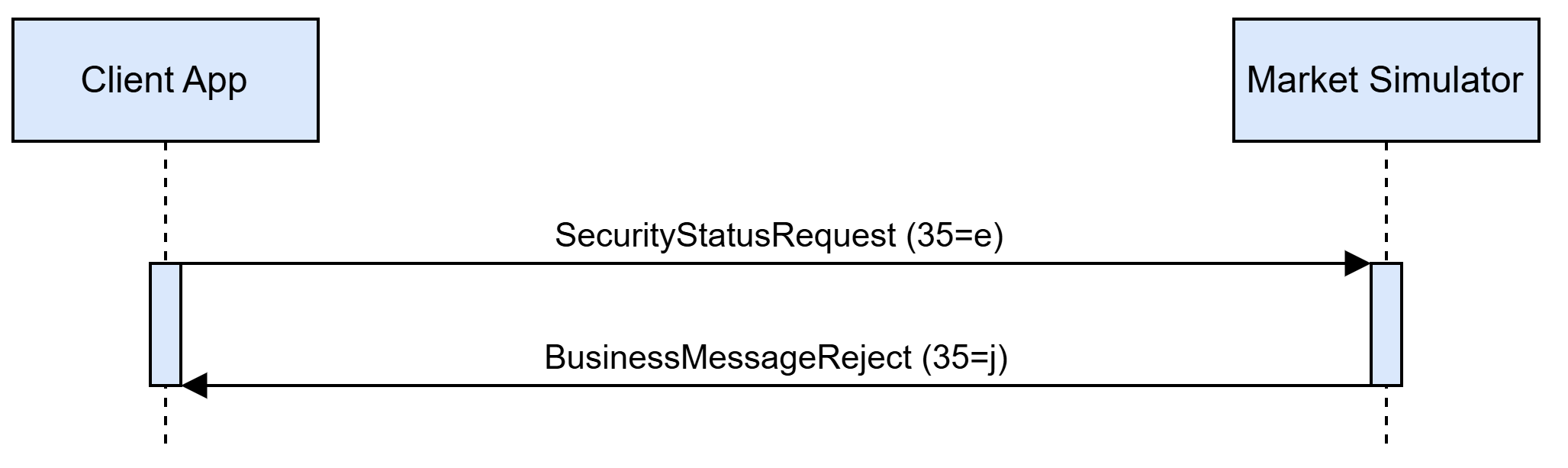
If there are any application-layer problems handling the SecurityStatusRequest, the simulator responds with a BusinessMessageReject (35=j) message, indicating the rejection details in Text and BusinessRejectReason tags, and considers the request invalid and terminated.
SecurityStatusRequest request (35=e)
| Tag | Field Name | Req’d | Comments |
|---|---|---|---|
Component |
Y |
MsgType = e |
|
324 |
SecurityStatusReqID |
Y |
Unique request ID used to request a snapshot, subscribe to updates, or unsubscribe from a previous subscription that used the same ID |
⇒ Component |
Y |
||
15 |
Currency |
C |
For non-FX instruments, identifies the currency used for price. The absence of this field is interpreted as the default for the security. For FX instruments, identifies the currency used for quantity. Required when SecurityIDSource = ISIN in the Instrument component. |
263 |
SubscriptionRequestType |
Y |
Subscription Request Type.
|
Component |
Y |
SecurityStatus response (35=f)
| Tag | Field Name | Req’d | Comments |
|---|---|---|---|
Component |
Y |
MsgType = e |
|
324 |
SecurityStatusReqID |
N |
ID of request that triggered this response |
⇒ Component |
Y |
||
15 |
Currency |
C |
For non-FX instruments, identifies the currency used for price. The absence of this field is interpreted as the default for the security. For FX instruments, identifies the currency used for quantity. Required when SecurityIDSource = ISIN in the Instrument component. |
336 |
TradingSessionID |
N |
Trading session identifier.
|
625 |
TradingSessionSubID |
N |
Sub-identifier for the active trading phase within a trading session.
|
326 |
SecurityTradingStatus |
N |
Trading status.
|
Component |
Y |
BusinessMessageReject (35=j)
| Tag | Field Name | Req’d | Comments |
|---|---|---|---|
Component |
Y |
MsgType = j |
|
45 |
RefSeqNum |
N |
The sequence number of the rejected message |
372 |
RefMsgType |
Y |
The rejected message type |
380 |
BusinessRejectReason |
Y |
Codified reason for the rejection.
|
58 |
Text |
N |
Free text message describing the reason for the rejection |
Component |
Y |
Message Flows
Market Data Streaming
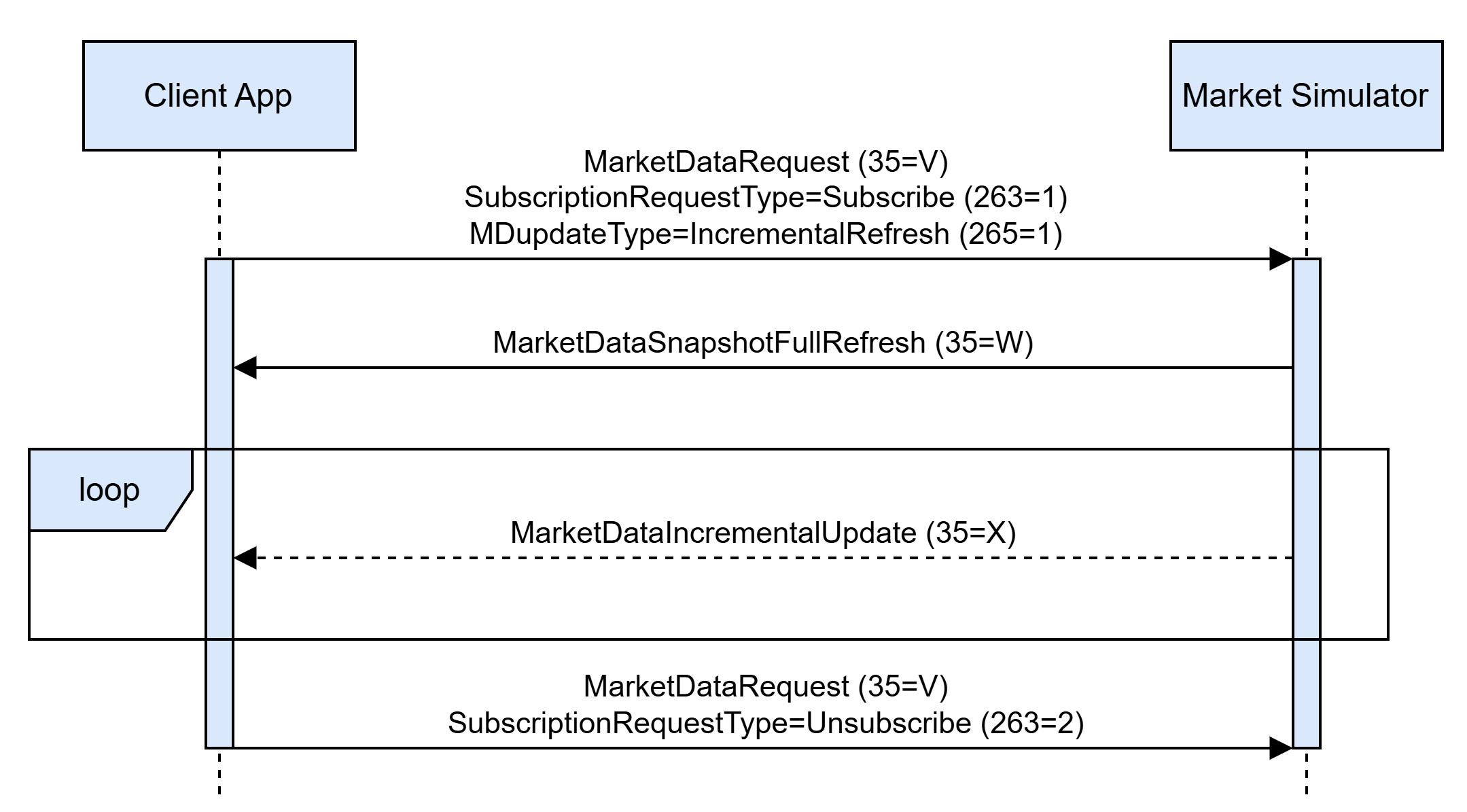
To subscribe to a market data stream, unsubscribe from a previously-subscribed market data stream or retrieve the actual market data state (snapshot) a client shall send the MarketDataRequest message. Depending on SubscriptionRequestType value, the market simulator:
-
creates a new subscription and starts requested market data streaming;
-
cancels an existing subscription and stops market data streaming for cancelled subscription;
-
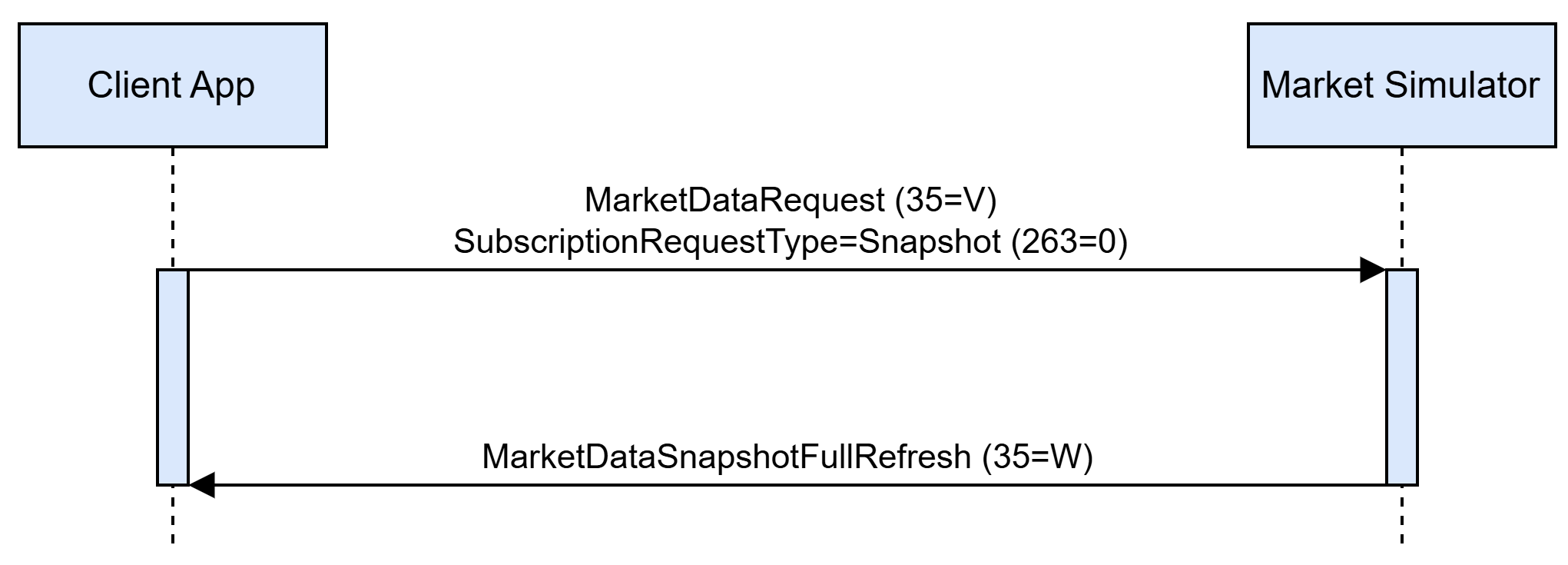
responds with an actual state of requested market data in the form of a snapshot.
Each market data request can be associated with only one listing. Market data updates are sent for each visible market data change. A change is visible to a subscription only if it affects at least one of the entry types requested in the subscription; a change affecting only entry types that were not requested produces no message, in either streaming format.
The format of a market data being streamed can be configured by a client in the MDUpdateType tag in the MarketDataRequest with SubscriptionRequestType=Subscribe, which allows to:
-
stream the data in the form of incremental updates applied to the initially reported full state;
-
stream the data in the form of full market data snapshots.
Active market data subscriptions are automatically cancelled by the simulator on client disconnection. The market data incremental streaming messages flow between the client application and the simulator:
The market data full snapshot streaming messages flow between the client application and the simulator:

The market data snapshot request-response messages flow between the client application and the simulator:
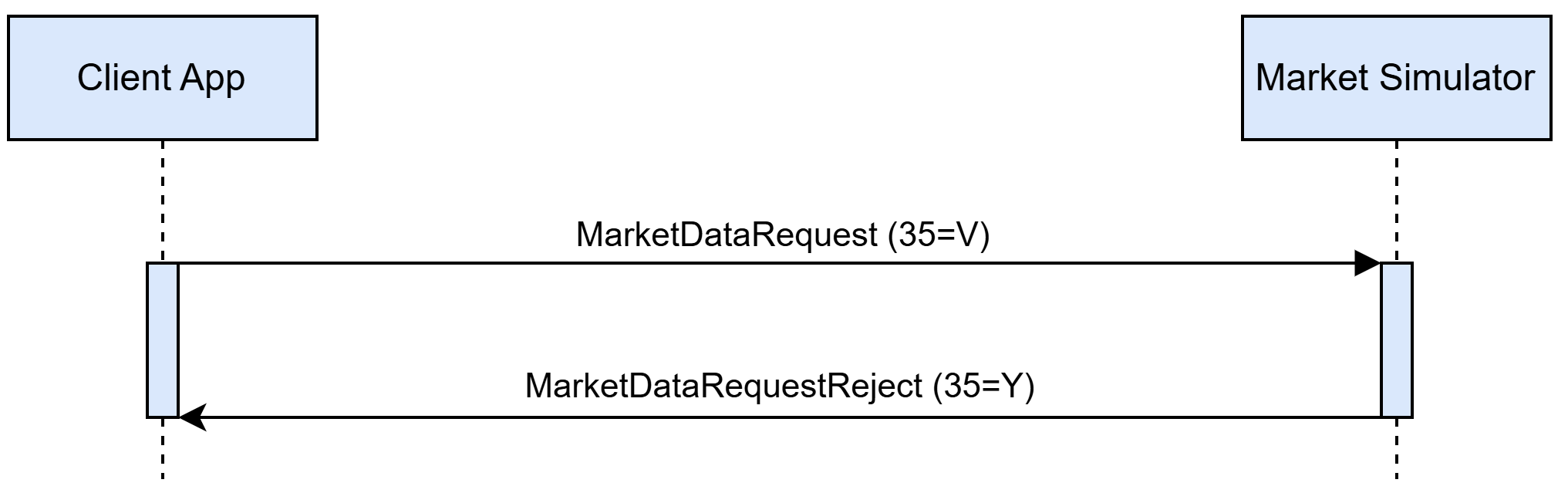
The simulator can reject the Market Data Request message issued by a client due to different circumstances. In case session-level rules violation occurs, the Market Data Request message is rejected by the Reject message with the reject reason indicated in the Text tag. For application-level rules violation, the MarketDataRequestReject message is used to report the rejection to a client, with an optional MDReqRejReason and Text specifying the details:
The application-level reasons for a MarketDataReject message are listed in the table below with details:
| Reason | Condition | MDReqRejReason (tag 281) value | Text (tag 58) value |
|---|---|---|---|
MarketDataRequest contains no securities inside NoRelatedSym (146) group |
– |
– |
|
MarketDataRequest contains more than one security inside NoRelatedSym (146) group |
– |
– |
‘market data requests on multiple securities are now allowed' |
No security matches listing identification attributes specified in NoRelatedSym (146) group |
– |
Unknown Symbol (0) |
‘listing not found' |
Security identification attributes cannot in NoRelatedSym (146) cannot be used to identify the listing (see Instrument Resolution section) |
– |
Unknown Symbol (0) |
‘listing identification attributes set is malformed’ |
Subscription MarketDataRequest has MDReqID (262) value is used by another active subscription |
MarketDataRequest has SubscriptionRequestType=Subscribe specified |
Duplicate MDReqID (1) |
'request identifier is used already' |
No active subscription associated with a given MDReqID (262) exists |
MarketDataRequest has SubscriptionRequestType=Unsubscribe specified |
– |
‘no subscription found for the request id’ |
Market Data During an Auction
During an auction’s call sub-phase, market data is published on every order action, exactly as during normal trading. The book reported to clients combines the orders already resting at the start of the phase with the orders placed during the call. Resting market orders are reported as Market Bid (269=b) and Market Offer (269=c) depth entries that carry no MDEntryPx and are ranked ahead of all priced levels; these entries are received only by clients that requested the 269=b/c entry types — a plain Bid (0) / Offer (1) subscription does not include them.
Snapshots taken during an auction also carry the last known values of the session-level entries:
-
Opening Price (269=4);
-
Closing Price (269=5);
-
Previous Closing Price (269=e);
-
Auction Clearing Price (269=Q), with its volume;
-
Trade Volume (269=B).
Each of these entries is included only if the corresponding entry type was requested, and any value that has never been determined is simply omitted. During an opening or a closing auction call, the Opening Price (269=4) or the Closing Price (269=5) carries that auction’s indicative price and volume instead of the value of a previous session. An intraday auction has no session-level entry of its own: it publishes its indicative value as a Settlement Price (269=6) entry that exists only for the duration of the call. See Indicative Auction Price, Volume and Imbalance.
Indicative Auction Price, Volume and Imbalance
Throughout the call sub-phase the simulator maintains an indicative equilibrium price (IEP), an indicative equilibrium volume (IEV) and an imbalance (a size and a side) for the instrument. They are recalculated after every order placement, amendment and cancellation accepted during the call, and are reported in the same market data message that carries the resulting book change — no separate message is emitted for them.
The entry type carrying the indicative price and volume depends on the auction phase:
| Auction phase | MDEntryType (269) | Entry |
|---|---|---|
Opening auction (PreOpen) |
4 |
Opening Price |
Closing auction (PreClose) |
5 |
Closing Price |
Intraday auction (Auction) |
6 |
Settlement Price |
While the order book is crossed (the best bid is priced at or above the best offer), two entries are published:
-
the auction phase’s price entry (269=4, 269=5 or 269=6), with MDEntryPx (270) = IEP and MDEntrySize (271) = IEV;
-
an imbalance entry, with MDEntryType (269) = A, MDEntrySize (271) = imbalance size and TradeCondition (277) = imbalance side (
P— more buyers,Q— more sellers). This entry carries no MDEntryPx (270). Venues normally suppress the imbalance when they already publish market depth; the simulator publishes both.
While the order book is not crossed, no equilibrium price exists. Only the auction phase’s price entry is published, with MDEntrySize (271) = 0 and no MDEntryPx (270), and any imbalance entry published earlier is deleted.
In addition, the same indicative price and volume are republished as an Early Price (269=P) entry on a fixed 30-second interval while the book is crossed, whether or not the value changed. The entry is deleted when the uncrossing begins, and a snapshot request returns its last published value immediately, without waiting for the next interval. If the book stops being crossed during the call, the entry is neither updated nor deleted — it keeps its last value until the uncrossing, so it may report an equilibrium price while the auction phase’s own price entry reports a zero volume and no price.
Calculation of the Indicative Price, Volume and Imbalance
1 — Candidate prices. The candidates are every distinct limit order price in the book that lies between the best offer and the best bid, inclusive. If the book is not crossed the range is empty, so there is no candidate and no indicative price.
2 — Cumulative quantities. For each candidate price \(p\):
-
the cumulative buy quantity \(CQB(p)\) is the total quantity of all buy orders eligible to trade at \(p\) — every buy limit order priced at \(p\) or higher, plus every buy market ("at-auction") order, which is eligible at every candidate price;
-
the cumulative sell quantity \(CQS(p)\) is the total quantity of all sell orders eligible to trade at \(p\) — every sell limit order priced at \(p\) or lower, plus every sell market order.
3 — Tradable quantity and imbalance. For each candidate price \(p\):
-
\(TradeQty(p) = \min(CQB(p), CQS(p))\);
-
\(Imb(p) = CQB(p) - CQS(p)\). A positive imbalance means demand exceeds supply at that price, a negative one that supply exceeds demand.
4 — Selecting the IEP. The following rules are applied in order, each one narrowing the candidates left by the previous rule, until a single price remains:
-
the price with the highest \(TradeQty(p)\);
-
the price with the lowest \(\lvert Imb(p) \rvert\);
-
if the remaining imbalances are non-zero and all share the same sign: the highest of the remaining prices when the imbalance is positive, the lowest when it is negative;
-
otherwise — the remaining imbalances are all zero, or they are equal in size but differ in sign — the remaining price closest to the reference price. The reference price is the last known Closing Price (269=5) for an opening auction, and the last trade price of the preceding Open phase for a closing or an intraday auction;
-
when no reference price has been determined yet the previous rule cannot apply: the lowest of the remaining prices is used.
5 — Reported values. The IEV is \(TradeQty(IEP)\) and the imbalance size is \(\lvert Imb(IEP) \rvert\). The imbalance side is P (more buyers) for a positive imbalance and Q (more sellers) for a negative one. When the imbalance at the IEP is zero, the side is taken from the heavier surplus across all candidate prices — Q if the largest sell surplus exceeds the largest buy surplus, P otherwise.
Calculation Example
Consider the following order book during a call for auction. The book is crossed: the best bid (60.10) is above the best offer (60.07).
| Order # | Bid Size | Bid Price | Ask Price | Ask Size | Order # |
|---|---|---|---|---|---|
1 |
100 |
60.10 |
60.07 |
300 |
2 |
3 |
200 |
60.09 |
60.08 |
500 |
5 |
4 |
300 |
60.07 |
60.11 |
300 |
6 |
The candidate prices are the book’s limit prices between 60.07 and 60.10 inclusive: {60.07, 60.08, 60.09, 60.10}. The order at 60.11 lies outside the range and is not a candidate.
| Candidate price \(p\) | \(CQB(p)\) | \(CQS(p)\) | \(TradeQty(p)\) | \(Imb(p)\) |
|---|---|---|---|---|
60.07 |
600 |
300 |
300 |
+300 |
60.08 |
300 |
800 |
300 |
−500 |
60.09 |
300 |
800 |
300 |
−500 |
60.10 |
100 |
800 |
100 |
−700 |
The maximum tradable quantity, 300, occurs at 60.07, 60.08 and 60.09; among those, the lowest absolute imbalance (300) singles out 60.07. The values published are therefore:
-
Opening/Closing/Settlement Price entry: MDEntryPx (270) = 60.07, MDEntrySize (271) = 300;
-
Imbalance entry (269=A): MDEntrySize (271) = 300, TradeCondition (277) =
P(more buyers).
Suppose a sell market ("at-auction") order for 500 is now entered:
| Order # | Bid Size | Bid Price | Ask Price | Ask Size | Order # |
|---|---|---|---|---|---|
At-Auction |
500 |
7 |
|||
1 |
100 |
60.10 |
60.07 |
300 |
2 |
3 |
200 |
60.09 |
60.08 |
500 |
5 |
4 |
300 |
60.07 |
60.11 |
300 |
6 |
The market order is eligible at every candidate price, so it raises \(CQS(p)\) across the whole range:
| Candidate price \(p\) | \(CQB(p)\) | \(CQS(p)\) | \(TradeQty(p)\) | \(Imb(p)\) |
|---|---|---|---|---|
60.07 |
600 |
800 |
600 |
−200 |
60.08 |
300 |
1300 |
300 |
−1000 |
60.09 |
300 |
1300 |
300 |
−1000 |
60.10 |
100 |
1300 |
100 |
−1200 |
The maximum tradable quantity is now 600, at 60.07 alone, so the values published are:
-
Opening/Closing/Settlement Price entry: MDEntryPx (270) = 60.07, MDEntrySize (271) = 600;
-
Imbalance entry (269=A): MDEntrySize (271) = 200, TradeCondition (277) =
Q(more sellers).
Suppose a buy market order for 1,000 is entered on top of that:
| Order # | Bid Size | Bid Price | Ask Price | Ask Size | Order # |
|---|---|---|---|---|---|
8 |
1,000 |
At-Auction |
At-Auction |
500 |
7 |
1 |
100 |
60.10 |
60.07 |
300 |
2 |
3 |
200 |
60.09 |
60.08 |
500 |
5 |
4 |
300 |
60.07 |
60.11 |
300 |
6 |
| Candidate price \(p\) | \(CQB(p)\) | \(CQS(p)\) | \(TradeQty(p)\) | \(Imb(p)\) |
|---|---|---|---|---|
60.07 |
1600 |
800 |
800 |
+800 |
60.08 |
1300 |
1300 |
1300 |
0 |
60.09 |
1300 |
1300 |
1300 |
0 |
60.10 |
1100 |
1300 |
1100 |
−200 |
The maximum tradable quantity, 1300, is reached at both 60.08 and 60.09, and both leave a zero imbalance, so the reference price decides — 60.08 if it is the closer of the two. The values published are:
-
Opening/Closing/Settlement Price entry: MDEntryPx (270) = 60.08, MDEntrySize (271) = 1300;
-
Imbalance entry (269=A): MDEntrySize (271) = 0, TradeCondition (277) =
P. There is no imbalance at the IEP, so the side is taken from the heavier surplus across the candidates (800 on the buy side against 200 on the sell side).
Uncrossing
The uncrossing crosses the book at the last IEP calculated during the call, for a total quantity equal to the IEV, in price-time priority. Orders are crossed in three passes, all executing at the IEP:
-
market orders against opposing market orders, in time priority;
-
the market orders left on one side (market orders can remain on one side only) against the opposing limit orders priced at or better than the IEP, best price first and oldest first within a price;
-
the remaining limit orders priced at or better than the IEP against one another, best price and oldest first on both sides.
Every cross produces the usual ExecutionReport messages for both orders and a trade market data entry. Market orders that remain unexecuted once the passes are complete are cancelled, and their owners receive an ExecutionReport with ExecType (150) = 4 (Canceled). If no IEP could be calculated — the book was not crossed at the end of the call — nothing is crossed and all market orders are cancelled. Because the IEP maximises the tradable quantity, the book is no longer crossed once the uncrossing completes; limit orders priced through the IEP may nevertheless remain in the book when the opposing side is exhausted.
Continuing the example above, the uncrossing takes place at 60.08 for 1300:
-
the two at-auction orders cross first — order 8 against order 7 for 500;
-
order 8’s remaining 500 crosses against the offers eligible at 60.08: 300 against order 2 and 200 against order 5;
-
the eligible bids then cross against order 5’s remaining 300 — 100 from order 1 and 200 from order 3.
1300 shares change hands, all at 60.08, and the book is left with order 4 (300 at 60.07) on the bid side and order 6 (300 at 60.11) on the offer side. Order 4 and order 6 were never eligible at the IEP, so neither trades.
When the uncrossing sub-phase begins, the indicative entries are withdrawn:
-
Early Price (269=P) — deleted;
-
Imbalance (269=A) — deleted;
-
Settlement Price (269=6) — deleted, for an intraday auction;
-
Opening Price (269=4) and Closing Price (269=5) — kept at their indicative value until the auction’s outcome replaces or clears it, as described below.
Each individual cross is reported as it occurs:
-
a client subscribed to full snapshots (MarketDataSnapshotFullRefresh, 35=W) receives, for every cross, a snapshot of the order book as it stood immediately before the uncrossing started together with that cross’s trade (Last Trade, 269=2);
-
a client subscribed to incremental updates (MarketDataIncrementalRefresh, 35=X) receives only the trade for each cross, with no bids or offers;
-
a client not subscribed to trades receives nothing for the individual crosses.
Once all crosses are complete, the simulator publishes a single fresh full snapshot of the resulting order book to every subscription, regardless of its update type. An auction in which nothing crosses produces no per-cross messages but still publishes this closing snapshot.
This closing snapshot reflects the auction’s outcome. A closing auction first carries the last settled Closing Price (269=5) — the price of an earlier session, never the indicative value published during the call — into the Previous Closing Price (269=e), whether or not the auction crossed. The remaining entries depend on the outcome.
An auction that crossed sets:
-
Auction Clearing Price (269=Q) — the IEP and IEV the book was crossed at (see Calculation of the Indicative Price, Volume and Imbalance);
-
Opening Price (269=4) — set by an opening auction to the clearing price, reported with MDEntryPx (270) only, replacing the indicative price and volume published during the call;
-
Closing Price (269=5) — set by a closing auction to the clearing price;
-
Trading Session High Price (269=7) and Trading Session Low Price (269=8) — reset by an opening auction to the opening price, and tracked from there on;
-
Trade Volume (269=B) — reset by an opening auction to the auction’s clearing volume; a closing or an intraday auction adds its clearing volume to it (see Daily Session Price Reset Without Auction Phases).
If an auction does not cross, no clearing price can be calculated, and the entries are instead cleared and omitted from updates until a price can next be determined:
-
Auction Clearing Price (269=Q) — cleared for any auction type;
-
Opening Price (269=4) — cleared by an opening auction;
-
Closing Price (269=5) — cleared by a closing auction;
-
Trade Volume (269=B) — cleared by an opening auction;
-
Trading Session High Price (269=7) and Trading Session Low Price (269=8) — left untouched.
Market Data During the TradeAtLast Phase
During the TradeAtLast phase, market data is published on every accepted order action, exactly as during normal trading. The orders accepted during the phase appear in the Bid (269=0) and Offer (269=1) depth entries like any other resting order; since all of them are priced at the closing price, they aggregate into a single price level, together with any order an earlier phase left at that price.
Every cross between two orders of the phase is published as a Trade (269=2) entry priced at the closing price, carrying TradingSessionID (336) = 1 (Day), TradingSessionSubID (625) = 5 (Post-Trading) and SecurityTradingStatus (326) = 3 (Resume). Their quantity is added to the daily Trade Volume (269=B), and their price updates the Trading Session High Price (269=7), the Trading Session Low Price (269=8) and the Mid Price (269=H) derived from them. The Closing Price (269=5) the phase trades at is not changed by them.
Daily Session Price Reset Without Auction Phases
The session-level L1 prices are normally reset by the opening and closing auctions, as described above:
-
Opening Price (269=4);
-
Closing Price (269=5);
-
Previous Closing Price (269=e);
-
Trading Session High Price (269=7);
-
Trading Session Low Price (269=8);
-
Mid Price (269=H).
When a venue’s phase schedule does not include the corresponding auction, the simulator instead resets these values to the day’s trades so they still roll over once per day.
When no opening auction (PreOpen) is scheduled, the Opening Price (269=4) is set from the price of the first trade that occurs after midnight in the venue’s configured time zone, and the session high (269=7) and low (269=8) prices are reset to that opening price and tracked from there on.
When no closing auction (PreClose) is scheduled, the Closing Price (269=5) is set to the price of the last trade before midnight in the venue’s configured time zone. As with the closing auction, each rollover first carries the last known Closing Price into the Previous Closing Price (269 = e).
The daily Trade Volume (269=B) follows the same daily cycle. During the Open phase and during the TradeAtLast phase, the quantity matched by each trade is added to it. When an opening auction is scheduled, the auction resets it to the auction’s clearing volume (see Market Data During an Auction); when no opening auction is scheduled, it is instead reset to the matched quantity of the first trade that occurs after midnight in the venue’s configured time zone. Closing and intraday auctions add their clearing volume on top.
Trading Messages
New Order Single
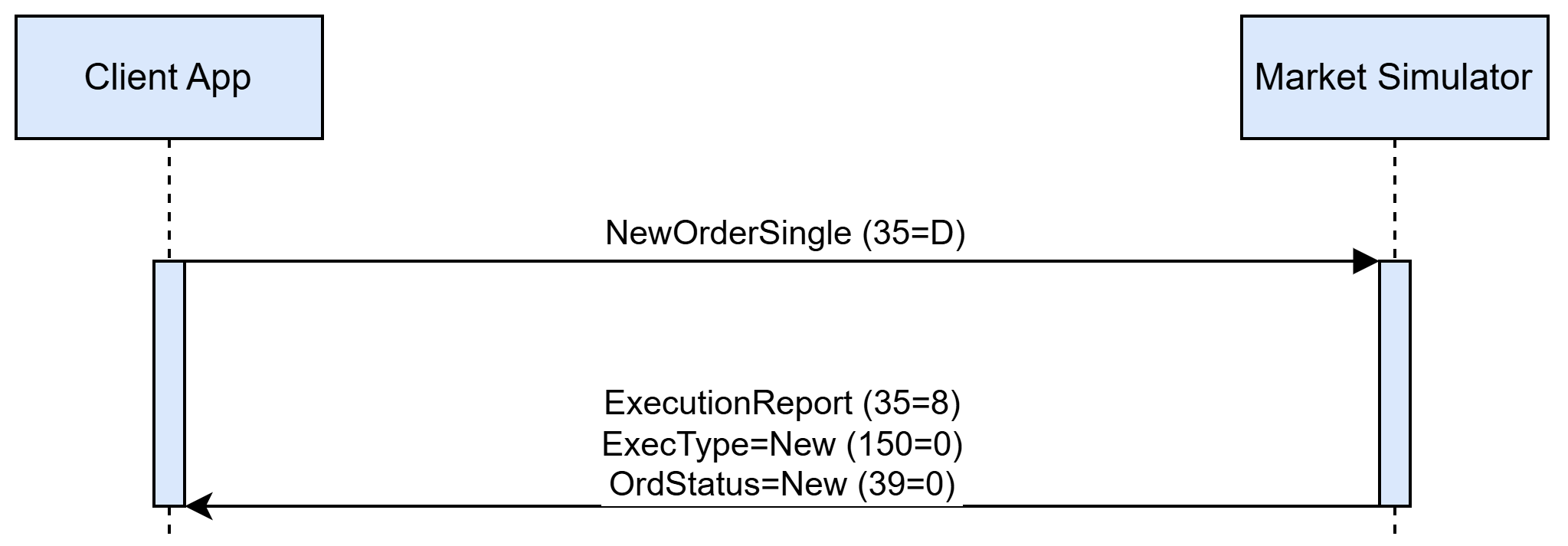
To create a new order a client shall issue the NewOrderSingle message, which should contain new order properties. The simulator responds with an ExecutionReport message indicating that an order for a requested listing is created and is ready to be executed. Each successfully created new order is acknowledged with an ExecutionReport containing ExecType=New and OrdStatus=New:
A NewOrderSingle message can be rejected by the simulator. An application-level reject is always issued in the form of an ExecutionReport message with ExecType=Rejected, OrdStatus=Rejected, and a Text field specifying the reason for a new order rejection:
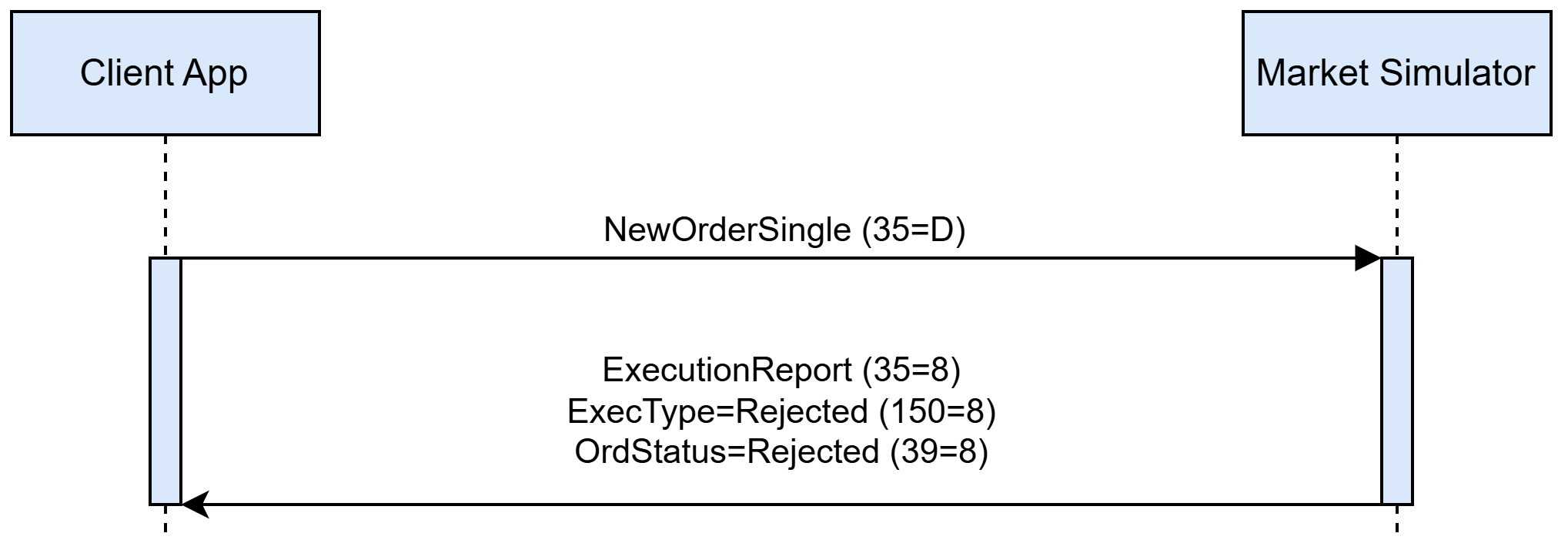
NewOrderSingle message rejection reasons are listed in the table below:
| Reason | Condition | Text (tag 58) value |
|---|---|---|
No listing matches listing identification attributes specified in NewOrderSingle |
– |
‘listing not found' |
Listing identification attributes cannot be used to identify the listing (see Instrument Resolution section) |
– |
‘listing identification attributes set is malformed’ |
Price (44) is missing in NewOrderSingle request |
Reported when an order with OrdType=Limit is specified without a price |
‘order price missing' |
Price (44) is specified in NewOrderSingle request |
Reported when an order with OrdType=Market is specified with a price |
‘order price is not allowed’ |
OrderQty (38) is missing in NewOrderSingle request |
– |
‘order quantity missing’ |
Value in Price (44) is not a multiple of the requested listing’s price tick |
– |
‘order price tick constraint is violated’ |
Value in OrderQty (38) is not a multiple of the requested listing’s quantity multiple |
– |
‘order quantity multiple constraint is violated’ |
Value in OrderQty (38) is less than the requested listing’s quantity minimum |
– |
‘minimal order quantity constraint is violated’ |
Value in OrderQty (38) is greater than the requested listing’s quantity maximum |
– |
‘maximal order quantity constraint is violated’ |
Both ExpireDate (432) and ExpireTime (126) are missing for a GoodTillCancel order |
Reported only for orders with TimeInForce=GoodTillCancel |
‘neither expire date nor expire time specified’ |
Both ExpireDate (432) and ExpireTime (126) are specified for a GoodTillCancel order |
Reported only for orders with TimeInForce=GoodTillCancel |
‘both expire date and expire time specified’ |
A new GoodTillCancel order is already expired as per the specified ExpireDate (432) or ExpireTime (126) |
Reported only for orders with TimeInForce=GoodTillCancel |
‘order already expired’ |
The venue is in the Open or the TradeAtLast halted phase. It means that in the message SecurityStatus (35=f), the tags are:
|
– |
‘request cannot be processed during halted trading status’ |
An ImmediateOrCancel or FillOrKill limit order is submitted during an auction call sub-phase |
Reported for orders with TimeInForce=ImmediateOrCancel or TimeInForce=FillOrKill while an auction is in its call sub-phase (SecurityTradingStatus 326=3 with an auction TradingSessionSubID 625=2/4/6) |
‘immediate-or-cancel and fill-or-kill orders are not accepted during an auction’ |
Any new order is submitted during an auction uncrossing sub-phase |
Reported while an auction is uncrossing (SecurityTradingStatus 326=2 with an auction TradingSessionSubID 625=2/4/6) |
‘orders are not allowed during the uncrossing phase’ |
Any new order is submitted during the Closed phase |
Reported while the Closed phase is active (SecurityTradingStatus 326=2 with TradingSessionSubID 625=10) |
‘request cannot be processed during closed phase’ |
A market order is submitted during the TradeAtLast phase |
Reported for orders with OrdType=Market while the TradeAtLast phase is active (TradingSessionSubID 625=5); only limit orders are accepted during that phase |
‘only limit orders are accepted during the trade-at-last phase’ |
A limit order with a TimeInForce other than Day is submitted during the TradeAtLast phase |
Covers ImmediateOrCancel, FillOrKill, GoodTillCancel and GoodTillDate |
‘only day orders are accepted during the trade-at-last phase’ |
A new order is submitted during the TradeAtLast phase while no Closing Price (269=5) is known |
For instance after a closing auction that did not cross; no order is accepted for the whole phase in that case |
‘no closing price is available, orders are not accepted during the trade-at-last phase’ |
A new order is submitted during the TradeAtLast phase with a Price (44) differing from the Closing Price (269=5) |
– |
‘order price must be equal to the closing price during the trade-at-last phase’ |
A NewOrderSingle message can be cancelled by the simulator. An application-level cancellation is issued in the form of an ExecutionReport message with ExecType=Cancelled, OrdStatus=Cancelled, and a Text field specifying the reason for the cancellation:
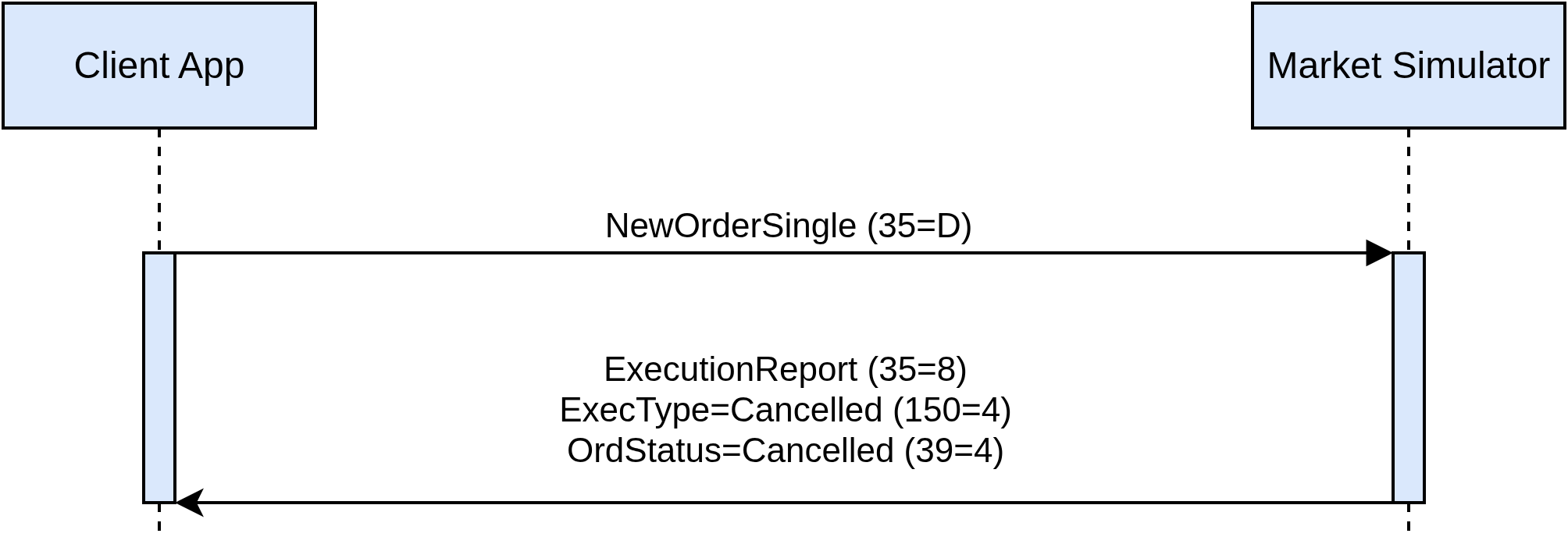
NewOrderSingle message cancellation reasons are listed in the table below:
| Reason | Condition | Text (tag 58) value |
|---|---|---|
An opposite side has no orders matching the new order to be traded |
Reported only for orders with OrdType=Market or TimeInForce=ImmediateOrCancel or TimeInForce=FillOrKill |
‘no facing orders found’ |
All matching opposite orders cannot fill a new FillOrKill order |
Reported only for orders with TimeInForce=FillOrKill |
‘not enough liquidity to fill FoK order’ |
Matching opposite orders cannot fully fill a new order; the non-executed remainder is cancelled after partial execution |
Reported only for orders with OrdType=Limit and TimeInForce=ImmediateOrCancel |
‘not enough liquidity to fully fill IoC order’ |
Matching opposite orders cannot fully fill a new order; the non-executed remainder is cancelled after partial execution |
Reported only for orders with OrdType=Market |
‘not enough liquidity to fully fill market order’ |
Execution Report
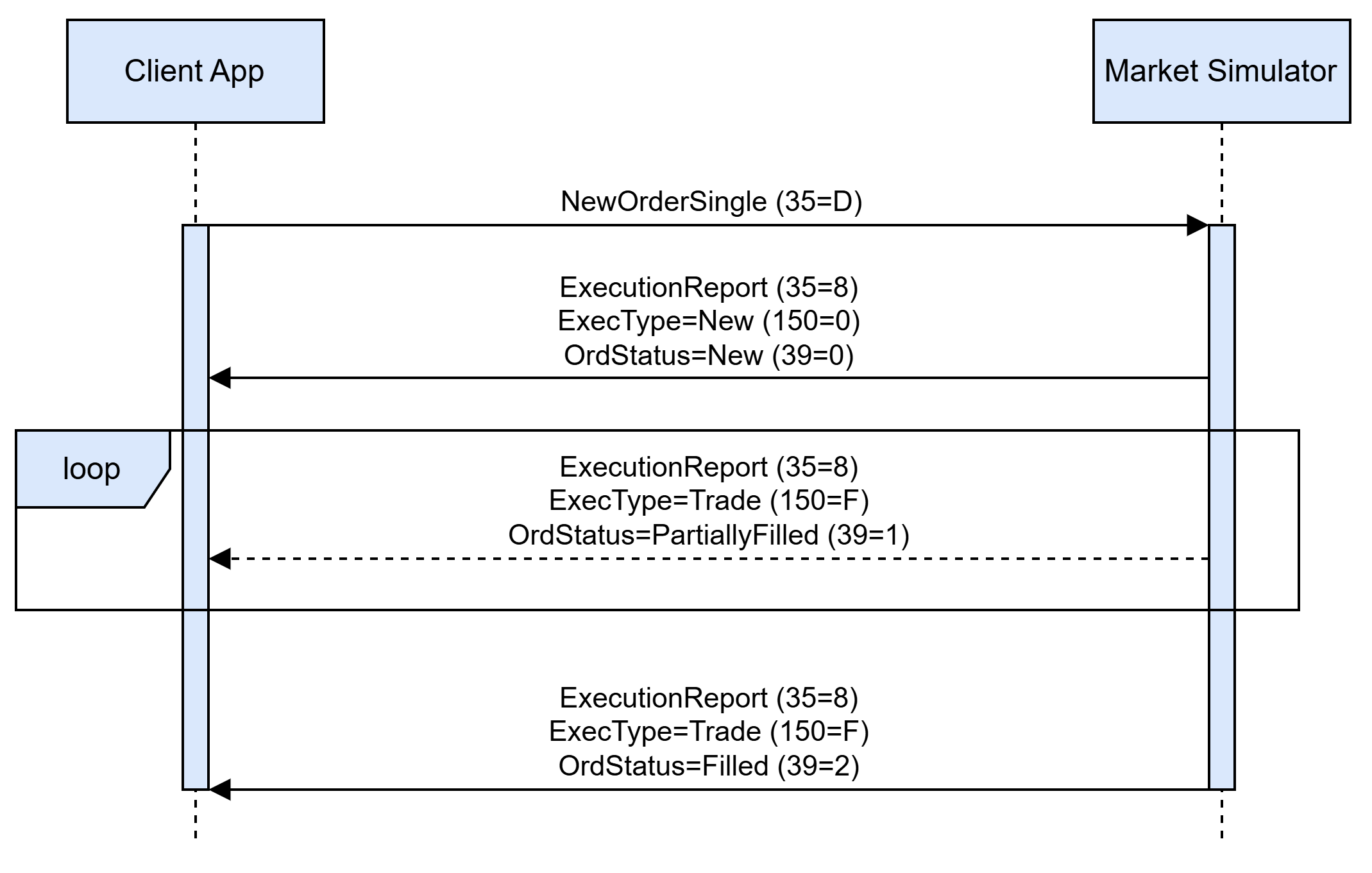
Once a NewOrderSingle message is accepted and acknowledged by the simulator, an order can be traded. Each trade event is reported by the ExecutionReport message with ExecType=Trade. The order status is changed to OrdStatus=PartiallyFilled if there is volume left for being executed, otherwise order status is changed to OrdStatus=Filled and the order is terminated. The diagram below illustrates the basic message flow for the order lifetime between a client and the simulator:
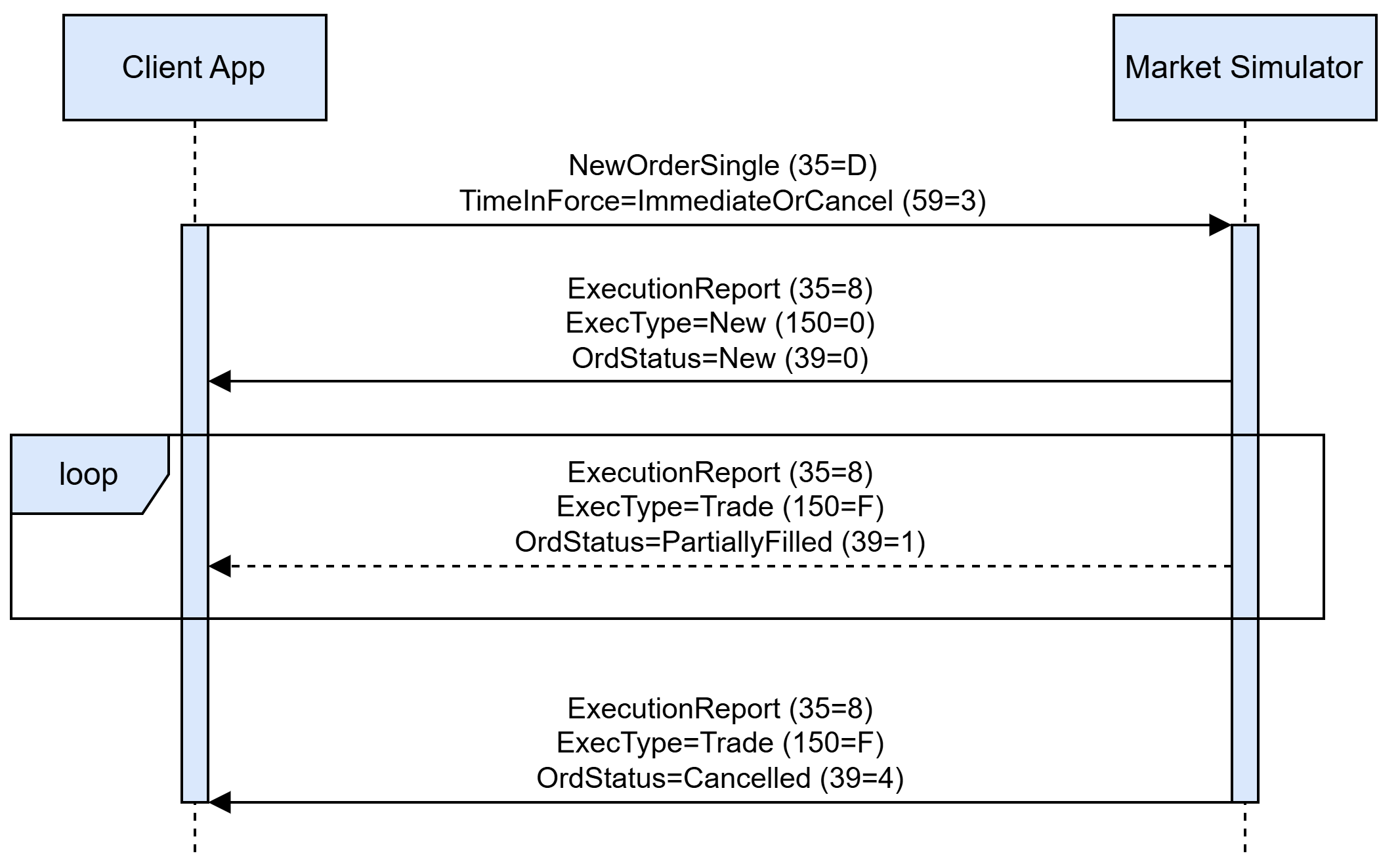
The simulator cancels orders with TimeInForce=ImmediateOrCancel automatically if there is a non-executed order part left after the order matching and trading process. Such cancellation would be reported by ExecType=Cancelled and OrdStatus=Cancelled in the last execution report for an order, with the Text field specifying the cancellation reason:
The simulator automatically cancels expired orders with TimeInForce=Day and TimeInForce=GoodTillDate. The cancellation is reported to a client in the form of an ExecutionReport message with ExecType=Cancelled and OrdStatus=Cancelled:
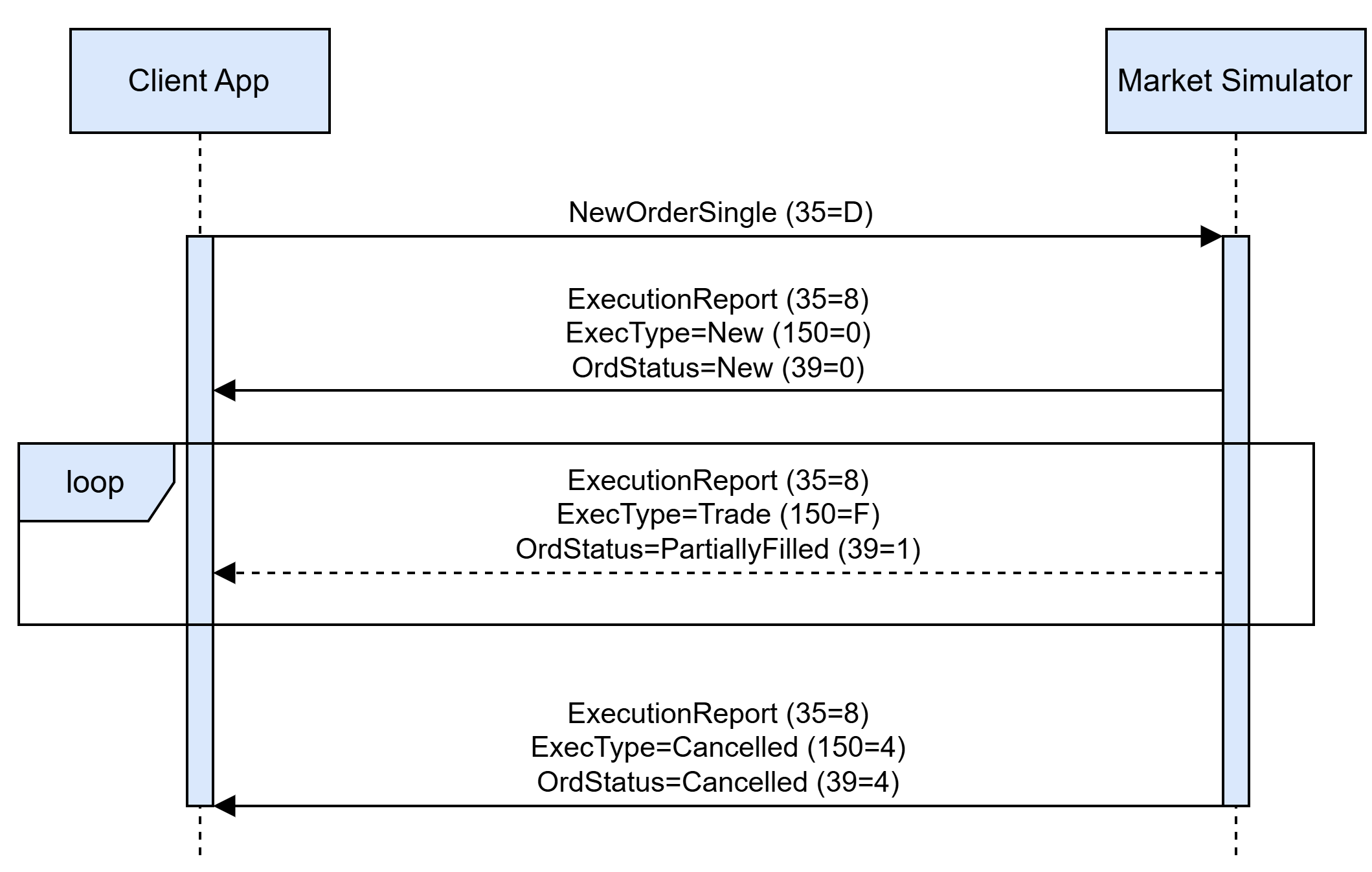
The orders left in the TradeAtLast queues are cancelled and reported the same way when that phase ends, whichever phase follows it, with LeavesQty (151) carrying the quantity that was not filled.
Order Cancel Replace Request
A client may issue an OrderCancelReplaceRequest to modify his active order. A successful modification is reported by an ExecutionReport message with ExecType=Replaced and OrdStatus=Replaced, as shown in the diagram:
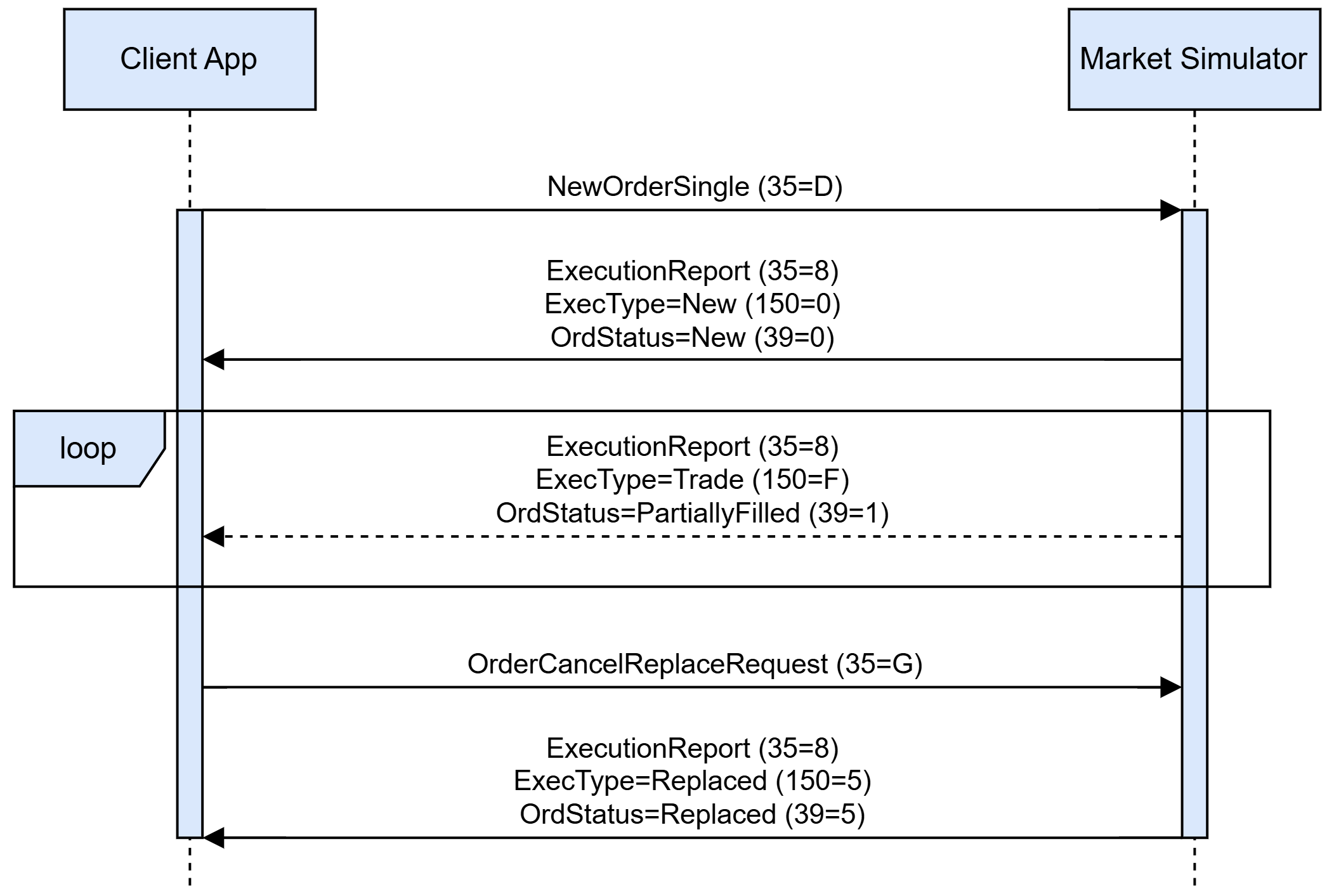
An OrderCancelReplaceRequest message can be rejected by the simulator. An application-level reject is always issued in the form of an OrderCancelReject message with CxlRejResponseTo=OrderCancelReplaceRequest, OrdStatus=Rejected, and a Text field specifying the reason for a modification rejection. An order is not modified if OrderCancelReplaceRequest is rejected.

OrderCancelReplaceRequest message rejection reasons are listed in the table below:
| Reason | Condition | Text (tag 58) value |
|---|---|---|
No listing matches listing identification attributes specified in OrderCancelReplaceRequest |
– |
‘listing not found' |
Listing identification attributes cannot be used to identify the listing (see Instrument Resolution section) |
– |
‘listing identification attributes set is malformed’ |
Given OrigClOrdID (41), ClOrdID (11), or OrderID (37) do not match any client order for a requested listing. Side (54) does not match the original order side value. Order is terminated (e.g. filled or cancelled) |
– |
‘order not found’ |
New OrderQty (38) value is less than or equal to the already executed CumQty (14) for an order |
– |
‘invalid quantity’ |
New TimeInForce (59) value does not match the original value specified for an order |
– |
‘time in force can not be changed’ |
Price (44) is missing in NewOrderSingle request |
Reported when an order with OrdType=Limit is specified without a price |
‘order price missing’ |
OrderQty (38) is missing in NewOrderSingle request |
– |
‘order quantity missing’ |
Value in Price (44) is not a multiple of the requested listing’s price tick |
– |
‘order price tick constraint is violated’ |
Value in OrderQty (38) is not a multiple of the requested listing’s quantity multiple |
– |
‘order quantity multiple constraint is violated’ |
Value in OrderQty (38) is less than the requested listing’s quantity minimum |
– |
‘minimal order quantity constraint is violated’ |
Value in OrderQty (38) is greater than the requested listing’s quantity maximum |
– |
‘maximal order quantity constraint is violated’ |
Both ExpireDate (432) and ExpireTime (126) are missing for a GoodTillCancel order |
Reported only for orders with TimeInForce=GoodTillCancel |
‘neither expire date nor expire time specified’ |
Both ExpireDate (432) and ExpireTime (126) are specified for a GoodTillCancel order |
Reported only for orders with TimeInForce=GoodTillCancel |
‘both expire date and expire time specified’ |
A new GoodTillCancel order is already expired as per specified ExpireDate (432) or ExpireTime (126) |
Reported only for orders with TimeInForce=GoodTillCancel |
‘order already expired’ |
The venue is in the Open or the TradeAtLast halted phase. It means that in the message SecurityStatus (35=f),the tags are:
|
– |
‘request cannot be processed during halted trading status' |
OrderCancelReplaceRequest targets a market order (OrdType=Market) outside an auction call sub-phase |
Market orders rest in the book only during an auction call, and only then can they be amended (their quantity); at any other time, the TradeAtLast phase included, an amendment of a market order is rejected |
‘unknown order type’ |
Any amend is submitted during an auction uncrossing sub-phase |
Reported while an auction is uncrossing (SecurityTradingStatus 326=2 with an auction TradingSessionSubID 625=2/4/6) |
‘orders are not allowed during the uncrossing phase’ |
Any amend is submitted during the Closed phase |
Reported while the Closed phase is active (SecurityTradingStatus 326=2 with TradingSessionSubID 625=10) |
‘request cannot be processed during closed phase’ |
An amend submitted during the TradeAtLast phase does not identify an order placed during that phase |
During the TradeAtLast phase (TradingSessionSubID 625=5) amendments are resolved only against the orders accepted in that phase; an order resting from an earlier phase is left untouched |
‘order not found’ |
An amend submitted during the TradeAtLast phase specifies a TimeInForce other than Day |
The amended values must satisfy the same rules as a new order submitted during that phase |
‘only day orders are accepted during the trade-at-last phase’ |
An amend is submitted during the TradeAtLast phase while no Closing Price (269=5) is known |
– |
‘no closing price is available, orders are not accepted during the trade-at-last phase’ |
An amend submitted during the TradeAtLast phase specifies a Price (44) differing from the Closing Price (269=5) |
– |
‘order price must be equal to the closing price during the trade-at-last phase’ |
Order Cancel Request
A client may issue an OrderCancelRequest (35=F) to cancel his active order. A successful cancellation is reported by an ExecutionReport message with ExecType=Cancelled and OrdStatus=Cancelled, as shown in the diagram:
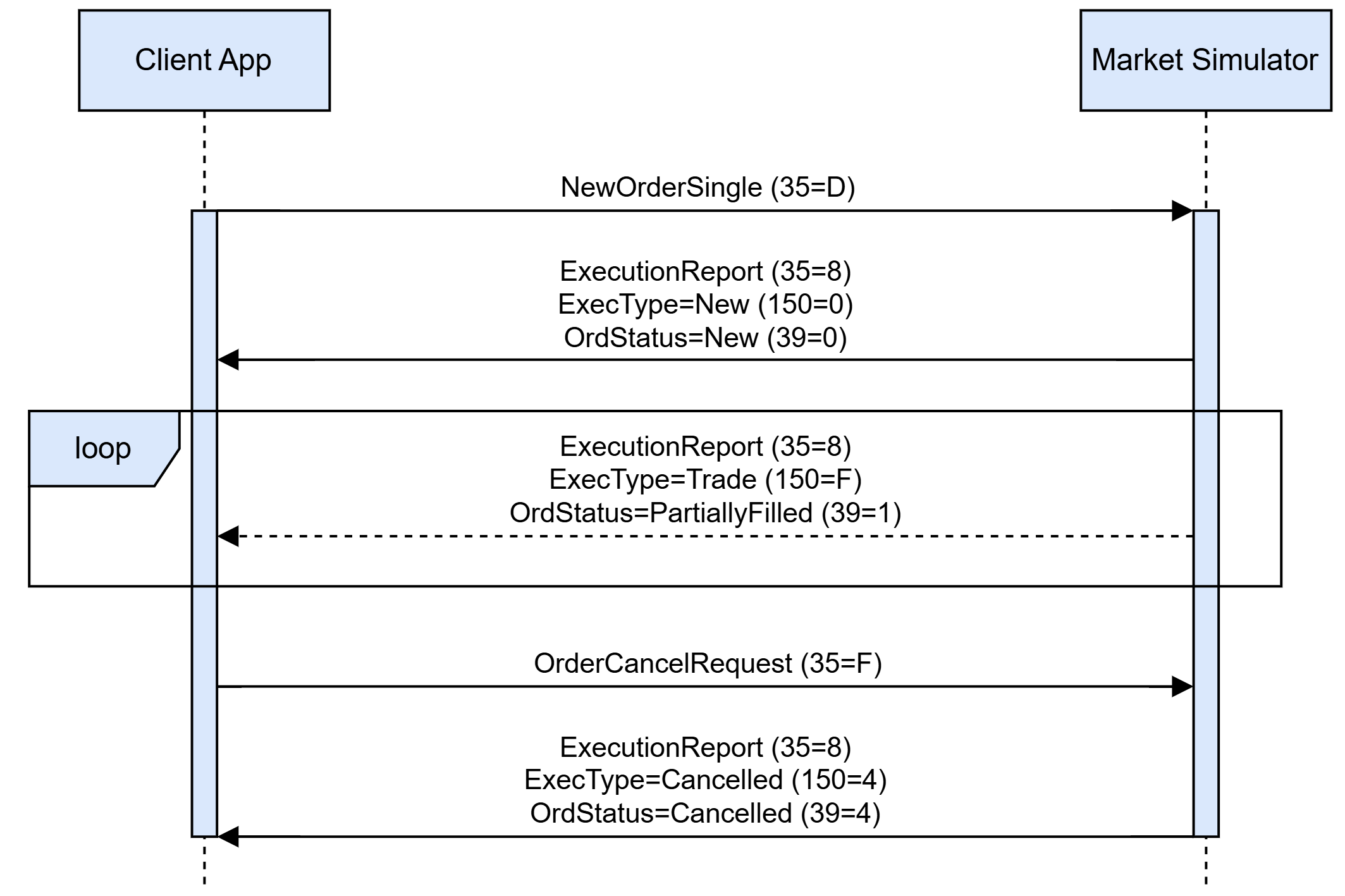
An OrderCancelReplaceRequest message can be rejected by the simulator. An application-level reject is always issued in the form of an OrderCancelReject message with CxlRejResponseTo=OrderCancelRequest, OrdStatus=Rejected, and a Text field specifying the reason for a cancellation rejection. An order remains active if OrderCancelRequest is rejected.

OrderCancelRequest message rejection reasons are listed in the table below:
| Reason | Condition | Text (tag 58) value |
|---|---|---|
No listing matches listing identification attributes specified in OrderCancelRequest |
– |
‘listing not found' |
Listing identification attributes cannot be used to identify the listing (see Instrument Resolution section) |
– |
‘listing identification attributes set is malformed’ |
Given OrigClOrdID (41), ClOrdID (11), or OrderID (37) do not match any client order for a requested listing. Side (54) does not match the original order side value. Order is terminated (e.g. filled or cancelled) |
– |
‘order not found’ |
The venue is in the Open or the TradeAtLast halted phase and OrderCancelRequest is not allowed on this halted phase. It means that in the message SecurityStatus (35=f), the tags are:
|
– |
‘request cannot be processed during halted trading status' |
Any cancel is submitted during an auction uncrossing sub-phase |
Order cancels are rejected while an auction is uncrossing, even when the halt settings would otherwise allow cancels (SecurityTradingStatus 326=2 with an auction TradingSessionSubID 625=2/4/6) |
‘orders are not allowed during the uncrossing phase’ |
Any cancel is submitted during the Closed phase |
Reported while the Closed phase is active (SecurityTradingStatus 326=2 with TradingSessionSubID 625=10) |
‘request cannot be processed during closed phase’ |
A cancel submitted during the TradeAtLast phase does not identify an order placed during that phase |
During the TradeAtLast phase (TradingSessionSubID 625=5) cancels are resolved only against the orders accepted in that phase, a halted phase that allows cancels included; an order resting from an earlier phase is left untouched |
‘order not found’ |
Trading Phase and Trading Status Reporting
The Market Simulator allows clients to retrieve trading phase and status updates for a specific security by issuing a SecurityStatusRequest message with the SubscriptionRequestType=Subscribe. The simulator creates a subscription for a client and starts updates streaming in the form of SecurityStatus messages, each defining a currently active trading phase and its status. The subscription is considered to be active until a client sends an unsubscribe request in the form of SecurityStatusRequest message with SubscriptionRequestType=Unsubscribe. A subscription is automatically cancelled upon client disconnect. The general trading phase/status reporting message flow is described in a diagram below:
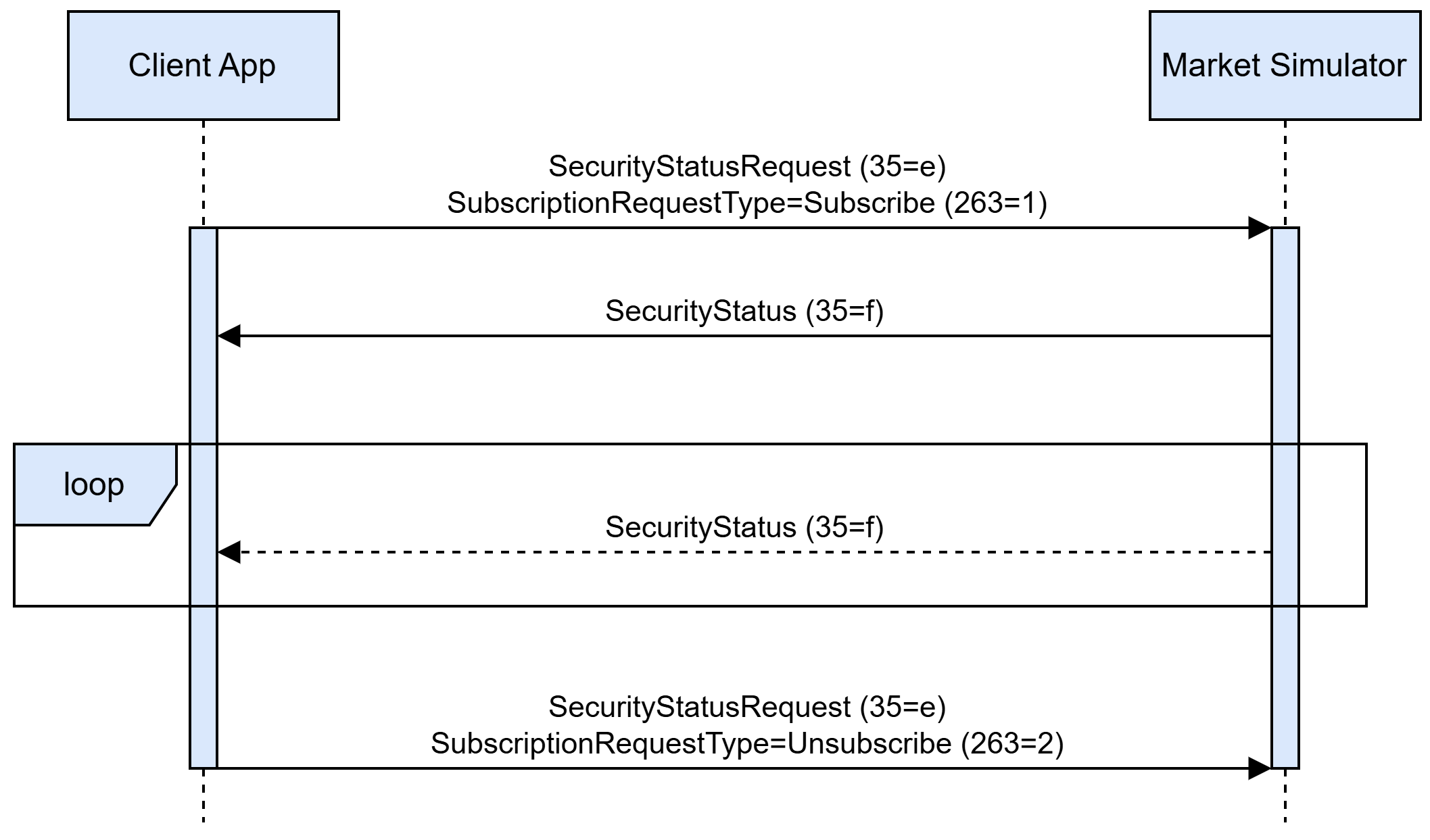
During an auction the phase is reported in two steps: a SecurityStatus carrying SecurityTradingStatus (326) = 3 (Resume) and the auction’s TradingSessionSubID (625 = 2 opening, 4 closing, 6 intraday) when the call sub-phase begins, then a SecurityStatus carrying SecurityTradingStatus (326) = 2 (Trading Halt) with the same TradingSessionSubID when the uncrossing sub-phase begins. The phase scheduled to follow the auction is reported afterwards.
The TradeAtLast phase, typically scheduled right after a closing auction, is reported in a single step: a SecurityStatus carrying TradingSessionSubID (625) = 5 (Post-Trading) and SecurityTradingStatus (326) = 3 (Resume) when the phase begins. A halt of the phase is reported as SecurityTradingStatus (326) = 2 (Trading Halt) with the same TradingSessionSubID. The phase accepts only limit orders with a TimeInForce of Day priced at the last Closing Price (269=5), crosses them only against one another and leaves the orders resting from earlier phases untouched; the rejections it produces are listed in the tables of Trading Messages.
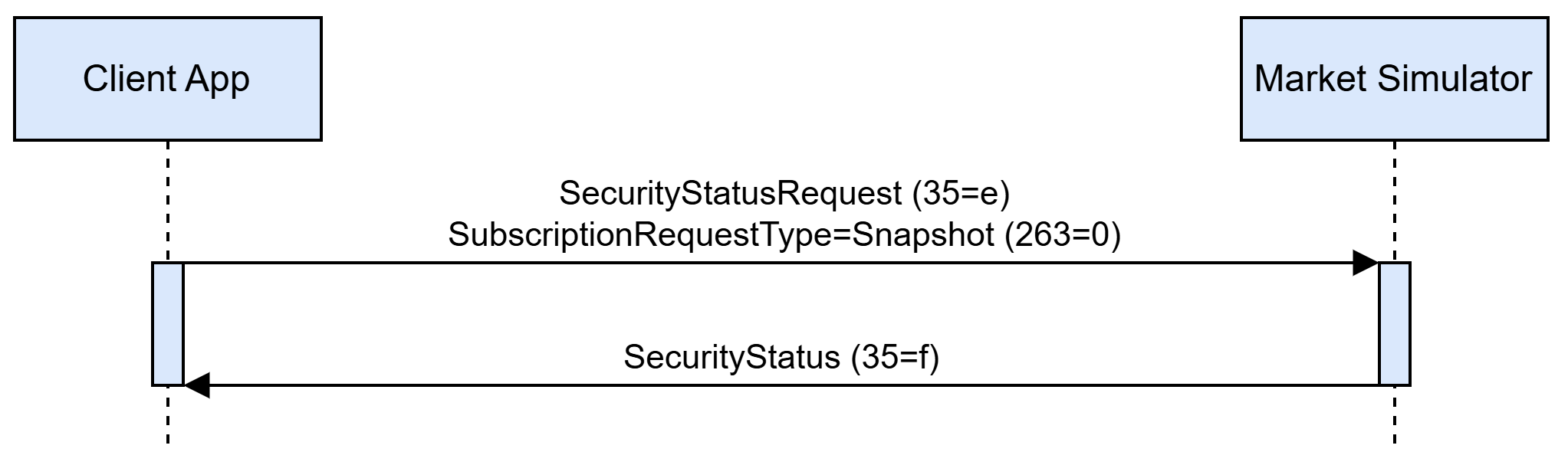
A client may also issue a current trading phase/status information only, without the creation of a subscription and further updates streaming. In this case, a client shall send a SecurityStatusRequest message with SubscriptionRequestType=Snapshot. The simulator replies with the SecurityStatus message only, as shown in the diagram below:
A SecurityStatusRequest message can be rejected by the simulator. An application-level reject is always issued in the form of a BusinessMessageReject message with BusinessRejectReason and Text specifying reject details.
SecurityStatusRequest message application level reject reasons listed in a table below.
| Reason | Condition | BusinessRejectReason (tag 380) value | Text (tag 58) value |
|---|---|---|---|
No listing matches listing identification attributes specified in NewOrderSingle |
– |
Unknown Security (2) |
‘listing not found' |
Listing identification attributes cannot be used to identify the listing (see Instrument Resolution section) |
– |
Unknown Security (2) |
‘listing identification attributes set is malformed’ |
SecurityStatusRequest has SecurityStatusReqID (324) value used by another active subscription |
SecurityStatusRequest is sent with SubscriptionRequestType=Subscribe |
Other (0) |
'security status subscription request id is already in use' |
No active subscription associated with a given SecurityStatusReqID (324) exists |
SecurityStatusRequest is sent with SubscriptionRequestType=Unsubscribe |
Unknown ID (1) |
‘no subscription found for the security status request id’ |